23
Hookups and Settings
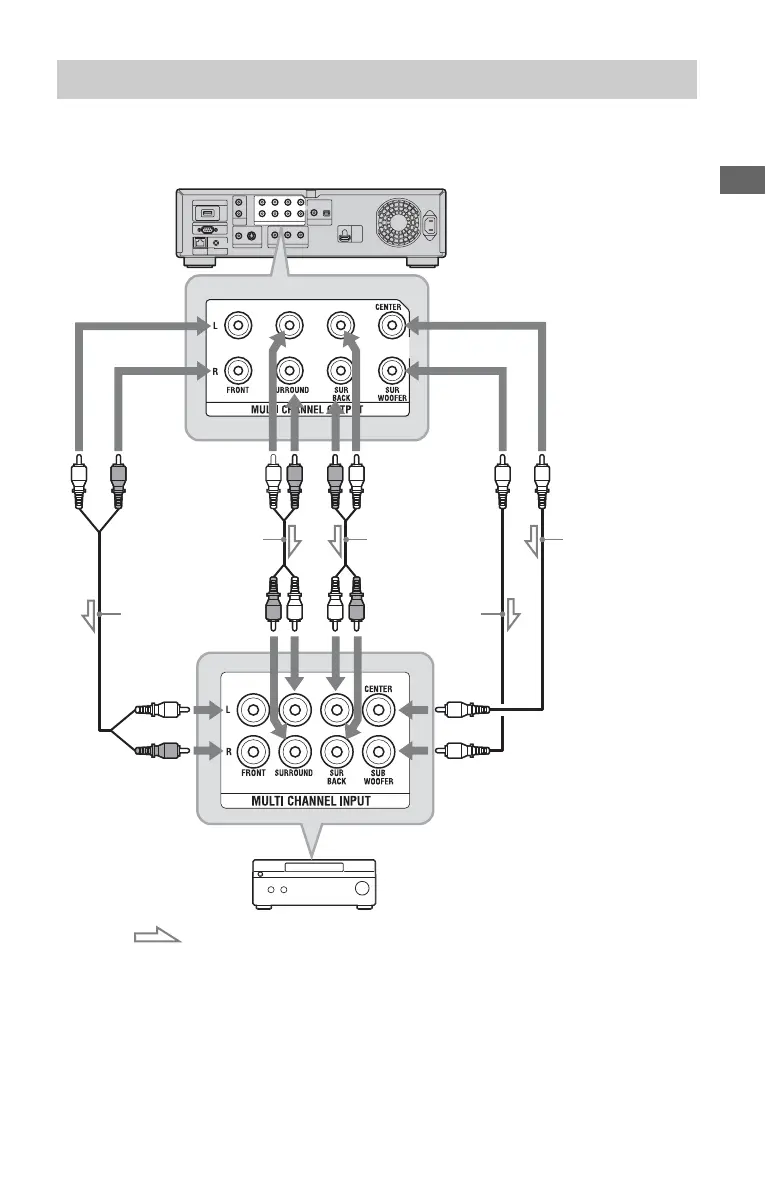
If your AV amplifier (receiver) has 7.1 channel inputs, you can enjoy multi channel surround
sound.
1 Connect the 7.1 channel jacks of the
player and your AV amplifier
(receiver).
2 Set “Audio Output Priority” to “Multi
Channel Analog” in the “Audio
Settings” setup (page 49).
3 Make the appropriate settings in
“Speaker Settings” under the “Audio
Settings” setup (page 49).
Connecting to 7.1 channel jacks
AV amplifier (receiver)
Blu-ray Disc/DVD player
Stereo audio cable
(not supplied)
Monaural audio
cable (not supplied)
: Signal flow
Stereo audio cable
(not supplied)
Stereo audio cable
(not supplied)
Monaural audio
cable (not supplied)
,continued













 To Next Page