17
Hookups and Settings
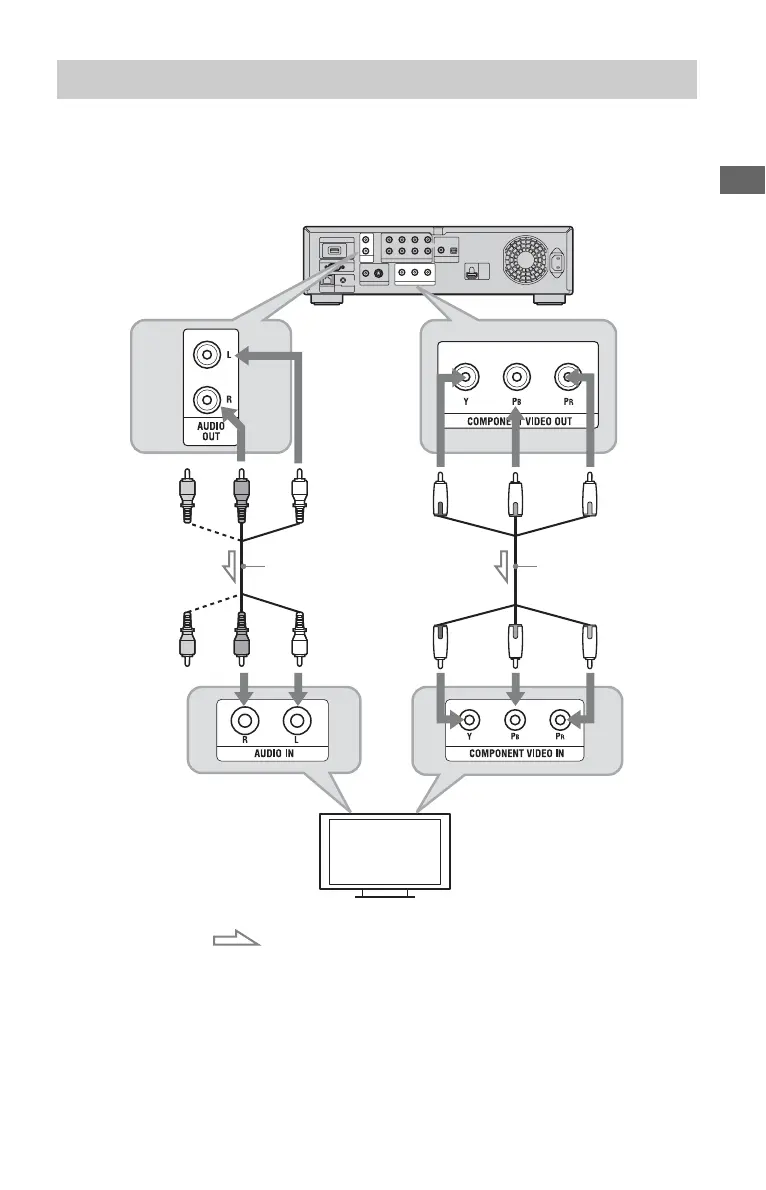
Connect the COMPONENT VIDEO OUT jacks of the player and your TV using a component
video cable or three video cables (not supplied) of the same kind and length. You can enjoy
high-quality pictures.
Be sure to connect to the AUDIO OUT (L/R) jacks using the audio/video cable.
b
When you connect the player and TV using a
component video cable, disconnect the video plug
(yellow) of the audio/video cable.
Connecting to component video jacks (Y, PB, PR)
Component video
cable (not supplied)
(green) (red)(blue)
: Signal flow
Match the color of the plug to that
of the jack.
Blu-ray Disc/DVD player
TV
Match the color of the plug to that
of the jack.
(green) (red)(blue)
(red) (white)
(red) (white)
Audio/video cable
(supplied)
,continued













 To Next Page