11
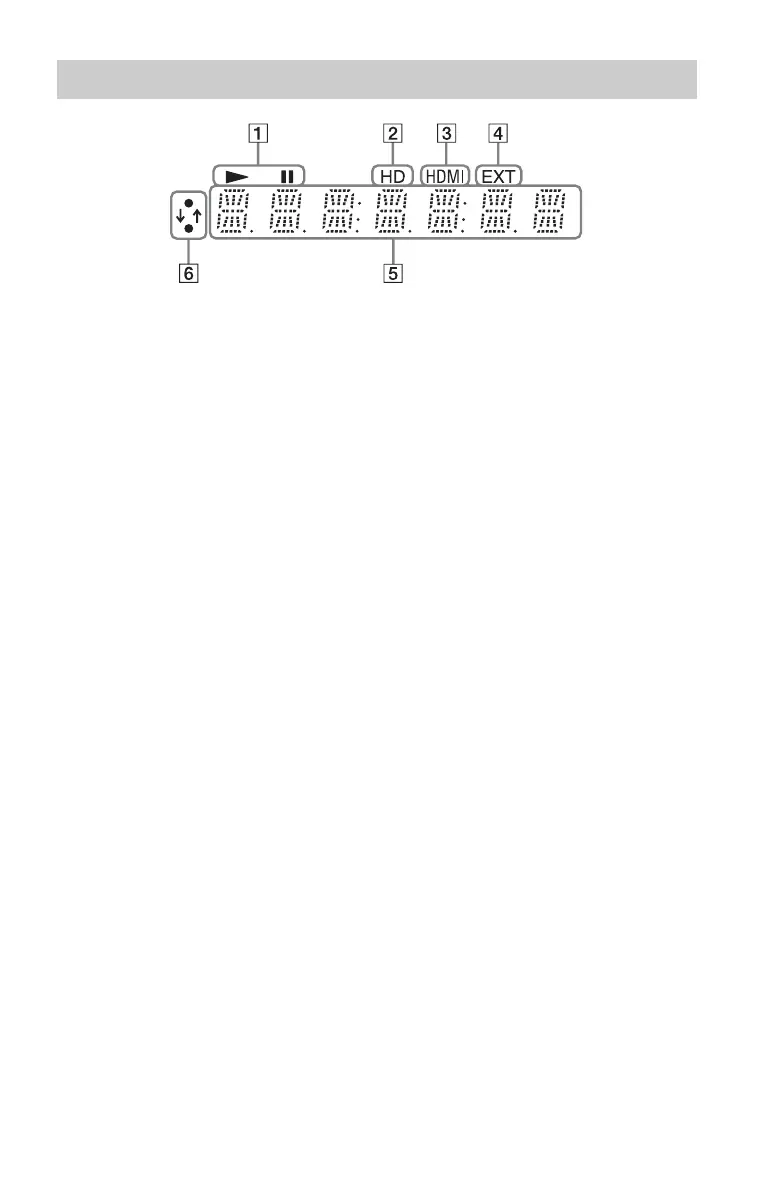
A N, X
Lights up during playback or pause.
B HD (page 46)
Lights up when outputting 720p/1080i/
1080p video signals from the HDMI
OUT jack or 720p/1080i video signals
from the COMPONENT VIDEO OUT
jacks.
C HDMI (page 15)
Lights up when an HDMI device is
connected.
D EXT (page 25)
Lights up when the external memory is
recognized.
E Playback information
You can check the time information.
Press TIME repeatedly during playback.
The display changes as follows.
When playing a BD-ROM/DVD VIDEO
Elapsed time of the current title
r
Remaining time of the current title
When playing a CD
Elapsed time of the current track
r
Remaining time of the current track
r
Elapsed time of the current disc
r
Remaining time of the current disc
z
“T” (Title or Track), “C” (Chapter), or “D”
(Disc) may be displayed depending on the
disc.
F Network connection indicator
Lights up when downloading the player’s
software.
For details on downloading the player’s
software, see page 44.
Front panel display
,continued













 To Next Page