49
Advanced operations
– CCD-TRV99 only
Using the trail function, you can record the picture which leaves an incidental image,
such as a trail. The sound is recorded normally. You can adjust the vanishing time of
the incidental image with the control dial.
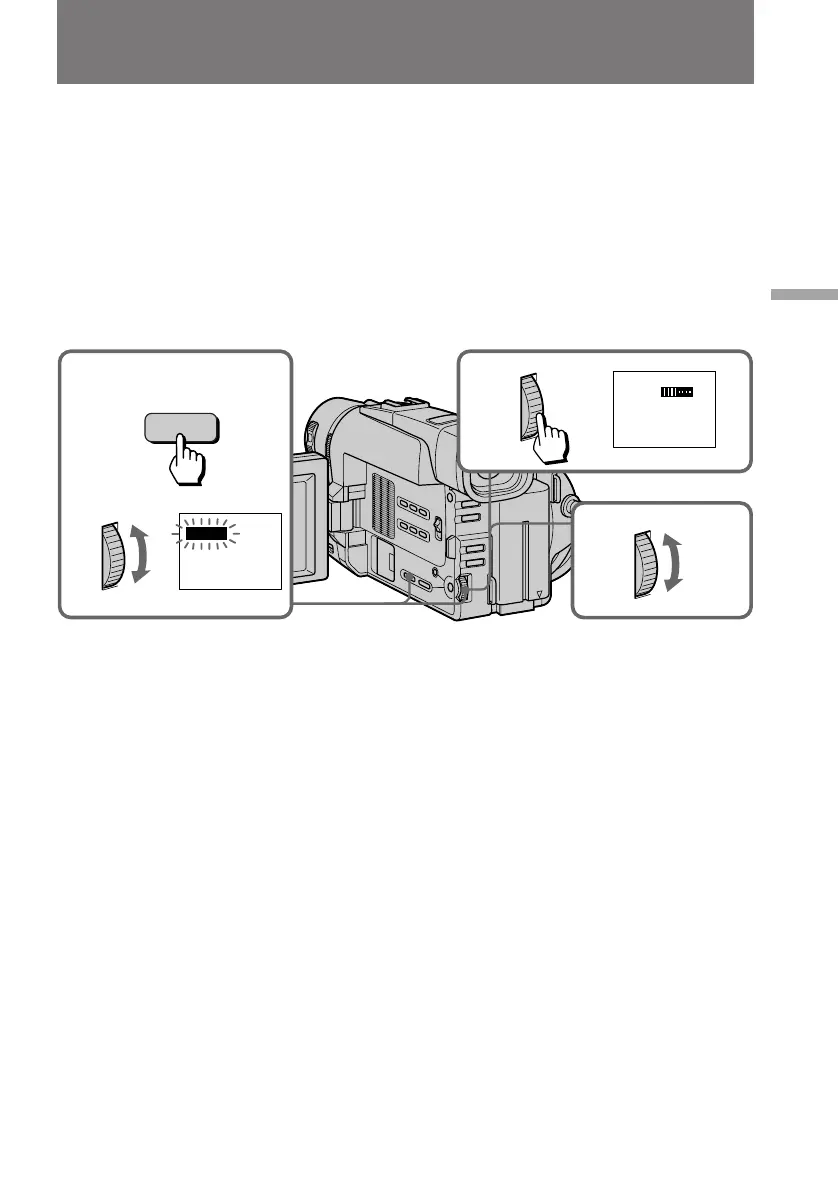
(1) While the camcorder is in Standby mode or recording mode, press DIGITAL
EFFECT and turn the control dial until the TRAIL indicator flashes.
(2) Press the control dial.
The TRAIL indicator lights up and the trail bars appear.
(3) Turn the control dial to adjust the vanishing time of the incidental image.
The vanishing time increases with the number of the trail bars.
To cancel the trail function
Press DIGITAL EFFECT.
Notes on the trail function
•The following functions do not work during trail mode.
– Functions using the FADER button
– Low Lux mode of PROGRAM AE
– Functions using the PHOTO button
•When you set the POWER switch to OFF, the trail function will be cancelled
automatically.
Adding an incidental image to pictures
2
3
1
TRAIL
DIGITAL
EFFECT
TRAIL



 To Next Page
 Loading...