46
Superimposing a still picture on a moving
picture
– CCD-TRV99 only
Using the still function, you can record a still picture to be superimposed on a moving
picture. The sound is recorded normally.
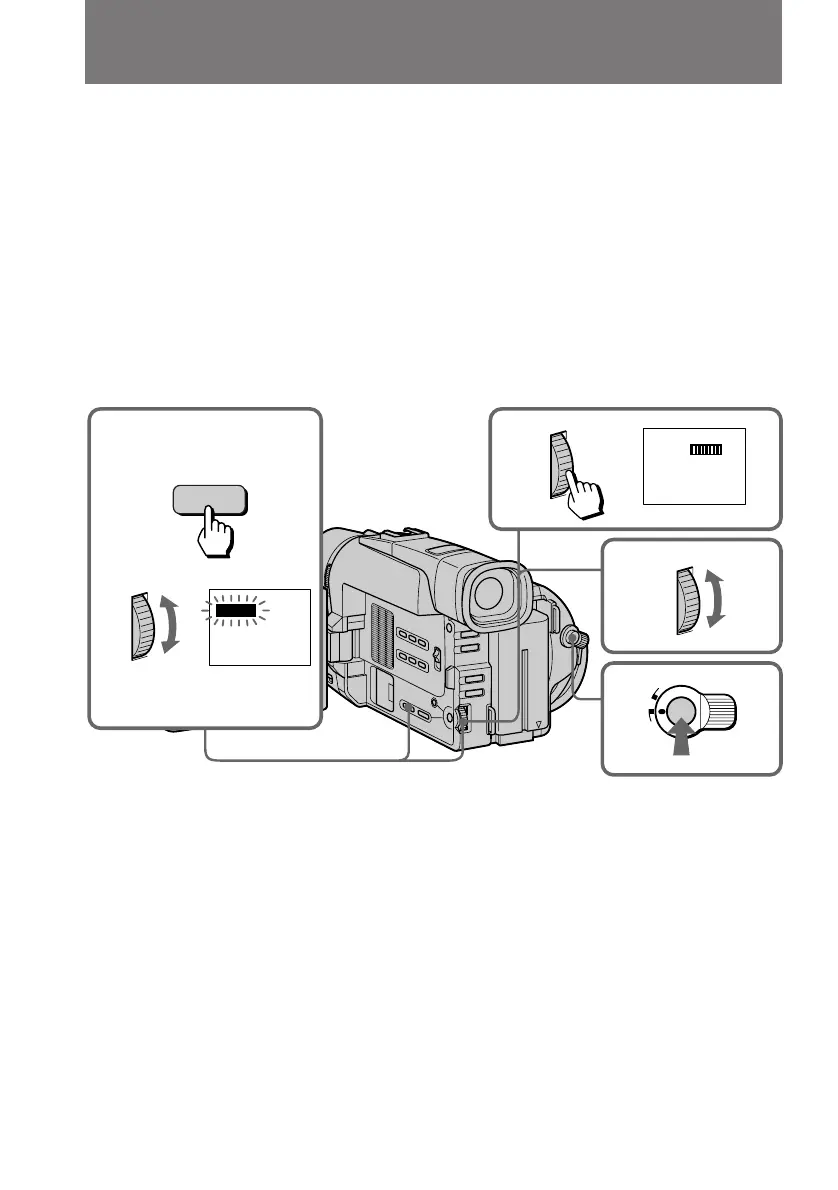
(1) While the camcorder is in Standby mode or recording mode, press DIGITAL
EFFECT and turn the control dial until the STILL indicator flashes.
(2) Press the control dial.
The STILL indicator lights up and the still bars appear. The still picture is
stored in memory.
(3) Turn the control dial to adjust the rate of the still picture you want to
superimpose on the moving picture. The rate of the still picture increases with
the number of the still bars.
(4) Press START/STOP to start recording a moving picture with a still picture
superimposed on it. When you stop recording, press START/STOP again.
To cancel the still function
Press DIGITAL EFFECT.
Notes on the still function
•You cannot use the following functions while recording a still picture.
– Functions using the FADER button
– Low Lux mode of PROGRAM AE
– Functions using the PHOTO button
•When you set the POWER switch to OFF, the still function will be cancelled
automatically.
2
3
4
1
STILL
STILL
L
O
C
K
START/STOP
S
T
A
N
D
B
Y
DIGITAL
EFFECT



 To Next Page
 Loading...