50
– CCD-TRV99 only
If you want to record a dark picture more brightly, or make the movement of the subject
seem lively, set the shutter speed to 1/25, 1/12, 1/6 or 1/3 (slow shutter).
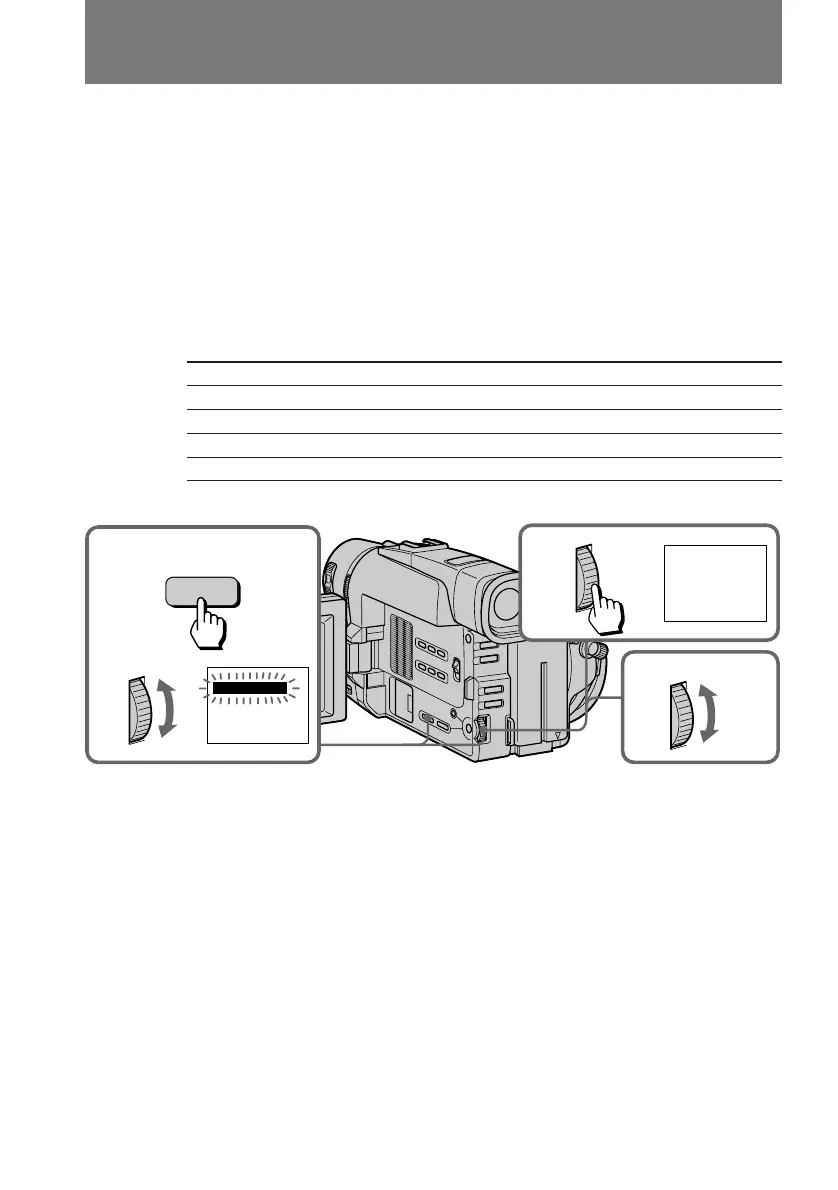
(1) While the camcorder is in Standby mode or recording mode, press DIGITAL
EFFECT and turn the control dial until the SLOW SHTR (shutter) indicator
flashes.
(2) Press the control dial.
The SLOW SHTR indicator lights up and the shutter speed number (1 - 4)
appears.
(3) Turn the control dial to select the shutter speed.
As the shutter speed number becomes bigger, the shutter speed becomes
slower.
Shutter speed number Shutter speed
SLOW SHTR 1 1/25
SLOW SHTR 2 1/12
SLOW SHTR 3 1/6
SLOW SHTR 4 1/3
To cancel the slow shutter function
Press DIGITAL EFFECT.
When recording with the slow shutter function
Auto focus may not be effective. Focus manually using a tripod.
Notes on the slow shutter function
•You cannot use the following functions during recording with the slow shutter
function.
– Functions using the FADER button
– Functions using the PROGRAM AE button
– Exposure
– Functions using the PHOTO button
•When you set the POWER switch to OFF, the slow shutter function will be cancelled
automatically.
Using slow shutter
2
3
1
SLOW SHTR
SLOW SHTR
1
DIGITAL
EFFECT



 To Next Page
 Loading...