EasyManua.ls Logo

Sony CDP-XA3ES - Playing CDs

Sony CDP-XA3ES
93 pages
Print Icon
To Next Page IconTo Next Page
To Previous Page IconTo Previous Page
Loading...
10
Playing
CDs
es
Using
the
Display
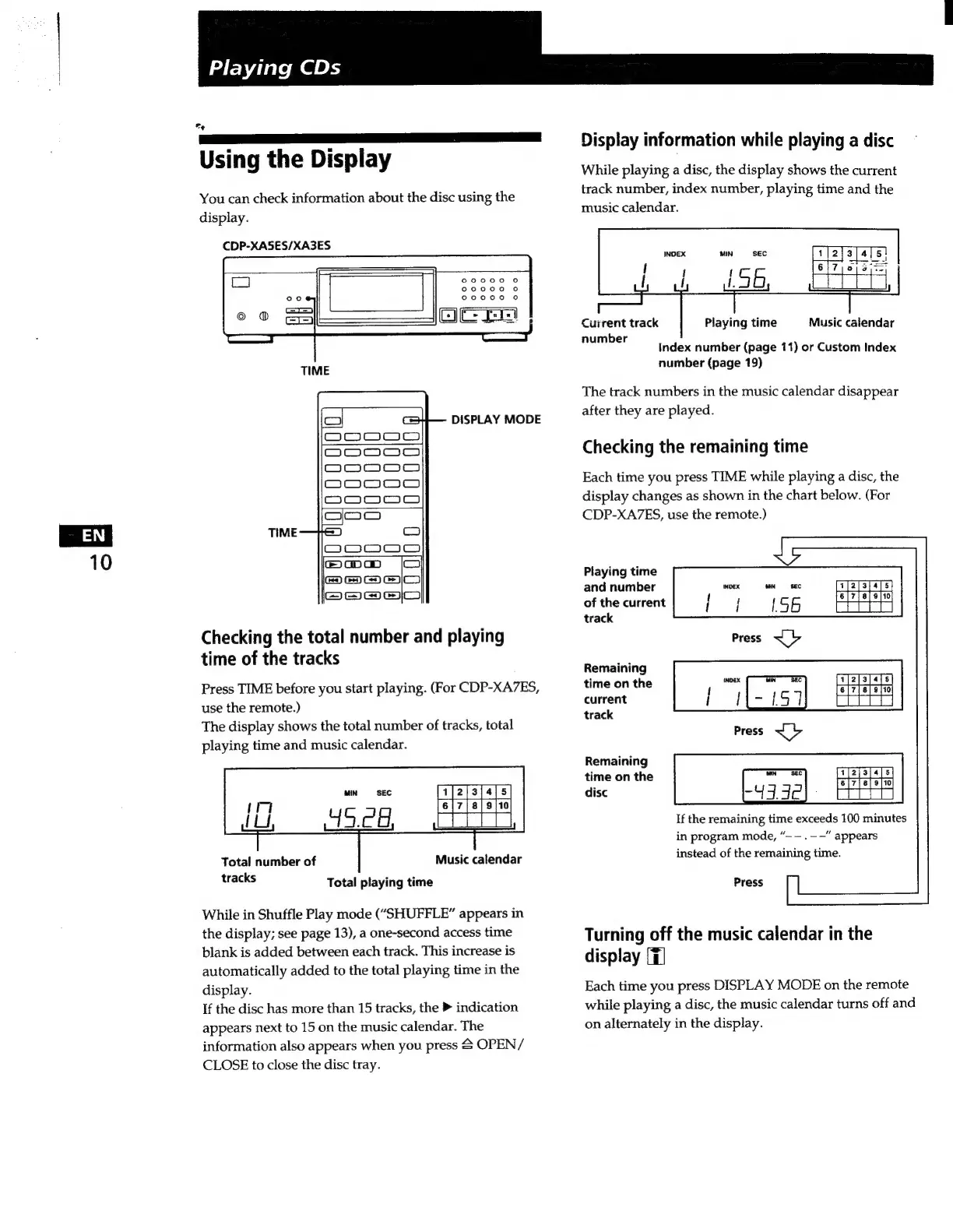
You
can
check
information
about
the
disc
using
the
display.
CDP-XASES/XA3ES
TIME
DISPLAY
MODE
Checking
the
total
number
and
playing
time
of
the
tracks
Press
TIME
before
you
start
playing.
(For
CDP-XA7ES,
use
the
remote.)
The
display
shows
the
total
number
of
tracks,
total
playing
time
and
music
calendar.
Music
calendar
Total
number
of
tracks
Total
playing
time
While
in
Shuffle
Play
mode
(“SHUFFLE”
appears
in
the
display;
see
page
13),
a
one-second
access
time
blank
is
added
between
each
track.
This
increase
is
automatically
added
to
the
total
playing
time
in
the
display.
If
the
disc
has
more
than
15
tracks,
the
P
indication
appears
next
to
15
on
the
music
calendar.
The
information
also
appears
when
you
press
£
OPEN/
CLOSE
to
close
the
disc
tray.
Display
information
while
playing
a
disc
While
playing
a
disc,
the
display
shows
the
current
track
number,
index
number,
playing
time
and
the
music
calendar.
Current
track
Music
calendar
number
Playing
time
Index
number
(page
11)
or
Custom
Index
number
(page
19)
The
track
numbers
in
the
music
calendar
disappear
after
they
are
played.
Checking
the
remaining
time
Each
time
you
press
TIME
while
playing
a
disc,
the
display
changes
as
shown
in
the
chart
below.
(For
CDP-XA7ES,
use
the
remote.)
Playing
time
and
number
of
the
current
track
Remaining
time
on
the
current
track
Remaining
time
on
the
disc
If
the
remaining
time
exceeds
100
minutes
in
program
mode,
“——.--"
appears
instead
of
the
remaining
time.
Press
Turning
off
the
music
calendar
in
the
display
[T]
Each
time
you
press
DISPLAY
MODE
on
the
remote
while
playing
a
disc,
the
music
calendar
turns
off
and
on
alternately
in
the
display.

Related product manuals