EasyManua.ls Logo

Sony CDP-XA3ES - Storing Specific Tracks (Delete Bank)

Sony CDP-XA3ES
93 pages
Print Icon
To Next Page IconTo Next Page
To Previous Page IconTo Previous Page
Loading...
20
Storing
Information
About
CDs
(Custom
Files)
When
you've
already
decided
where
to
index
You
can
directly
mark
an
index
without
adjusting
the
point.
When
you
find
the
point
to
be
indexed,
first
press
If
to
pause
playing
and
press
FILE
to
mark
an
index.
(For
CDP-XA7ES,
use
the
remote.)
Playing
from
an
indexed
point
(Custom
Index
Play)
1
Press
PLAY
MODE
repeatedly
until
“CUSTOM
INDEX”
appears
in
the
display.
When
using
the
remote,
press
C.INDEX.
2
Locate
the
Custom
Index
you
want
as
follows:
To
locate
Press
The
next
Custom
Index
n
INDEX:
aièr
The
current
Custom
Index
INDEX
de=
A
specific
Custom
Index
Number
button
of
the
directly
Custom
Index
MUSIC
SCAN.
When
you
find
the
point
you
want,
press
e>
to
start
playing.
By
scanning
the
indexed
points
for
10
seconds
Playback
starts
from
the
selected
Custom
Index
to
the
end
of
the
disc.
To
cancel
the
Custom
Index
Play
Press
PLAY
MODE
twice
(or
CONTINUE
on
the
remote).
Notes
*
You
cannot
use
the
index
search
function
(see
page
11).
¢
Use
INDEX
“tam
/
=è:
buttons
to
locate
the
next
or
the
current
Custom
Indexes,
instead
of
KK1/
DA
buttons.
Playing
from
one
index
to
the
next
one
(Custom
Index
Single
Play)
1
Press
PLAY
MODE
repeatedly
until
“CUSTOM
INDEX
(1)”
appears
in
the
display.
When
using
the
remote,
press
C.INDEX.
2
Press
the
number
button
of
the
Custom
Index
you
want.
Playback
starts
from
the
selected
Custom
Index
and
stops
at
the
beginning
of
the
next
index.
To
cancel
the
Custom
Index
Single
Play,
press
PLAY
MODE
once
(or
CONTINUE
on
the
remote).
You
can
play
the
portion
between
two
indexes
repeatedly
Press
REPEAT.
(For
CDP-XA7ES,
use
the
remote.)
Erasing
the
Custom
Index
À
Insert
the
disc.
2
Press
PLAY
MODE
repeatedly
until
"CUSTOM
INDEX"
appears
in
the
display.
When
using
the
remote,
press
C.INDEX.
3
Press
CHECK
repeatedly
until
the
Custom
Index
number
you
want
to
erase
flashes.
4
Press
ERASE
while
the
number
is
flashing
to
erase
the
Custom
Index.
(For
CDP-XA7ES,
use
the
remote.)
The
succeeding
Custom
Index
numbers
decrease
by
one.
aat
A
|
Storing
Specific
Tracks
of
a
Disc
(Delete
Bank)
You
can
delete
unwanted
tracks
and
store
only
the
tracks
you
want.
You
can
start
playing
your
favorite
tracks
without
deleting
tracks
each
time.
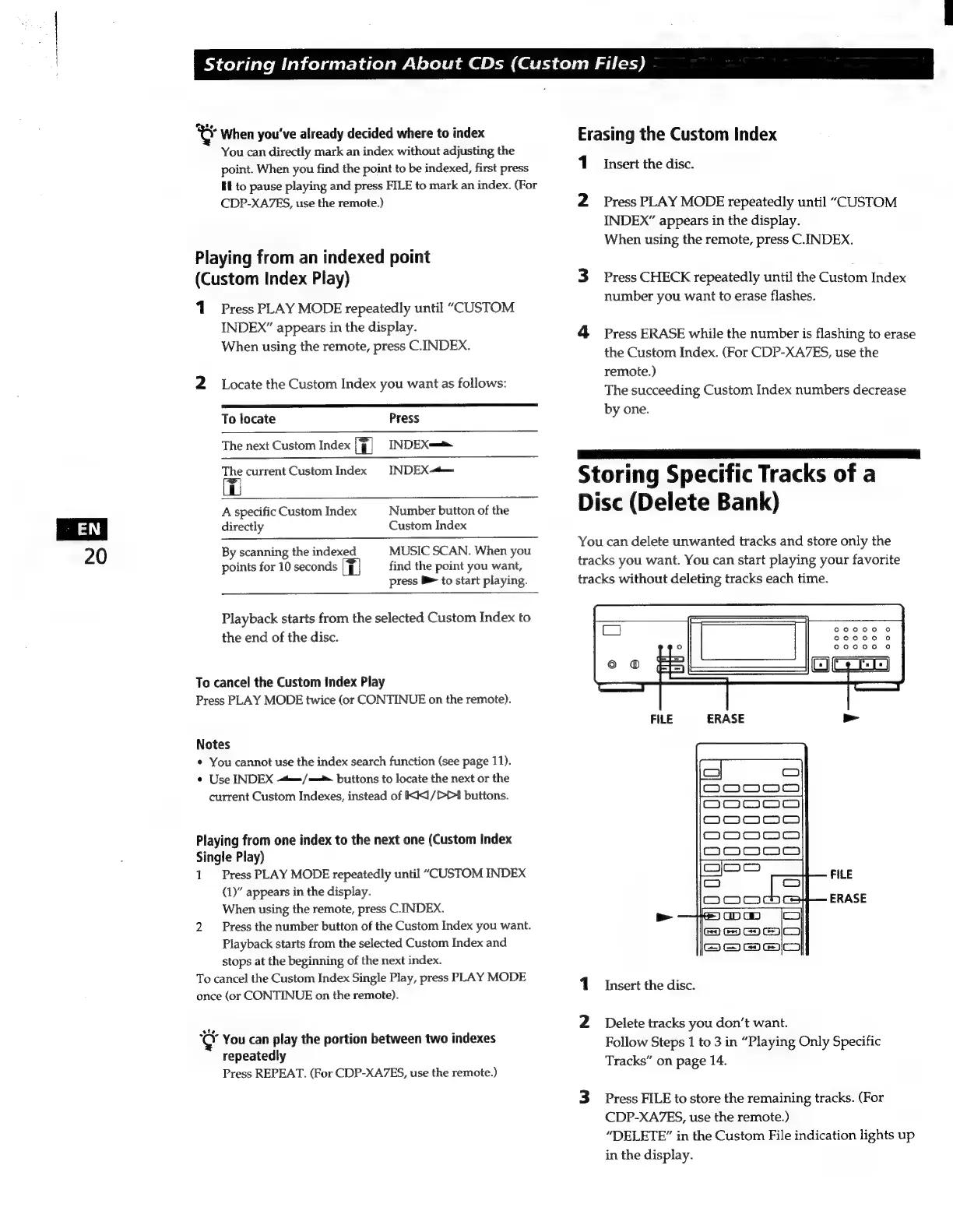
FILE
ERASE
>
1
Insert
the
disc.
2
Delete
tracks
you
don’t
want.
Follow
Steps
1
to
3
in
“Playing
Only
Specific
Tracks”
on
page
14.
3
Press
FILE
to
store
the
remaining
tracks.
(For
CDP-XA7ES,
use
the
remote.)
“DELETE”
in
the
Custom
File
indication
lights
up
in
the
display.

Related product manuals