EasyManua.ls Logo

Sony CDP-XA3ES - Repeating Playback Modes

Sony CDP-XA3ES
93 pages
Print Icon
To Next Page IconTo Next Page
To Previous Page IconTo Previous Page
Loading...
12
Playing
CDs
es
Playing
Tracks
Repeatedly
You
can
play
tracks
repeatedly
in
any
play
mode.
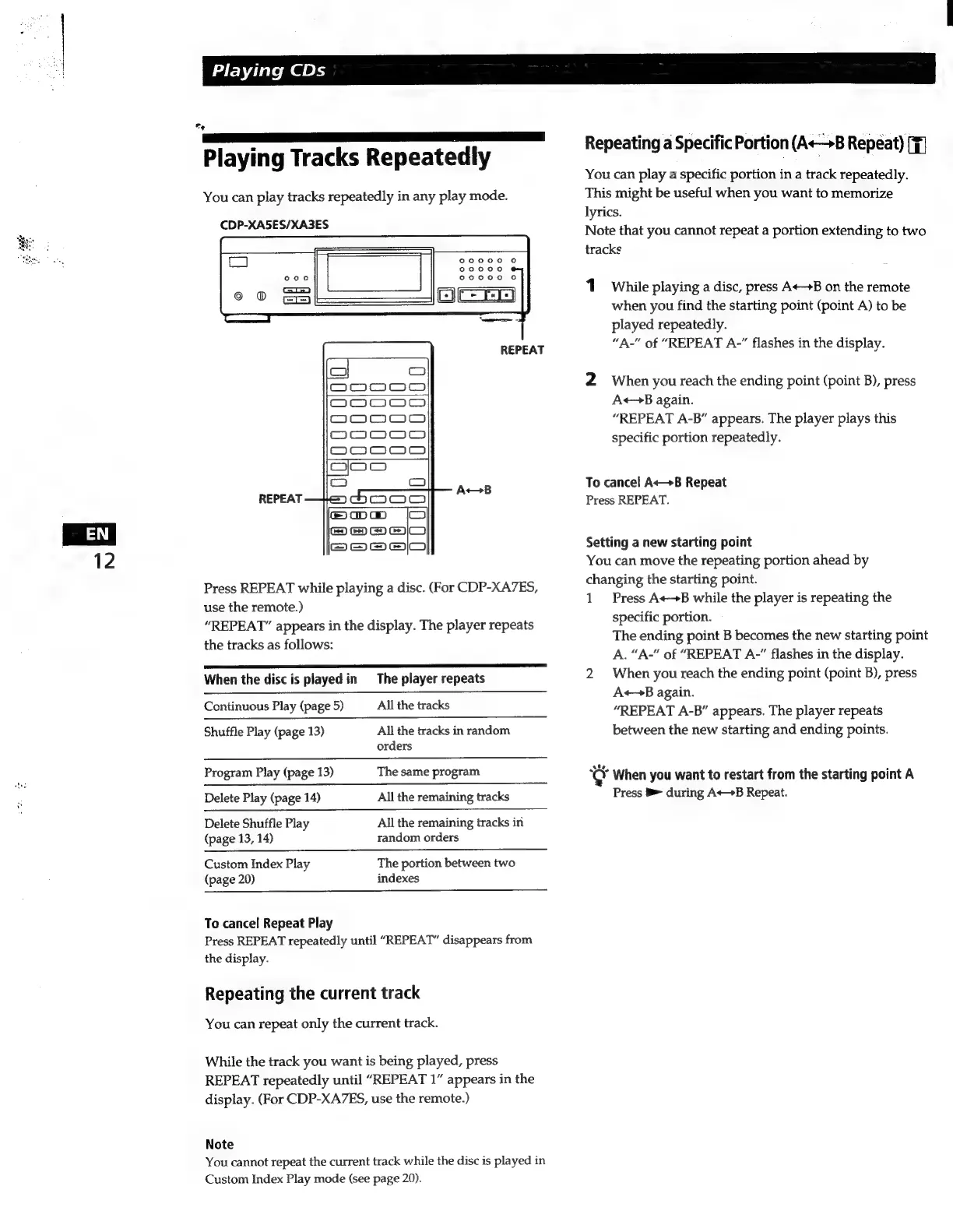
CDP-XA5ES/XA3ES
REPEAT
REPEAT
APTE
Press
REPEAT
while
playing
a
disc.
(For
CDP-XA7ES,
use
the
remote.)
“REPEAT”
appears
in
the
display.
The
player
repeats
the
tracks
as
follows:
PE
When
the
disc
is
played
in
The
player
repeats
Continuous
Play
(page
5)
All
the
tracks
Shuffle
Play
(page
13)
All the
tracks
in
random
orders
Program
Play
(page
13)
The
same
program
Delete
Play
(page
14)
All
the
remaining
tracks
Delete
Shuffle
Play
All
the
remaining
tracks
in
(page
13,
14)
random
orders
Custom
Index
Play
The
portion
between
two
(page
20)
indexes
To
cancel
Repeat
Play
Press
REPEAT
repeatedly
until
“REPEAT”
disappears
from
the
display.
Repeating
the
current
track
You
can
repeat
only
the
current
track.
While
the
track
you
want
is
being
played,
press
REPEAT
repeatedly
until
“REPEAT
1”
appears
in
the
display.
(For
CDP-XA7ES,
use
the
remote.)
Note
You
cannot
repeat
the
current
track
while
the
disc
is
played
in
Custom
Index
Play
mode
(see
page
20).
Repeating
a
Specific
Portion
(A+B
Repeat)
[F]
You
can
play
a
specific
portion
in
a
track
repeatedly.
This
might
be
useful
when
you
want
to
memorize
lyrics.
Note
that
you
cannot
repeat
a
portion
extending
to
two
tracks
1
While
playing
a
disc,
press
A++B
on
the
remote
when
you
find
the
starting
point
(point
A)
to
be
played
repeatedly.
“A-"
of
“REPEAT
A-”
flashes
in
the
display.
2
When
you
reach
the
ending
point
(point
B),
press
A«—B
again.
“REPEAT
A-B”
appears.
The
player
plays
this
specific
portion
repeatedly.
To
cancel
A«—B
Repeat
Press
REPEAT.
Setting
a
new
starting
point
You
can
move
the
repeating
portion
ahead
by
changing
the
starting point.
1
Press
AB
while
the
player
is
repeating
the
specific
portion.
The
ending
point
B
becomes
the
new
starting
point
A.
“A-"
of
“REPEAT
A-”
flashes
in
the
display.
2
When
you
reach
the
ending
point
(point
B),
press
A«—B
again.
“REPEAT
A-B”
appears.
The
player
repeats
between
the
new
starting
and
ending
points.
When
you
want
to
restart
from
the
starting
point
A
Press
B>-
during
A+>B
Repeat.

Related product manuals