EasyManua.ls Logo

Sony CDP-XA3ES - Hooking up the System (for CDP-XA5 ES;XA3 ES) Ee

Sony CDP-XA3ES
93 pages
Print Icon
To Next Page IconTo Next Page
To Previous Page IconTo Previous Page
Loading...
Getting
Started
e
+
If
you
have
a
digital
component
with
a
coaxial
digital
input
connector
Connect
the
component
via
the
DIGITAL
OUT
(COAXIAL)
connector
using
the
coaxial
cable
(not
supplied).
CD
player
Digital
component
©
a
©)
After
making
connections,
press
DIGITAL
OUTPUT
on
the
player
to
turn
on
the
DIGITAL
OUT
indicator.
Note
When
you
connect
via
the
DIGITAL
OUT
connector,
noise
may
occur
when
you
play
CD
software
other
than
music,
such
as
a
CD-ROM.
Connecting
the
AC
power
cord
Connect
the
AC
power
cord
to
a
wall
outlet.
Removing
the
notice
sheet
The
notice
sheet
is
put
on
the
player.
Remove
the
sheet
before
you
use
your
player.
Where
do
I
go
next?
Now
you're
ready
to
use
your
player.
If
you
aren't
familiar
with
how
to
play
CDs,
go
to
the
section
“Playing
a
CD”
on
page
4.
Then,
go
to
the
following
sections
for
other
operations.
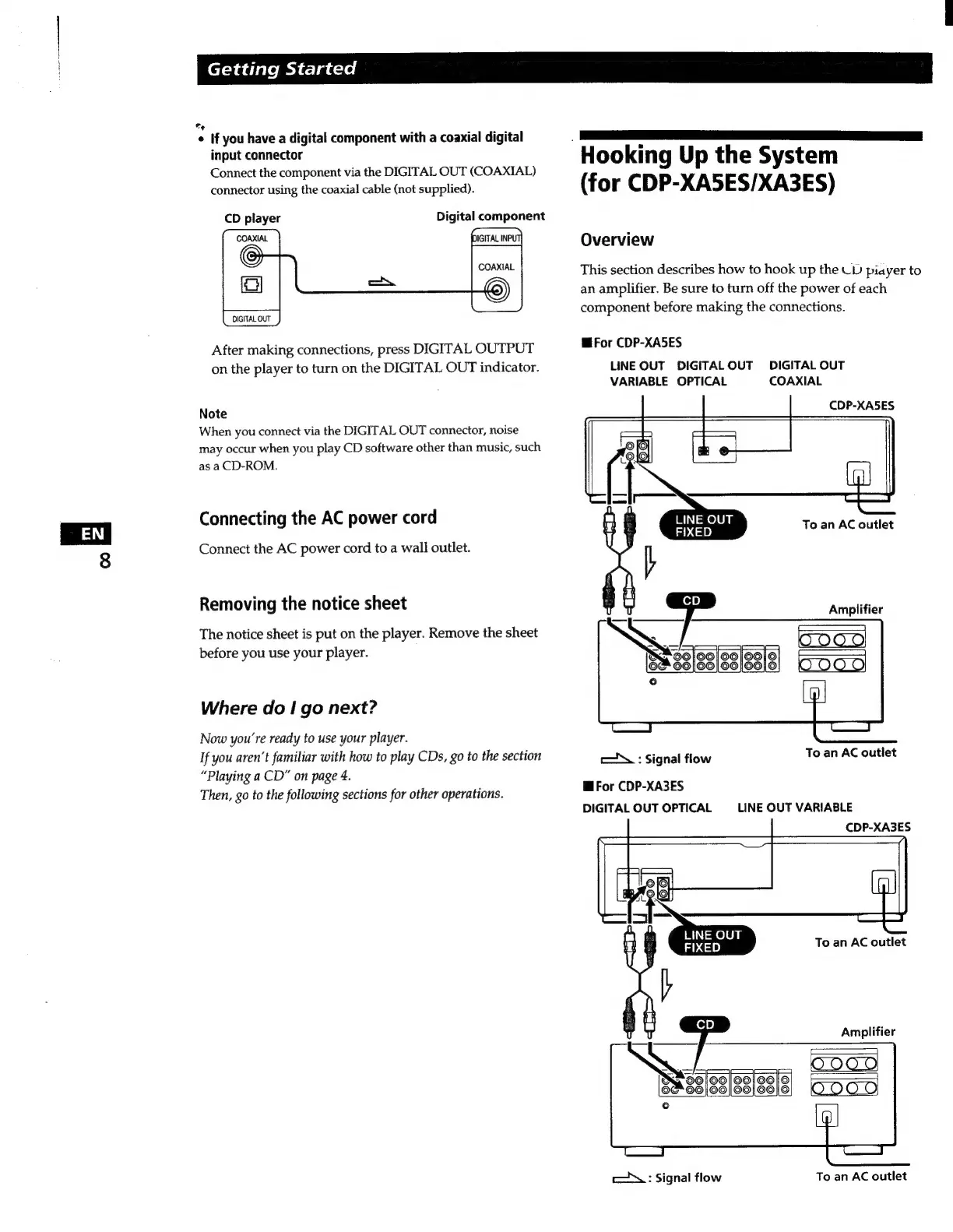
‘Hooking
Up
the
System
(for
CDP-XA5ES/XA3ES)
Overview
This
section
describes
how
to
hook
up
the
UD
piayer
to
an
amplifier.
Be
sure
to
turn
off
the
power
of
each
component
before
making
the
connections.
E
For
CDP-XA5ES
LINE
OUT
DIGITAL
OUT
DIGITAL
OUT
VARIABLE
OPTICAL
COAXIAL
CDP-XA5ES
LINE
OUT
FIXED
To
an
AC
outlet
Amplifier
0000
To
an
AC
outlet
E
:
Signal
flow
Mi
For
CDP-XA3ES
DIGITAL
OUT
OPTICAL
LINE
OUT
VARIABLE
CDP-XA3ES
To
an
AC
outlet
Amplifier
To
an
AC
outlet
y
:
Signal
flow

Related product manuals