EasyManua.ls Logo

Sony CDP-XA3ES - Custom Play Modes

Sony CDP-XA3ES
93 pages
Print Icon
To Next Page IconTo Next Page
To Previous Page IconTo Previous Page
Loading...
14
Playing
CDs
“O
The
program
remains
even
after
the
Program
Play
ends
;
`
-
When
you
press
B>,
you
can
play
the
same
program
again.
Notes
“-—.—-—”
appears
instead
of
the
total
playing
time
in
the
display
when
it
exceeds
100
minutes.
¢
“FULL”
appears
in
the
display
when
you
try
to
add
a
track
to
a
program
which
already
contains
24
tracks.
Checking
the
track
order
You
can
check
your
program
before
or
after
you
start
playing.
Press
CHECK.
Each
time
you
press
this
button,
the
display
shows
the
track
number
in
the
programmed
order.
After
the
last
track
in
the
program,
the
display
shows
“End”
and
returns
to
the
original
display.
If
you
check
the
order
after
you
start
playing,
the
display
shows
only
the
remaining
track
numbers.
Changing
the
track
order
You
can
change
your
program
before
you
start
playing.
To
Press
CHECK
until
the
track
you
don't
want
appears
in
the
display,
then
press
CLEAR
Erase
a
track
Erase
the
last
track
in
the
program
Add
tracks
to
the
end
of
the
program
Change
the
whole
program
completely
CLEAR.
Each
time
you
press
the
button,
the
last
track
will
be
cleared.
Number
buttons
of
the
tracks
to
be
added
H
(stop).
Create
a
new
program
following
the
programming
procedure.
Playing
Only
Specific
Tracks
(Delete
Play)
T
You
can
delete
unwanted
tracks
and
play
only
the
remaining
tracks.
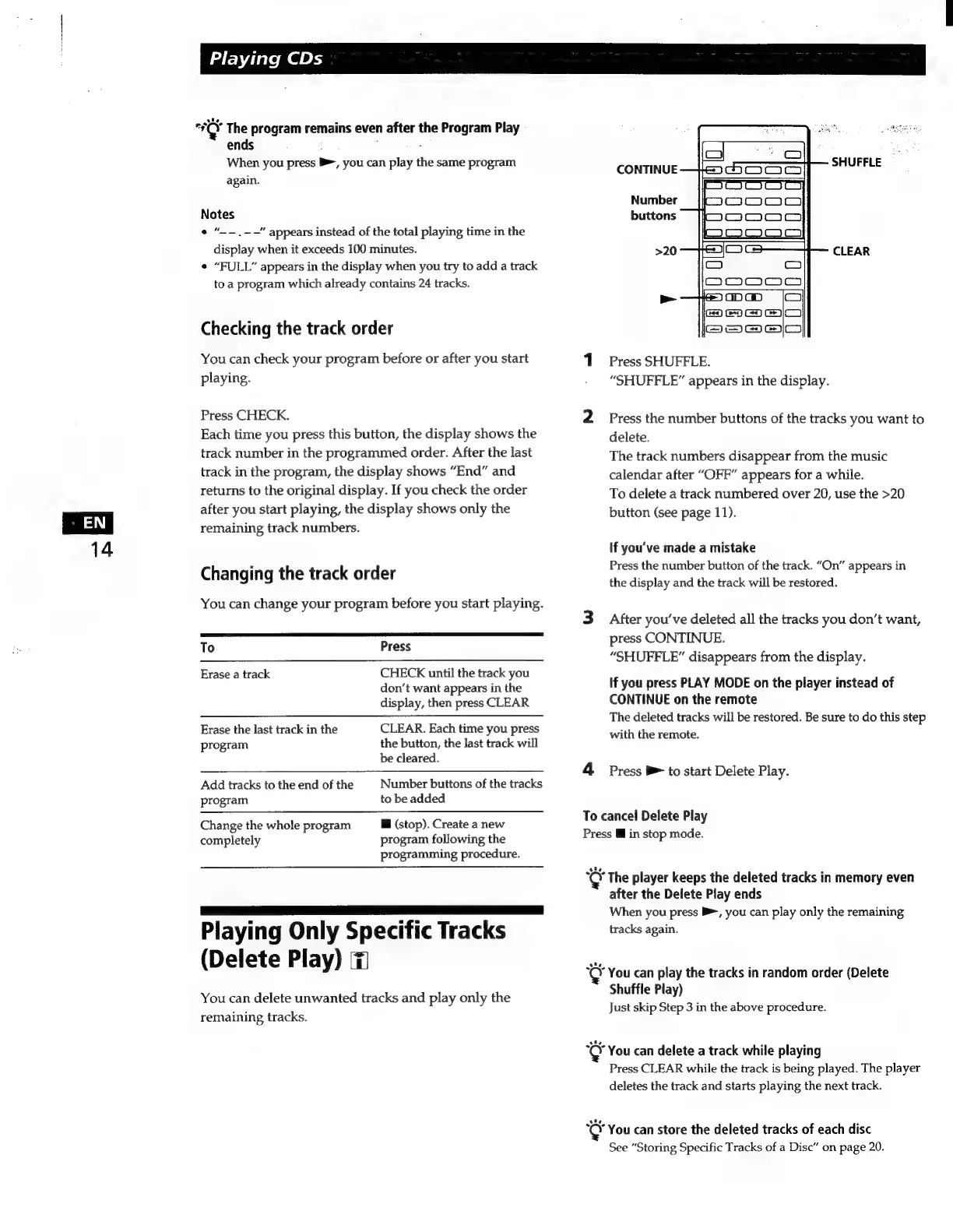
CONTINUE
Number
buttons
>20
CLEAR
1
Press
SHUFFLE.
“SHUFFLE”
appears
in
the
display.
2
Press
the
number
buttons
of
the
tracks
you
want
to
delete.
The
track
numbers
disappear
from
the
music
calendar
after
“OFF”
appears
for
a
while.
To
delete
a
track
numbered
over
20,
use
the
>20
button
(see
page
11).
If
you've
made
a
mistake
Press
the
number
button
of
the
track.
“On”
appears
in
the
display
and
the
track
will
be
restored.
3
After
you've
deleted
all
the
tracks
you
don't
want,
press
CONTINUE.
“SHUFFLE”
disappears
from
the
display.
if
you
press
PLAY
MODE
on
the
player
instead
of
CONTINUE
on
the
remote
The
deleted
tracks
will
be
restored.
Be
sure
to
do
this
step
with
the
remote.
4
Press
e>
to
start
Delete
Play.
To
cancel
Delete
Play
Press
M
in
stop
mode.
The
player
keeps
the
deleted
tracks
in
memory
even
after
the
Delete
Play
ends
When
you
press
$,
you
can
play only
the
remaining
tracks
again.
You
can
play
the
tracks
in
random
order
(Delete
Shuffle
Play)
Just
skip
Step
3
in
the
above
procedure.
You
can
delete
a
track
while
playing
Press
CLEAR
while
the
track
is
being
played.
The
player
deletes
the
track
and
starts
playing
the
next
track.
You
can
store
the
deleted
tracks
of
each
disc
See
“Storing
Specific
Tracks
of
a
Disc”
on
page
20.

Related product manuals