EasyManua.ls Logo

Sony CDP-XA3ES - Page 19

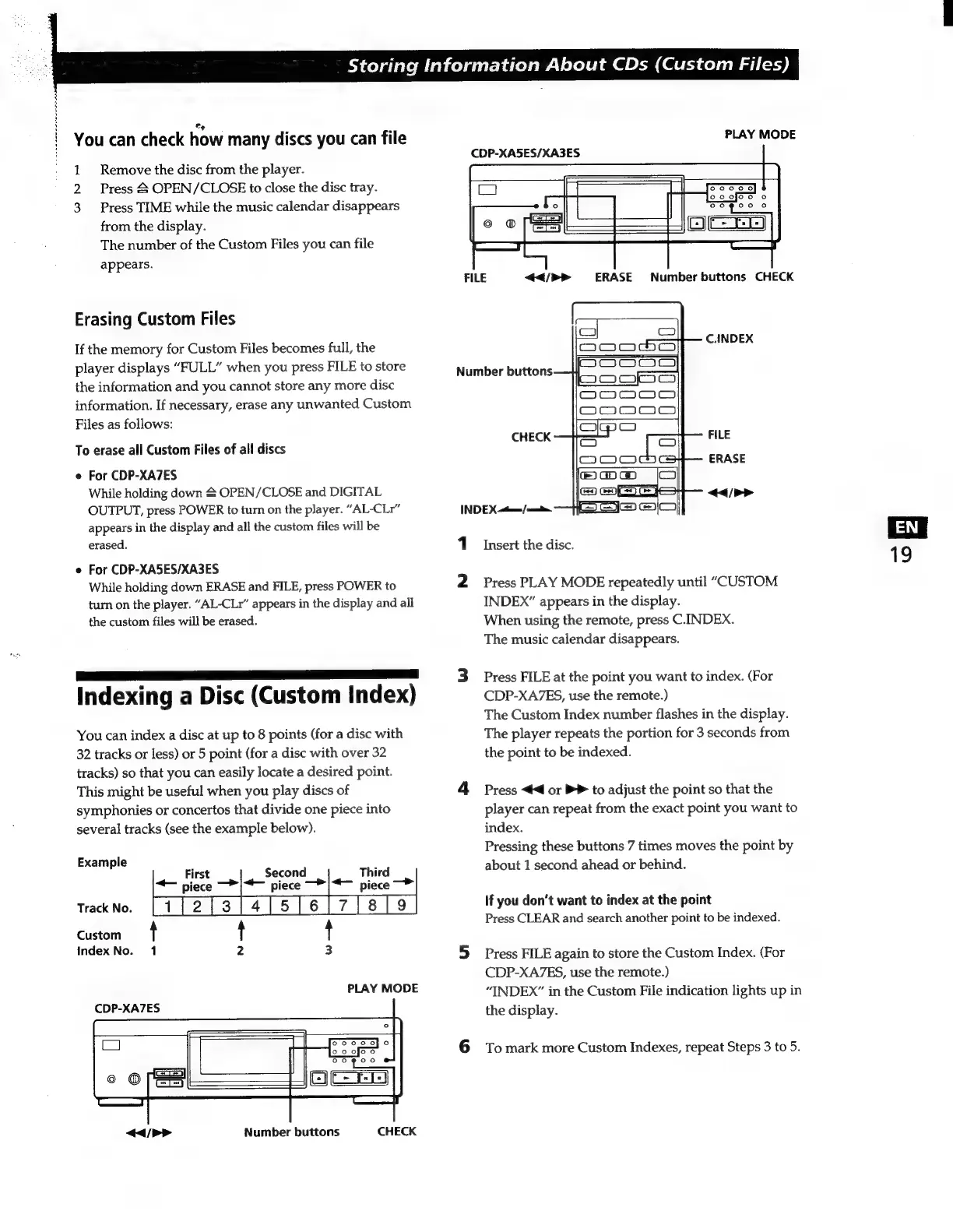
Sony CDP-XA3ES
93 pages
Print Icon
To Next Page IconTo Next Page
To Previous Page IconTo Previous Page
Loading...
E
$
N
å
N
à
y
1
,
You
can
check
how
many
discs
you
can
file
1
Remove
the
disc
from
the
player.
Press
£
OPEN/CLOSE
to
close
the
disc
tray.
3
Press
TIME
while
the
music
calendar
disappears
from
the
display.
The
number
of
the
Custom
Files
you
can
file
appears.
Erasing
Custom
Files
If
the
memory
for
Custom
Files
becomes
full,
the
player
displays
“FULL”
when
you
press
FILE
to
store
the
information
and
you
cannot
store
any
more
disc
information.
If
necessary,
erase
any
unwanted
Custom
Files
as
follows:
To
erase
all
Custom
Files
of
all
discs
e
For
CDP-XA7ES
While
holding
down
&
OPEN/CLOSE
and
DIGITAL
OUTPUT,
press
POWER
to
turn
on
the
player.
“AL-CLr”
appears
in
the
display
and
all
the
custom
files
will
be
erased.
e
For
CDP-XA5ES/XA3ES
While
holding
down
ERASE
and
FILE,
press
POWER
to
turn
on
the
player.
“AL-CLr”
appears
in
the
display
and
all
the
custom
files
will
be
erased.
7
|
Indexing
a
Disc
(Custom
Index)
You
can
index
a
disc
at
up
to
8
points
(for
a
disc
with
32
tracks
or
less)
or
5
point
(for
a
disc
with
over
32
tracks)
so
that
you
can
easily
locate
a
desired
point.
This
might
be
useful
when
you
play
discs
of
symphonies
or
concertos
that
divide
one
piece
into
several
tracks
(see
the
example
below).
Example
First
Second
+
piece
I
piece
Track
No.
Custom
4 t
t
Index
No.
1
2
3
CDP-XA7ES
CHECK
Number
buttons
Storing
Information
About
CDs
(Custom
Files)
PLAY
MODE
CDP-XA5ES/XA3ES
FILE
<u>
ERASE
Number
buttons
CHECK
C.INDEX
Number
buttons
FILE
ERASE
CHECK
INDEX
tn
/
cami.
1
Insert
the
disc.
2
Press
PLAY
MODE
repeatedly
until
“CUSTOM
INDEX”
appears
in
the
display.
When
using
the
remote,
press
C.INDEX.
The
music
calendar
disappears.
3
Press
FILE
at
the
point
you
want
to
index.
(For
CDP-XA/ZES,
use
the
remote.)
The
Custom
Index
number
flashes
in
the
display.
The
player
repeats
the
portion
for
3
seconds
from
the
point
to
be
indexed.
4
Press
<4
or
PP
to
adjust
the
point
so
that
the
player
can
repeat
from
the
exact
point
you
want
to
index.
Pressing
these
buttons
7
times
moves
the
point
by
about
1
second
ahead
or
behind.
If
you
don't
want
to
index
at
the
point
Press
CLEAR
and
search
another
point
to
be
indexed.
5
Press
FILE
again
to
store
the
Custom
Index.
(For
CDP-XA7ES,
use
the
remote.)
“INDEX”
in
the
Custom
File
indication
lights
up
in
the
display.
6
To
mark
more
Custom
Indexes,
repeat
Steps
3
to
5.

Related product manuals