EasyManua.ls Logo

Sony CDP-XA3ES - Recording by Tape Length (Time;Just Edit); Fading In and Out

Sony CDP-XA3ES
93 pages
Print Icon
To Next Page IconTo Next Page
To Previous Page IconTo Previous Page
Loading...
-B
o
|
Recording
From
CDs
KK/AA
>
EDIT/TIME
FADE
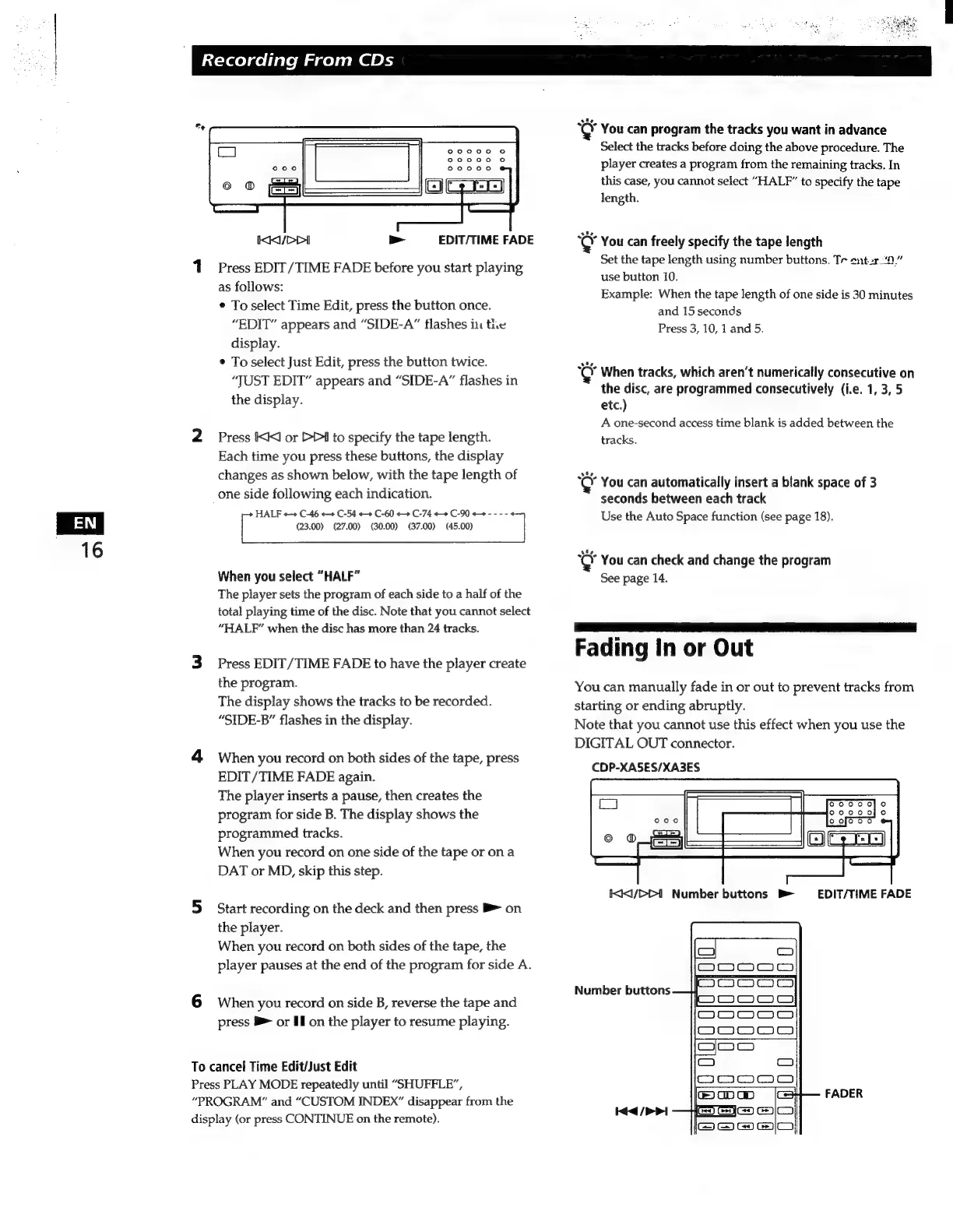
1
Press
EDIT/TIME
FADE
before
you
start
playing
as
follows:
¢
To
select
Time
Edit,
press
the
button
once.
“EDIT”
appears
and
“SIDE-A”
flashes
in
the
display.
*
To
select
Just
Edit,
press
the
button
twice.
“JUST
EDIT”
appears
and
“SIDE-A”
flashes
in
the
display.
2
Press
KK
or
DDI
to
specify
the
tape
length.
Each
time
you
press
these
buttons,
the
display
changes
as
shown
below,
with
the
tape
length
of
one
side
following
each
indication.
HALF
++
C-46
++
C-54
++
C-60
++
C-74
++
C-90
++
----
(23.00) (27.00)
(30.00)
(37.00)
(45.00)
When
you
select
“HALF”
The
player
sets
the
program
of
each
side
to
a
half
of
the
total
playing
time
of
the
disc.
Note
that
you
cannot
select
“HALF”
when
the
disc
has
more
than
24
tracks.
3
Press
EDIT/TIME
FADE
to
have
the
player
create
the
program.
The
display
shows
the
tracks
to
be
recorded.
“SIDE-B”
flashes
in
the
display.
4
When
you
record
on
both
sides
of
the
tape,
press
EDIT/TIME
FADE
again.
The
player
inserts
a
pause,
then
creates
the
program
for
side
B.
The
display
shows
the
programmed
tracks.
When
you
record
on
one
side
of
the
tape
or
ona
DAT
or
MD,
skip
this
step.
5
Start
recording
on
the
deck
and
then
press
B
on
the
player.
When
you
record
on
both
sides
of
the
tape,
the
player
pauses
at
the
end
of
the
program
for
side
A.
6
When
you
record
on
side
B,
reverse
the
tape
and
press
B
or
Il
on
the
player
to
resume
playing.
To
cancel
Time
Edit/Just
Edit
Press
PLAY
MODE
repeatedly
until
“SHUFFLE”,
“PROGRAM”
and
“CUSTOM
INDEX”
disappear
from
the
display
(or
press
CONTINUE
on
the
remote).
Ç
You
can
program
the
tracks
you
want
in
advance
Select
the
tracks
before
doing
the
above
procedure.
The
player
creates
a
program
from
the
remaining
tracks.
In
this
case,
you
cannot
select
"HALF”
to
specify
the
tape
length.
Ç
You
can
freely
specify
the
tape
length
Set
the
tape
length
using
number
buttons.
Tr
entar
“0”
use
button
10.
Example:
When
the
tape
length
of
one
side
is
30
minutes
and
15
seconds
Press
3,
10,
1
and
5.
“CY
When
tracks,
which
aren't
numerically
consecutive
on
the
disc,
are
programmed
consecutively
(i.e.
1,
3,
5
etc.)
A
one-second
access
time
blank
is
added
between
the
tracks.
You
can
automatically
insert
a
blank
space
of
3
seconds
between
each
track
Use
the
Auto
Space
function
(see
page
18).
You
can
check
and
change
the
program
See
page
14.
Fading
in
or
Out
You
can
manually
fade
in
or
out
to
prevent
tracks
from
starting
or
ending
abruptly.
Note
that
you
cannot
use
this
effect
when
you
use
the
DIGITAL
OUT
connector.
CDP-XASES/XA3ES
KKD
Number
buttons
b>
EDIT/TIME
FADE
Number
buttons
FADER
iea
(PI

Related product manuals