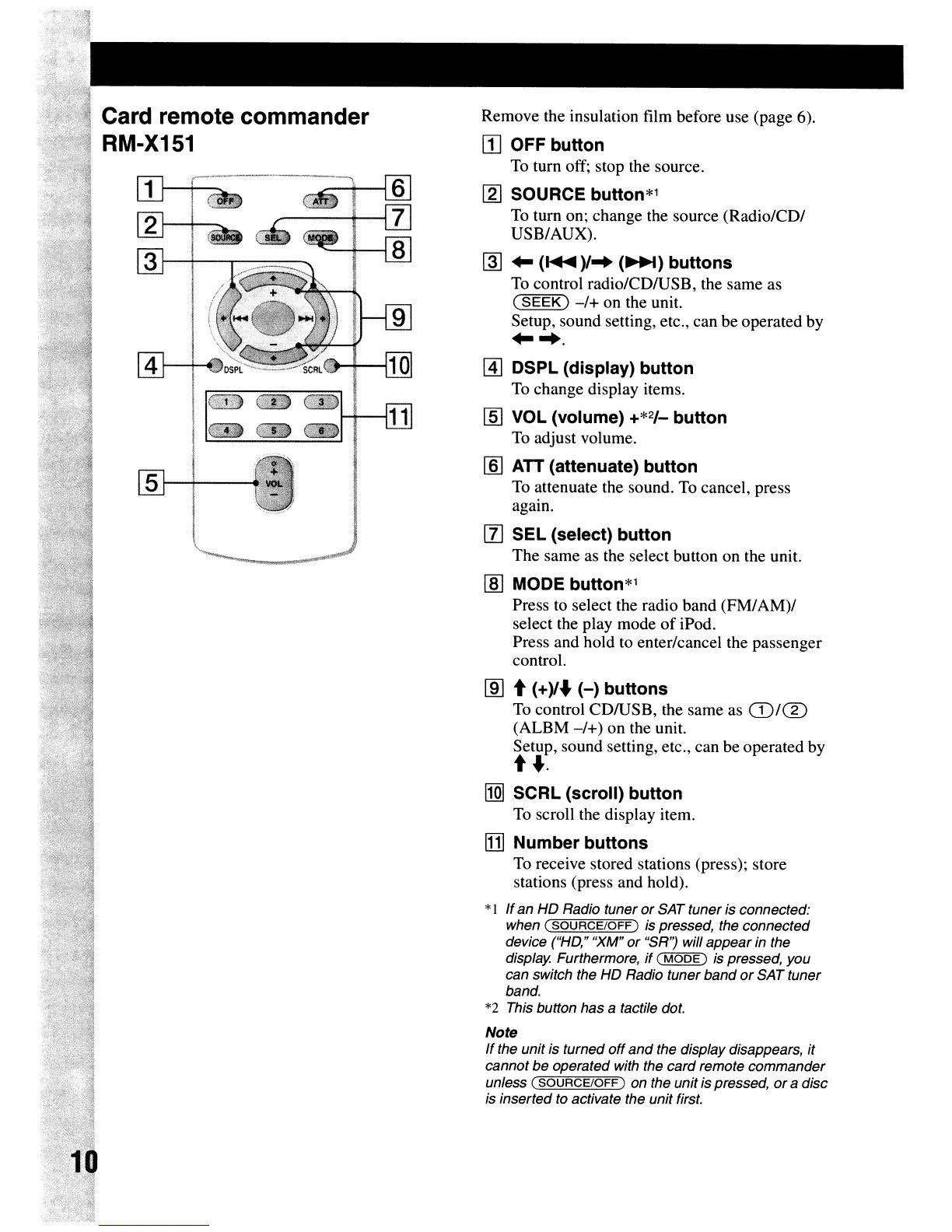
Card remote commander
RM-X151
~
[:
----~
3
1--+---.,.----
Remove the insulation film before use (page 6).
[I] OFF button
To turn off; stop the source.
[gJ
SOURCE button*1
To turn on; change the source
(Radio/CD/
USB/AUX).
@I
..
(
.....
)/
..
(~)
buttons
To control radio/CDIUSB, the
same
as
(SEEK)
-/+
on the unit.
Setup, sound setting, etc., can
be
operated by
.....
[I]
DSPl
(display) button
To
change
display items.
[§]
VOL (volume) +*2/_ button
To adjust volume.
[§] ATT (attenuate) button
To attenuate the sound. To cancel, press
again.
[1]
SEl
(select) button
The
same as the select button on the unit.
rnJ
MODE button*1
Press to select the radio
band
(FM/
AM)/
select the play
mode
of
iPod.
Press and
hold
to enter/cancel the
passenger
control.
lID
t (+)/
...
(-)
buttons
To control
CDIUSB,
the
same
as ill/CD
(ALBM
-/+)
on
the unit.
Setup, sound setting, etc., can be
operated
by
t
....
l1Q]
SCRl
(scroll) button
To scroll the display item.
[1]
Number buttons
To receive stored stations (press); store
stations (press and hold).
*I Ifan
HO
Radio tuner or SAT tuner is connected:
when (
SOURCE/OFF)
is pressed, the connected
device ("HO," "XM"
or
"SR'?
will appear in the
display. Furthermore,
if
(
MODE)
is pressed, you
can switch the
HO
Radio tuner band orSAT tuner
band.
*2 This button has a tactile dot.
Note
If the unit is turned
off
and
the display disappears,
it
cannot be operated with the card remote commander
unless
(SOURCE/OFF)
on the unit is pressed, ora disc
is inserted to activate the unit first.



 To Next Page