Searching a track by listening to
track passages -
ZAPPINTM
While playing back short track passages
in
a
CD
or USB device
in
sequence, you can search for a
track you want to listen to.
ZAPPIN mode
is
suitable for searching for a
track in shuffle or shuffle repeat mode.
Radio
Storing
and
receiving
stations
Caution
When tuning in stations while driving, use Best
Tuning Memory (BTM) to prevent an accident.
Storing manually
1 While receiving the station that you
want to store, press and hold a
number button
(CD to
®)
until
"MEM" appears.
Note
If
you try to store another station on the same number
button, the previously stored station will be replaced.
Tuning automatically
1 Select the band, then press
(SEEK)
+1-
to search for the station.
Scanning stops when the unit receives a
station. Repeat this procedure until the
desired station is received.
Receiving the stored stations
1 Select the band, then press a number
button
(CD to
®).
Storing automatically -
8TM
1 Press
(SOURCE/OFF)
repeatedly until
"TUNER" appears.
To change the band, press
(MODE)
repeatedly.
You
can select from FM
1,
FM2,
FM3, AM1 or AM2.
2 Press and hold the select button.
The setup display appears.
3 Press the select button repeatedly
until "BTM" appears.
4 Press
(SEEK)
+.
The unit stores stations in order
of
frequency
on the number buttons.
A beep sounds when the setting
is
stored.
,
~
t Y
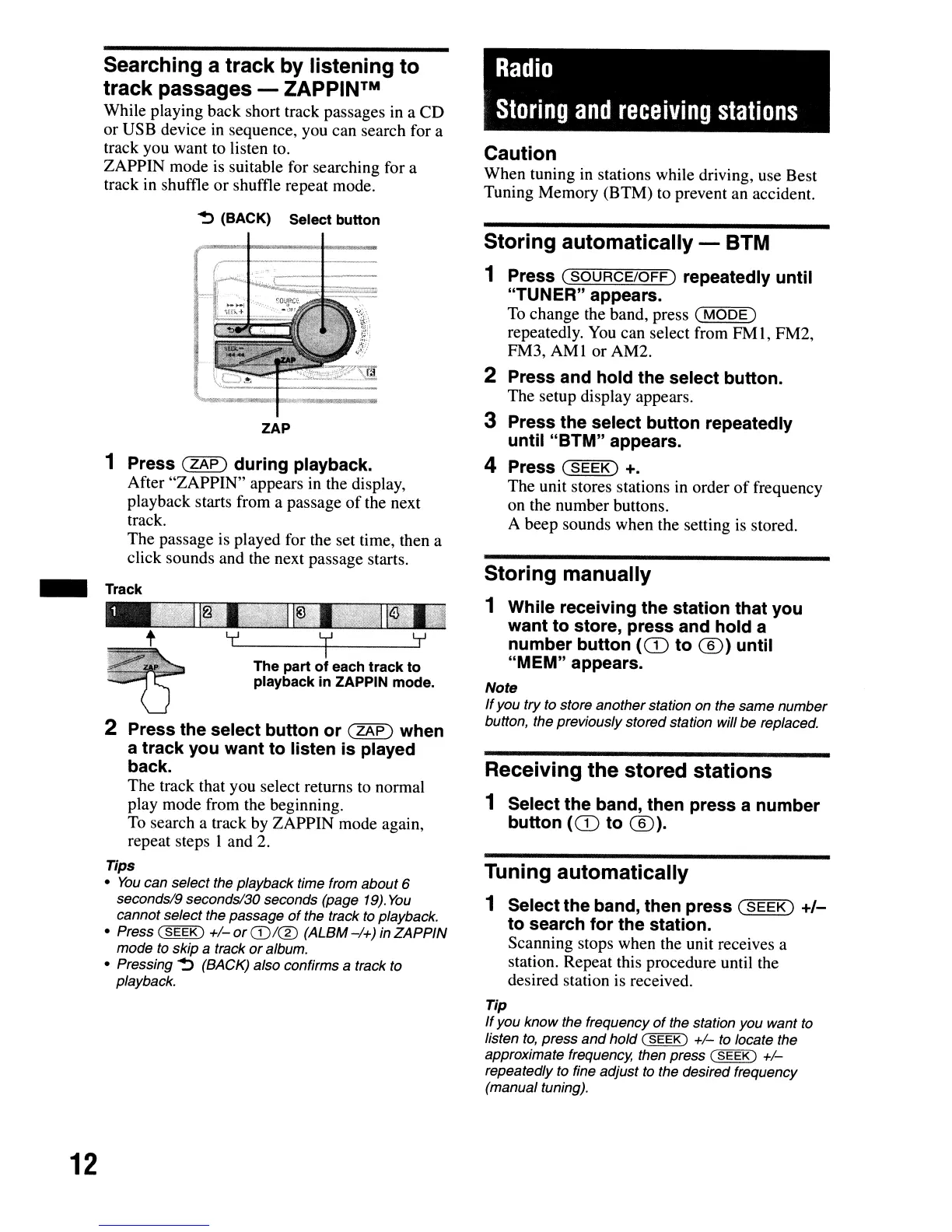
The part of each track to
playback
in
ZAPPIN mode.
2 Press the select button or
(ZAP)
when
a track you want to listen is played
back.
The track that you select returns to normal
play mode from the beginning.
To search a track by ZAPPIN mode again,
repeat steps 1 and 2.
Tips
•
You
can select the playback time from about 6
seconds/9 seconds/3D seconds (page
19).
You
cannot select the passage
of
the track
to
playback.
• Press
(SEEK)
+/-
or
CD/CD
(ALBM
-/+)
in ZAPPIN
mode to Skip
a track
or
album.
• Pressing
~
(BACK) also confirms a track to
playback.
~
(BACK) Select button
ZAP
1 Press
(ZAP)
during playback.
After "ZAPPIN" appears in the display,
playback starts from a passage
of
the next
track.
The passage is played for the set time, then a
click sounds and the next passage starts.
Track
-
Tip
If
you know the frequency
of
the station you want
to
listen
to,
press
and
hold (
SEEK)
+/-
to locate the
approximate frequency, then press
(SEEK)
+/-
repeatedly to fine adjust
to
the desired frequency
(manual tuning).
12



 To Next Page