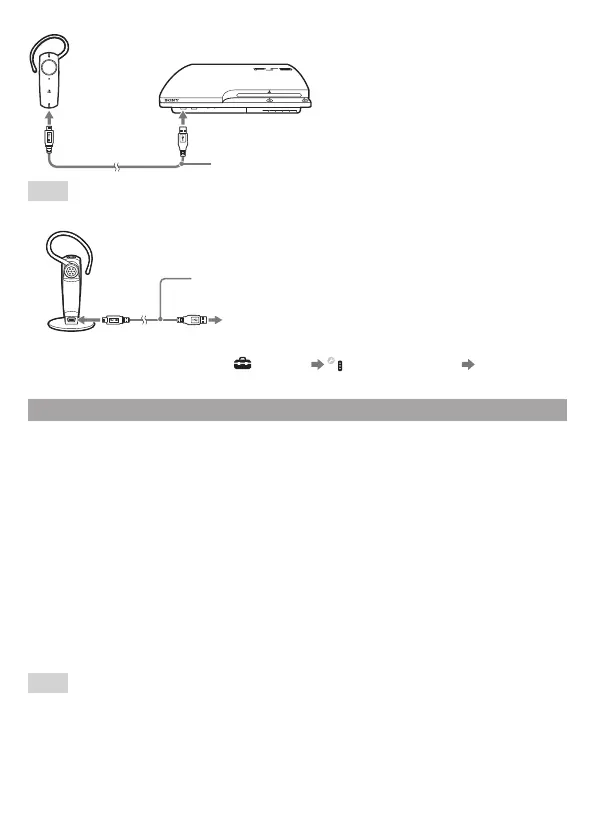
USB cable (supplied)
Hints
ˎ You can also pair the headset while it is attached to the supplied charging cradle.
USB cable (supplied)
To the PS3™ system
ˎ When the headset is paired with a PS3™ system, you can only select [3] or [Off] in the
[Microphone Level] settings under
(Settings) (Accessory Settings) [Audio
Device Settings].
Registering (pairing) the headset with other Bluetooth
®
Devices
You can pair the headset with up to seven Bluetooth
®
devices other than the PS3™ system.
For information about operating the Bluetooth
®
device, refer to the instructions supplied with
the device.
Registering (pairing) the headset with a Bluetooth
®
mobile phone
To pair the headset with a Bluetooth
®
mobile phone, perform the following steps.
1 Turn on the mobile phone.
2 Press and hold down the POWER button on the headset until the status indicator
flashes alternately in red and blue, indicating that the headset is in pairing mode.
3 Start the Bluetooth
®
connection on the mobile phone.
For details, refer to the instructions supplied with the mobile phone.
If the device prompts you for a PIN code or pass key, enter [0000].
The headset is displayed as [Wireless Headset] on the Bluetooth
®
device. If it is not displayed, try
pairing the devices again, starting with step 1.
For details about use of the headset to answer calls, refer to “Using the headset”.
Hints
ˎ There is no guarantee that this product can be paired with all Bluetooth
®
-compatible devices.
To pair with the headset, the Bluetooth
®
device must support the same Bluetooth
®
profile as the
headset.
ˎ You cannot use a USB cable to pair the headset with a Bluetooth
®
device other than the PS3™
system.


 To Next Page