Shooting
images
easily
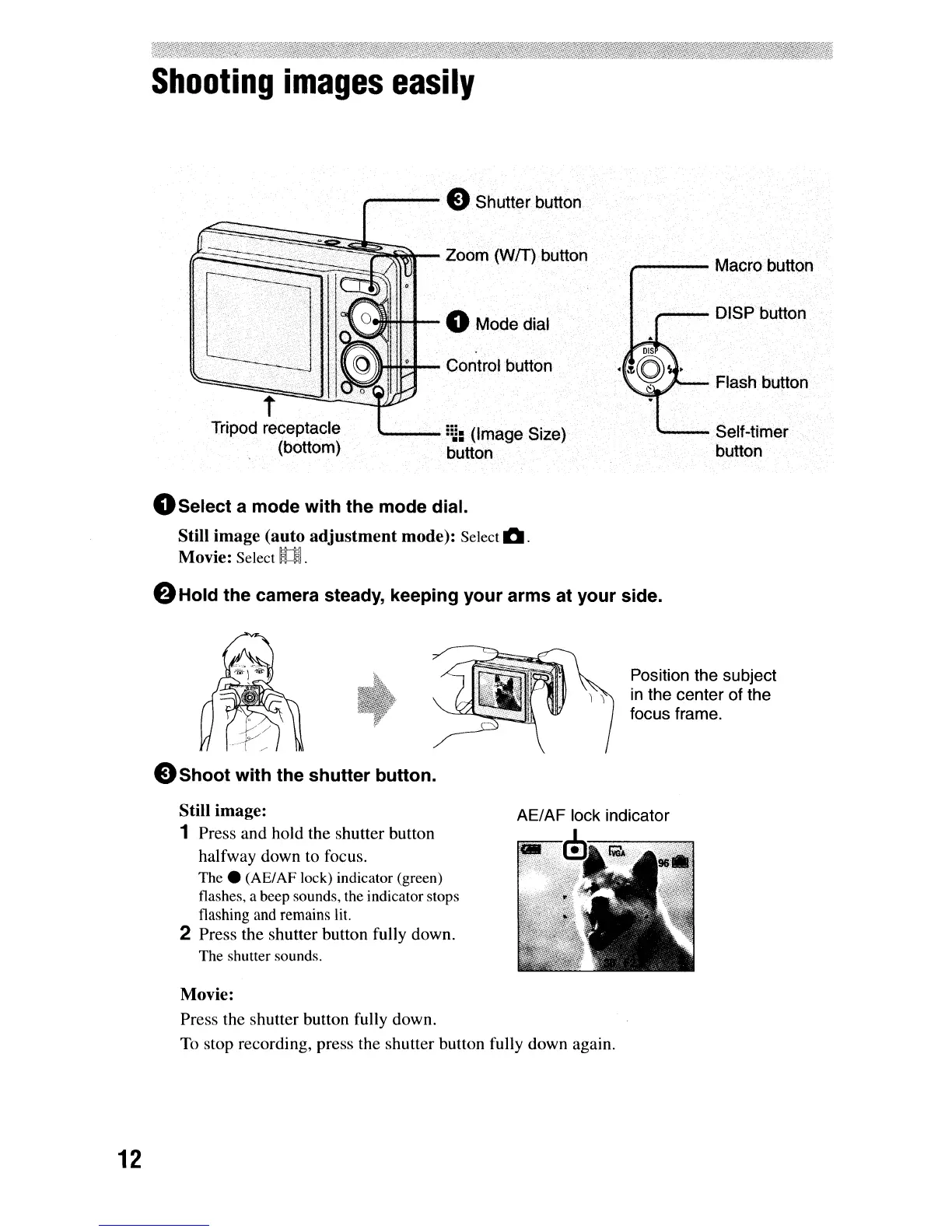
Flash button
"--
Self-timer
button
i---DISP button
,......---
Macro button
---
!!j: (Image Size)
button
1ll4lo-l+o"-t-
Control button
eIllI4f++--
0 Mode dial
I""~UIJI
-----eShutter button
t
Tripod receptacle
(bottom)
k~::::~~~~~r--
Zoom (WIT) button
OSelect
a mode
with
the
mode dial.
Still image (auto
adjustment
mode): Select
11IOI.
Movie: Select
U.
eHold the camera steady, keeping
your
arms at
your
side.
Position the subject
in
the center of the
focus frame.
eShoot
with
the
shutter
button.
Still image:
1 Press and hold the shutter button
halfway down to focus.
The.
(AE/AF lock) indicator (green)
flashes, a beep sounds, the indicator stops
flashing
and
remains
lit.
2 Press the shutter button fully down.
The shutter sounds.
Movie:
Press the shutter button fully down.
To
stop recording, press the shutter button fully down again.
12



 To Next Page
 Loading...








