EasyManua.ls Logo

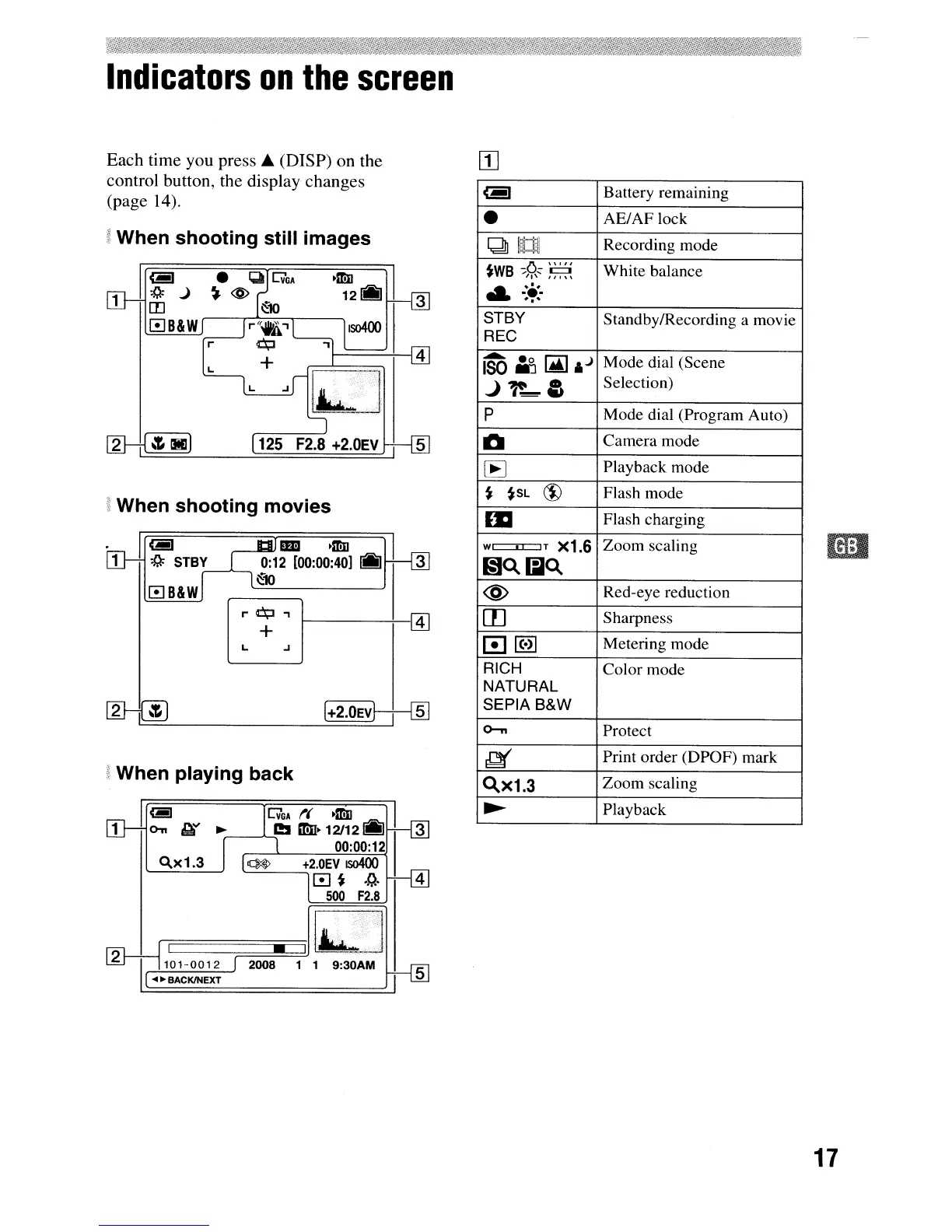
Sony CYBER-SHOT DSC-S730 - Indicators on the Screen

Sony CYBER-SHOT DSC-S730
140 pages
Print Icon
To Next Page IconTo Next Page
To Previous Page IconTo Previous Page
Loading...
Indicators
on
the
screen
<-I
Battery remaining
AE/AF lock
QU
Recording mode
o
".,,
White balance
~WB
-;"l'~
,~,
..
:.'.
'o-
STBY
Standby/Recording a movie
REC
iSO
I]
~
,J
Mode dial (Scene
J~-&
Selection)
p
Mode dial (Program Auto)
~
Camera mode
lE
Playback mode
~
~SL
(i)
Flash mode
lSI
Flash charging
WI
..
IT
X1.6
Zoom scaling
Glo..liJo..
@
Red-eye reduction
rn
Sharpness
0lHl
Metering mode
RICH
Color mode
NATURAL
SEPIA
B&W
0-"
Protect
~
Print order (DPOF) mark
o..X1.3
Zoom scaling
~
Playback
5
(+2.0EV
t--f---{ID
oJ
~
+2.0EV
IS0400
[!]
~
.~.
4
500
F2.8
L
L
When
playing
back
11
Ui!J
jG'GA
t(
·mn
ra:,
I
1
o-n
Glt
~
l!!
mo·
12/12
_I
3
00:00:12
t When
shooting
movies
Em
·mn
]I
0:12
[00:00:40]
I!IIJ
,.--"""---,
~10
~~--------'
Each time you
press'"
(DISP) on the
[I]
control button, the display changes
(page 14).
gWhen
shooting
still
images
Ir
~
I;l
G'GA
·mn
II
:Q:
j
~
@
121!11J
3
1 [[)
~10
0B&W
17

Table of Contents

Other manuals for Sony CYBER-SHOT DSC-S730

Related product manuals