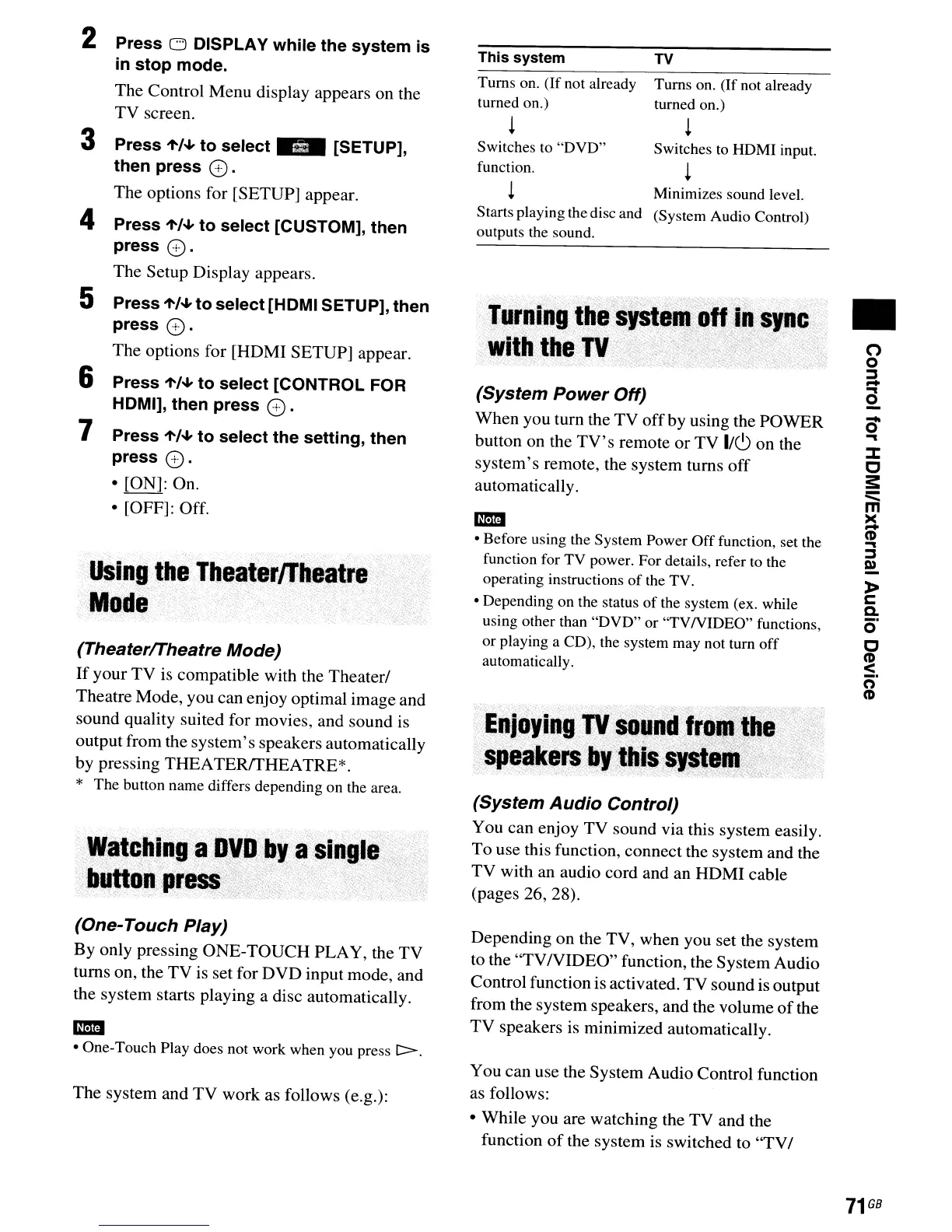
2
! Minimizes sound level.
Starts playing the disc and (System Audio Control)
outputs the sound.
o
o
~
-
...
2-
0-
...
:J:
o
s::
:::::
m
~
('D
...
~
D)
»
c
c.
0'
o
('D
:$.
n
('D
•
TV
Turns on.
(If
not already
turned on.)
!
Switches to HDMI input.
!
(System
Audio
Control)
You can enjoy TV sound via this system easily.
To use this function, connect the system and the
TV with an audio cord and an HDMI cable
(pages 26, 28).
(System
Power
Off)
When you
tum
the TV
off
by using the POWER
button on the
TV's
remote
or
TV
1/(9
on the
system's remote, the system turns off
automatically.
This
system
Turns on.
(If
not already
turned on.)
!
Switches to
"DVD"
function.
.EdjoYinllij·'$Ou:~;d.j·,~qfj~~·"
,','
t;:$I!~.~.~:~l;j,'~_i,.~,~~~~.,;\?~~·;?;i
.>;'
'.'
-
• Before using the System Power
Off
function, set the
function for
TV
power. For details, refer to the
operating instructions
of
the TV.
• Depending on the status
of
the system (ex. while
using other than
"DVD"
or
"TVNIDEO"
functions,
or playing a CD), the system may not turn
off
automatically.
(Theaterffheatre
Mode)
If
your
TV
is
compatible with the Theaterl
Theatre Mode, you can enjoy optimal image and
sound quality suited for movies, and sound is
output from the system's speakers automatically
by pressing
THEA
TERffHEA
TRE*.
* The button name differs depending on the area.
·····USing···lheThealernheatre>;;
, -
.-.
• •
-.-
~,
-
'-
-
'",
,-
-
<--
'
'.
- -
••
-
'Mode.
·:W.tc,hing,:a,D'flrby
aSiqle.,
.~.
tiutto~pj'ess\/:':'i
."
'
..
,
'<i,"
4 Press
'f'/~
to
select
[CUSTOM],
then
press
(0.
The Setup Display appears.
5 Press
1'/~
to
select
[HOMI SETUP],
then
press
(0.
The options for [HOMI SETUP] appear.
6
Press
'f'/~
to
select
[CONTROL FOR
HOMI],
then
press
(0.
7
Press
1'/~
to
select
the
setting,
then
press
(0.
• [ON]: On.
• [OFF]: Off.
Press 0 OISPLAY
while
the
system
is
in
stop
mode.
The Control Menu display appears on the
TV
screen.
3
Press
1'/~
to
select"
[SETUP],
then
press
(0.
The options for [SETUP] appear.
(One-
Touch
Play)
By only pressing ONE-TOUCH PLAY, the TV
turns on, the
TV
is set for DVD input mode, and
the system starts playing a disc automatically.
-
• One-Touch Play does not work when you press
t>.
The system and TV work as follows (e.g.):
Depending on the TV, when you set the system
to the "TV/VIDEO" function, the System Audio
Control function is activated. TV sound is output
from the system speakers, and the volume
of
the
TV
speakers is minimized automatically.
You can use the System Audio Control function
as follows:
• While you are watching the TV and the
function
of
the system is switched to
"TVI
71
GB



 To Next Page