188
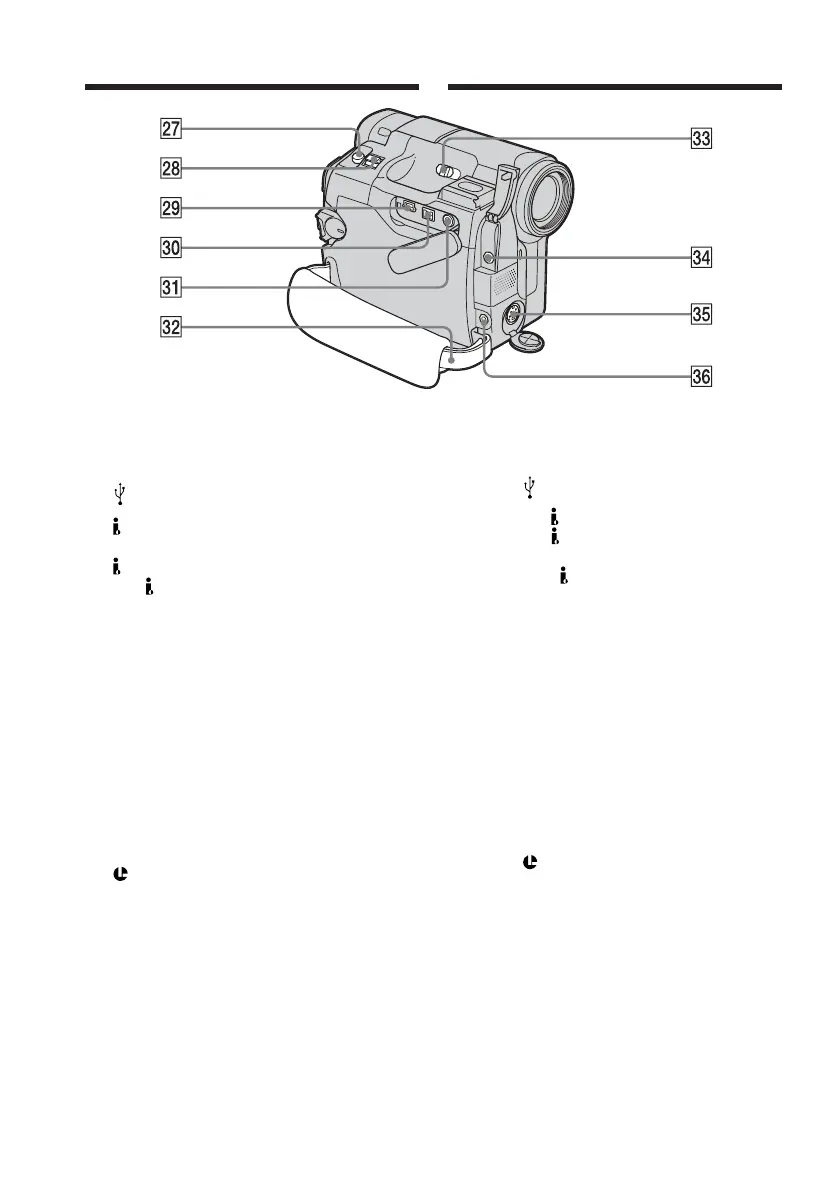
wj PHOTO button (p. 56)
wk Power zoom lever (p. 39)
wl
(USB) jack
e;
DV OUT Interface (DCR-HC14E,
p. 91)
DV Interface (DCR-HC15E, p. 91, 107)
The
DV Interface is i.LINK compatible.
ea AUDIO/VIDEO OUT jack (yellow) (p.
54, 91)
es Grip belt (p. 12)
ed NIGHTSHOT switch (p. 42)
ef MIC jack (PLUG IN POWER) (red) (p.
112)
Connect an external microphone
(optional). This jack also accepts a
“plug-in-power” microphone.
eg S VIDEO OUT jack (p. 55)
eh
(LANC) jack (blue)
Identifying parts and controls
Identification des composants
et des commandes
wj Touche PHOTO (p. 56)
wk Manette de puissance de zoom (p. 39)
wl Prise
(USB)
e; Interface
DV OUT(DCR-HC14E, p. 91)
Interface
DV (DCR-HC15E, pp. 91 et
107)
L’interface
DV est compatible i.LINK.
ea Prise AUDIO/VIDEO OUT (jaune)
(pp. 54 et 91)
es Sangle (p. 14)
ed Commutateur NIGHTSHOT (p. 42)
ef Prise MIC (PLUG IN POWER) (rouge) (p.
112)
Permet de raccorder un micro externe
(en option). Cette prise accepte
également les micros à alimentation par
système « plug-in-power ».
eg Prise S VIDEO OUT (p. 55)
eh Prise
(LANC) (bleue)



 To Next Page