21
DCR-HC32/HC42 2-584-906-11(1)
Recording/Playback
Playing back with ease
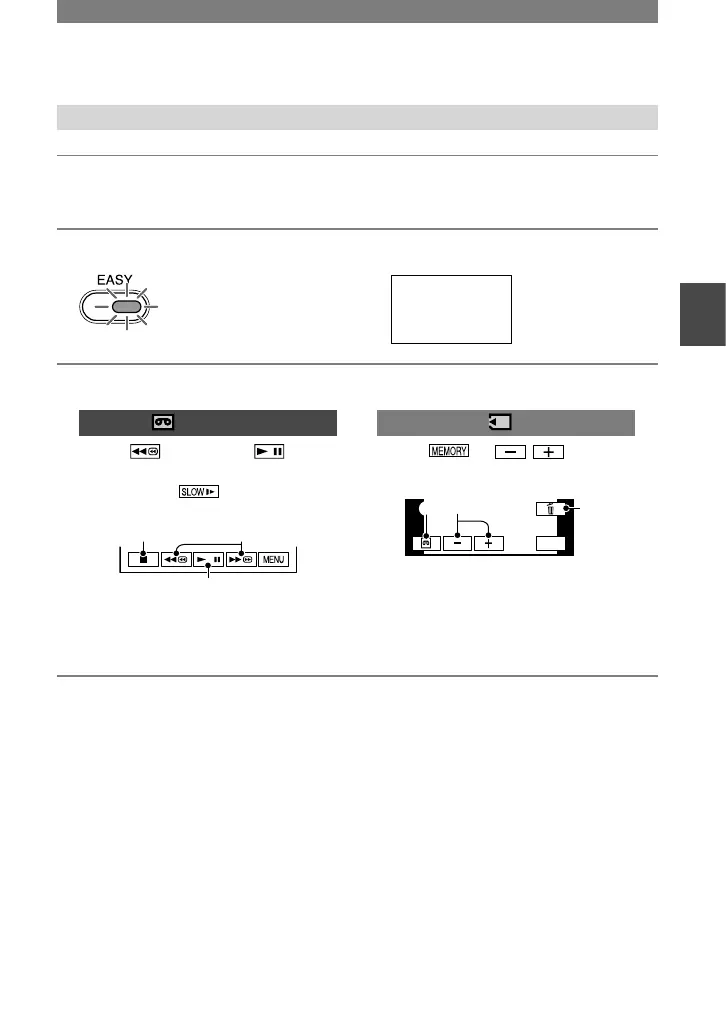
1 Slide the POWER switch in the direction of the arrow repeatedly to turn
on the PLAY/EDIT lamp.
2 Press EASY .
The EASY lights up in blue.
Tape playback
Previous/Next
Delete (p. 65)
To cancel Easy Handycam operation
Press EASY again.
The EASY lamp turns off and all the
settings are returned to the previous
situation.
• The recording mode for tape, and the image
size (DCR-HC42) and quality for “Memory
Stick Duo” return to the default settings.
• What you can do during Easy Handycam
operation
– Adjust some menu settings (p.
38)
If you touch [MENU], adjustable items will
be displayed. Items not displayed return to
the default settings.
– Zoom (during recording) (p.
24)
– NightShot plus (p.
24)
– Turn the screen indicators on/off (p.
16)
– “Playing the picture on a TV” (p.
34)
– “Dubbing to other recording devices” (p.
60)
• [Invalid during Easy Handycam operation]
appears if operations not available during Easy
Handycam are attempted.



 To Next Page