For DCR-HC42:
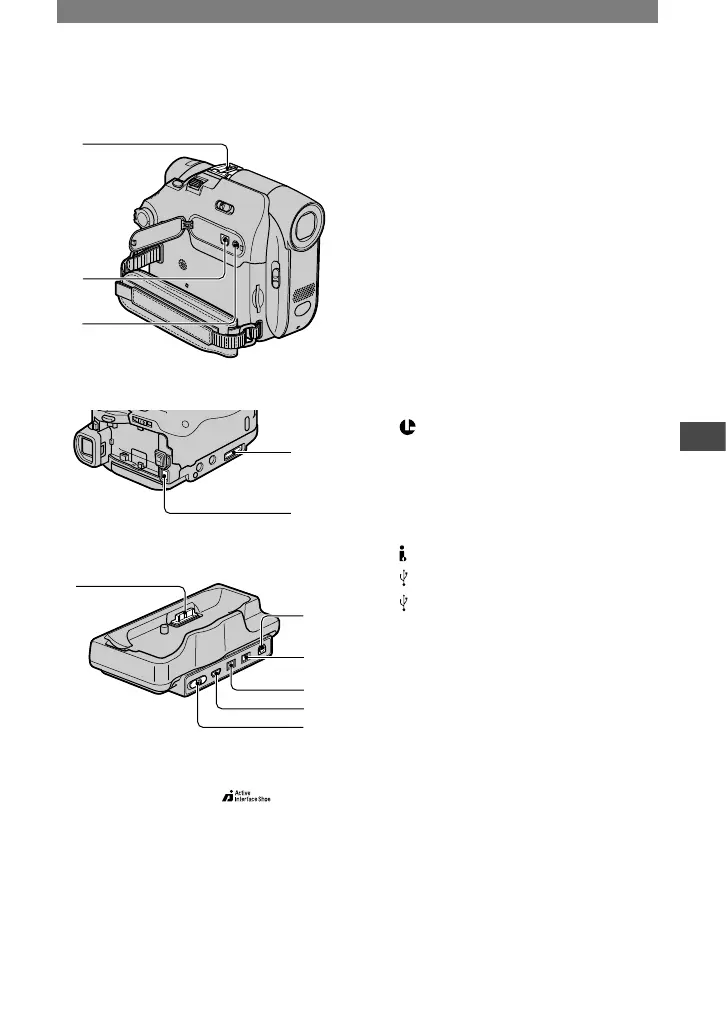
Active Interface Shoe (p. 63)
The Active Interface Shoe supplies
power to optional accessories such as
a video light, a flash, or a microphone.
The accessory can be turned on or off
as you operate the POWER switch on
your camcorder. Refer to the operating
instructions supplied with your
accessory for details.
For DCR-HC32:
Accessory shoe
• Remove the shoe cover when you use an
accessory.
• The Active Interface Shoe and the accessory
shoe have a safety device for fixing the
installed accessory securely. To connect an
accessory, press down and push it to the
end, and then tighten the screw. To remove
an accessory, loosen the screw, and then
press down and pull out the accessory.
• When you are recording on a “Memory
Stick Duo” with an external flash (optional)
connected to the accessory shoe, turn off
the power of the external flash to prevent
charging noise being recorded.
A/V (audio/video) jack (p. 34, 59, 80)
LANC jack (blue)
• The LANC control jack is used for
controlling the tape transport of video
devices and peripherals connected to it.
Interface connector
DC IN jack (p. 10)
DV Interface jack (p. 59, 77, 80)
(USB) jack (p. 70)
(USB) ON/OFF switch
• Set this to ON to use the USB connection.



 To Next Page