25
Recording/Playback
DCR-HC32/HC42 2-584-906-11(1)
To adjust the exposure for backlit
subjects ................................
To adjust the exposure for backlit subjects,
press BACK LIGHT to display
. To
cancel the back light function, press BACK
LIGHT again.
To adjust the focus for an off center
subject (SPOT FOCUS) ...............
See [SPOT FOCUS] on page 42.
To fix the exposure for the selected
subject (Flexible spot meter) .......
See [SPOT METER] on page 40.
To record in mirror mode ............
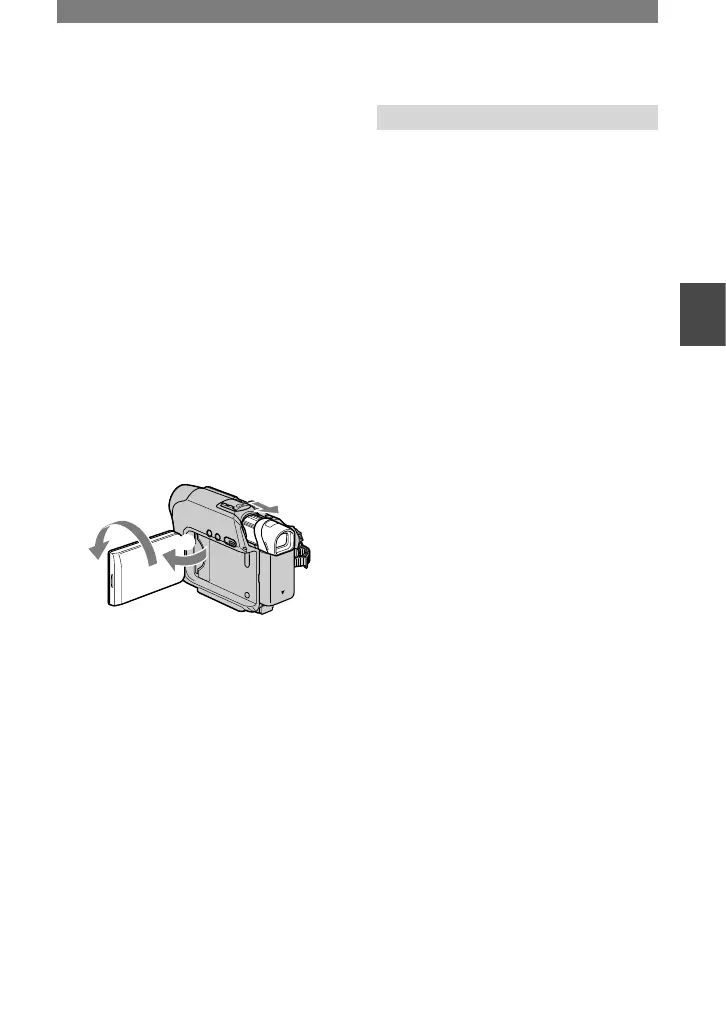
Open the LCD panel 90 degrees to the
camcorder (), then rotate it 180 degrees
to the lens side ().
• A mirror-image of the subject appears on the
LCD screen, but the picture will be normal
when recorded.
To use a tripod ........................
Attach the tripod (optional: the length of
the screw must be less than 5.5 mm (7/32
inches) to the tripod receptacle using a
tripod screw.
Playback
To play back the images in sequence
...........................................
See [SLIDE SHOW] on page 49.
To use PB zoom ..................
You can magnify pictures from about 1.1 to
5 times the original size.
Play back the picture you want to
magnify.
Magnify the picture with T (Telephoto).
Touch the screen at the point you want
to magnify within the displayed frame.
Adjust the magnification with W (Wide
angle)/T (Telephoto).
To cancel, touch [END].
• You cannot change the zoom speed with the
zoom buttons on the LCD frame.
Continued



 To Next Page