22
DCR-HC32/HC42 2-584-906-11(1)
Recording
Open the lens cover.
PHOTO
DCR-HC32: POWER switch
REC START/
STOP
REC START/
STOP
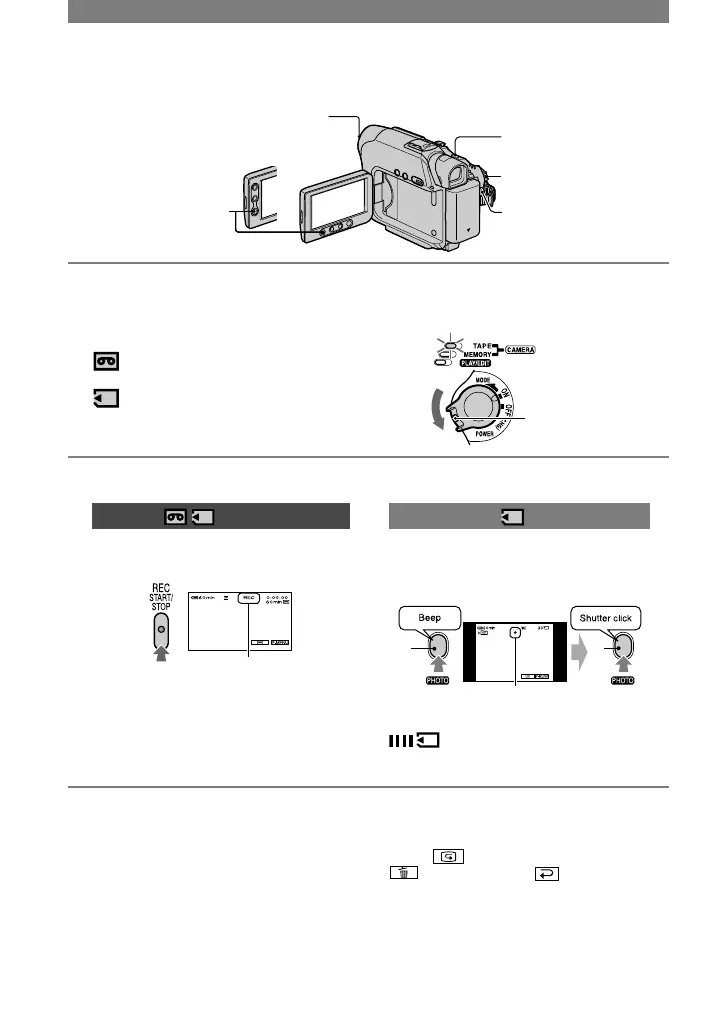
1 Slide the POWER switch in the direction of the arrow repeatedly to turn on
the respective lamp to select a recording medium.
On a tape: Light up the CAMERA-
TAPE lamp.
If the POWER
switch is set to OFF,
slide it down while
pressing the green
button.
On a “Memory Stick Duo”: Light up
the CAMERA-MEMORY lamp.
2 Start recording.
Movies
Press REC START/STOP
(or
).
[STBY] (tape only) [REC]
•
The sound of a movie (MPEG MOVIE EX)
recorded on a “Memory Stick Duo” will be
monaural.
Still images
Press and hold PHOTO lightly to
adjust the focus (), then press it
fully ().
Flashing Lights up
A shutter sound is heard. When
disappears, the image has been
recorded.
To stop movie recording
Press REC START/STOP again.
• You can record a still image on a “Memory
Stick Duo” while recording movies on a tape or
in standby mode.
For DCR-HC42:
Still images will be fixed to image size [640 ×
360] for 16:9 pictures and [640 × 480] for 4:3
pictures during recording in CAMERA-TAPE.
To check the latest recording on a
“Memory Stick Duo”
Touch . To delete the picture, touch
[YES]. Touch to return to the
standby mode.



 To Next Page