120
– DCR-TRV17 only
You can record moving pictures with sound on “Memory Stick”s.
Before operation
Insert a “Memory Stick” into your camcorder.
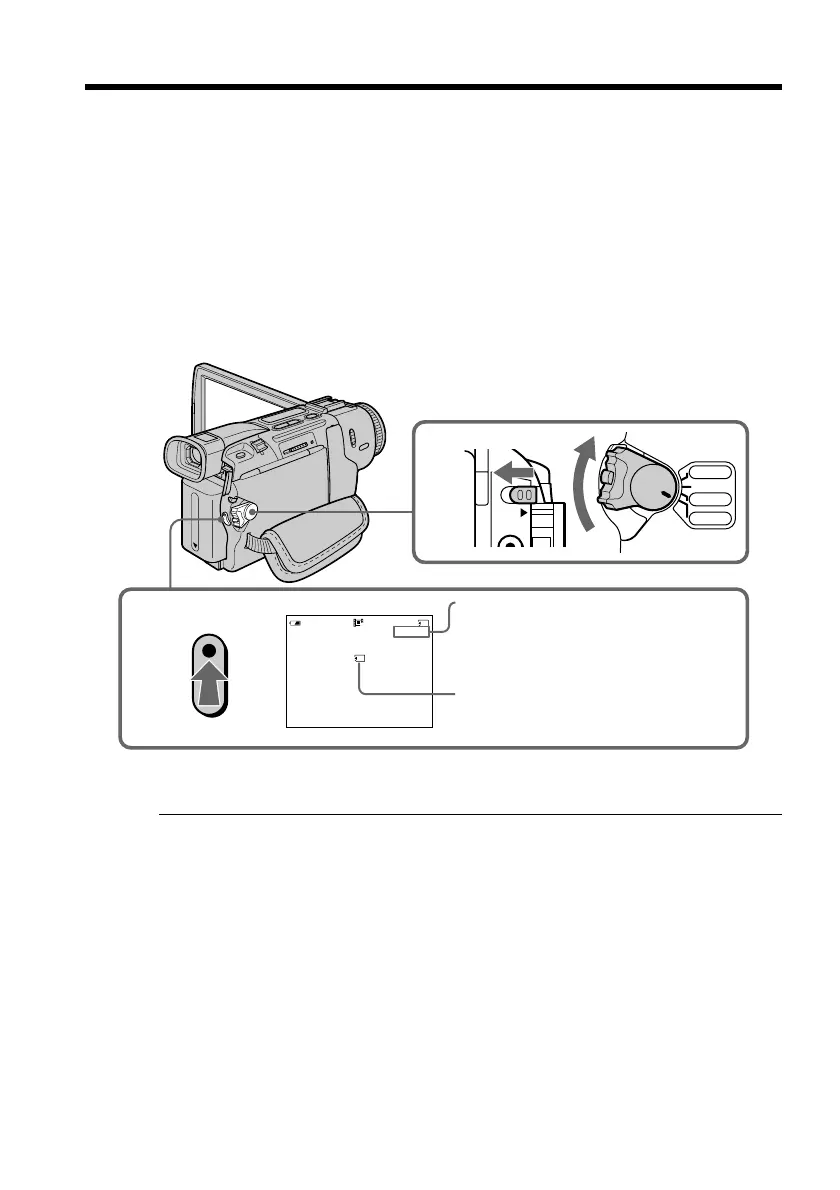
(1) Set the POWER switch to MEMORY. Make sure that the LOCK switch is set to
the left (unlock) position.
(2) Press START/STOP. Your camcorder starts recording. The camera recording
lamp located on the front of your camcorder lights up. When IMAGESIZE in
the menu settings is set to 160 × 112, the maximum recording time is 60
seconds. However, when IMAGESIZE in the menu settings is set to 320 × 240,
the maximum recording time is 15 seconds.
To stop recording
Press START/STOP.
Note
Sound is recorded in monaural.
When the POWER switch is set to MEMORY
The following functions do not work:
– Wide TV
– Digital zoom
– SteadyShot function
– Super NightShot
– Fader
– Picture effect
– Digital effect
– Title
– Low lux mode (The indicator flashes.)
– Sports lesson mode (The indicator flashes.)
Recording moving pictures on “Memory
Stick”s – MPEG movie recording
2
320
40
REC
0
:
03
[
15
]
min
SEC
BBB
1
LOCK
VCR
CAMERA
MEMORY
OFF(CHG)
POWER
Recording time can be recorded on
the “Memory Stick”
This indicator is displayed for 5
seconds after pressing START/STOP.
This indicator is not recorded.



 To Next Page
 Loading...










