127
“Memory Stick” Operations
Copying still images from a tape
– Photo save
– DCR-TRV17 only
Using the search function, you can automatically take in only still images from tapes
and record them on a “Memory Stick” in sequence.
Before operation
•Insert a recorded tape into your camcorder and rewind the tape.
•Insert a “Memory Stick” into your camcorder.
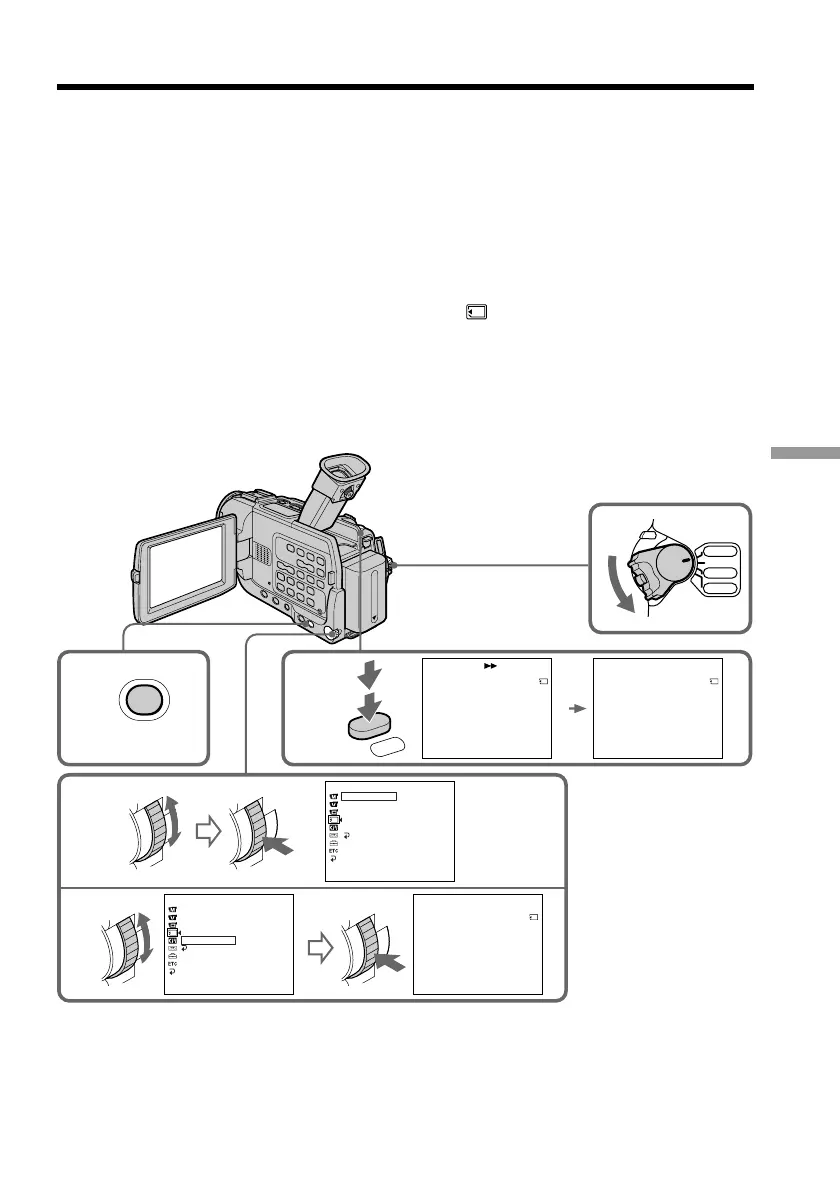
(1) Set the POWER switch to VCR.
(2) Press MENU to display the menu.
(3) Turn the SEL/PUSH EXEC dial to select
, then press the dial.
(4) Turn the SEL/PUSH EXEC dial to select PHOTO SAVE, then press the dial.
“PHOTO BUTTON” appears on the screen.
(5) Press PHOTO deeper. The still image from the tape is recorded on a “Memory
Stick.” The number of still images copied is displayed. END is displayed when
copying is completed.
2
3
5
4
1
PHOTO
MEMORY SET
STILL SET
MOVIE SET
PR
I
NT MARK
PROTECT
PHOTO SAVE
RETURN
[
MENU
]
:
END
MEMORY SET
STILL SET
MOVIE SET
PR
I
NT MARK
PROTECT
PHOTO SAVE
RETURN
[
MENU
]
:
END
READY
PHOTO SAVE 0 : 00 : 00 : 00
[
PHOTO
]
:
START
[
MENU
]
:
END
4 / 15
PHOTO BUTTON
PHOTO SAVE 0 : 00 : 00 : 00
[
MENU
]
:
END
4 / 15
SAV
I
NG
0
PHOTO SAVE 0 : 30 : 00 : 00
[
MENU
]
:
END
8 / 15
END
4
MENU
POWER
VCR
CAMERA
MEMORY
OFF(CHG)



 To Next Page
 Loading...










