144
Installing ImageMixer
Make sure USB driver installation is complete.
“ImageMixer Ver.1.5 for Sony” is an application that can capture or edit images, or
create video CDs.
To install and use this software in Windows 2000, you must be authorized as
administrators. For Windows XP, you must be authorized as computer administrators.
(1) Turn on a computer and allow Windows to load.
(2) Insert the supplied CD-ROM into the CD-ROM drive of the computer.
The application software starts up.
(3) Select “Handycam” on the screen.
The title screen appears.
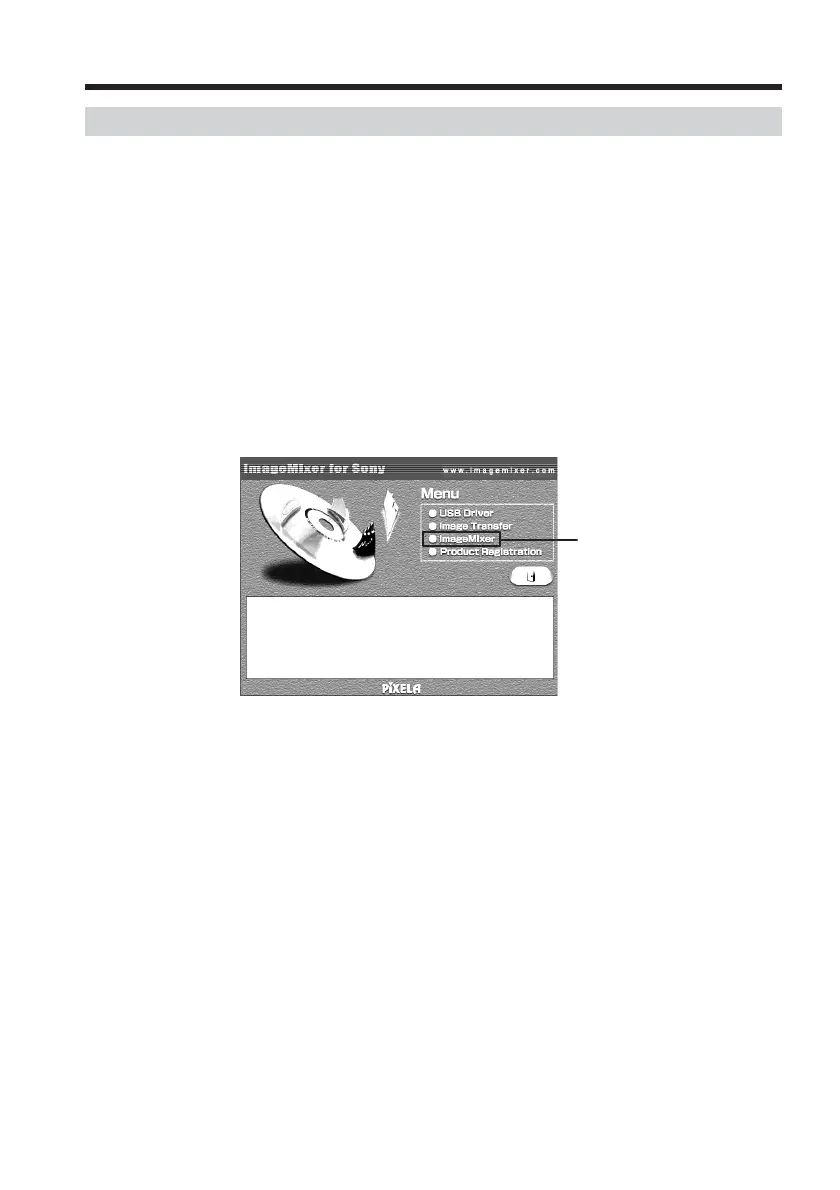
(4) Move the cursor to “ImageMixer” and click.
The Install Wizard program starts up and the “Choose Setup Language”
screen appears.
(5) Select the language for installation.
(6) Follow the on-screen messages.
The installation screen disappears when installation is complete.
(7) Follow the on-screen messages to install WinASPI.
(8) If DirectX 8.0a or later is not installed on the computer, continue installation
after installing ImageMixer.
Follow the on-screen messages to install DirectX 8.0a. After installation is
complete, restart the computer.
Connecting your camcorder to a computer using the USB cable
(For Windows users)
Click


 To Next Page
 Loading...