90
You can record additional audio to the original sound on the tape by connecting audio
equipment or a microphone. If you connect the audio equipment, you can add sound to
the tape already recorded in the 12-bit mode by specifying starting and ending points.
The original sound will not be erased.
Preparing for audio dubbing
You can record additional audio in the following:
•Dubbing with the built-in microphone
•Connecting the microphone (optional) to the MIC jack
•Connecting the microphone (optional) to the intelligent accessory shoe
•Connecting the A/V connecting cable to the AUDIO/VIDEO jack
The audio input to be recorded will take precedence over others in the following order:
•MIC jack
•Intelligent accessory shoe
•AUDIO/VIDEO jack
•Built-in microphone
Dubbing with the built-in microphone
No connection is necessary.
If no external microphone (optional) is connected, sound is recorded via the built-in
microphone.
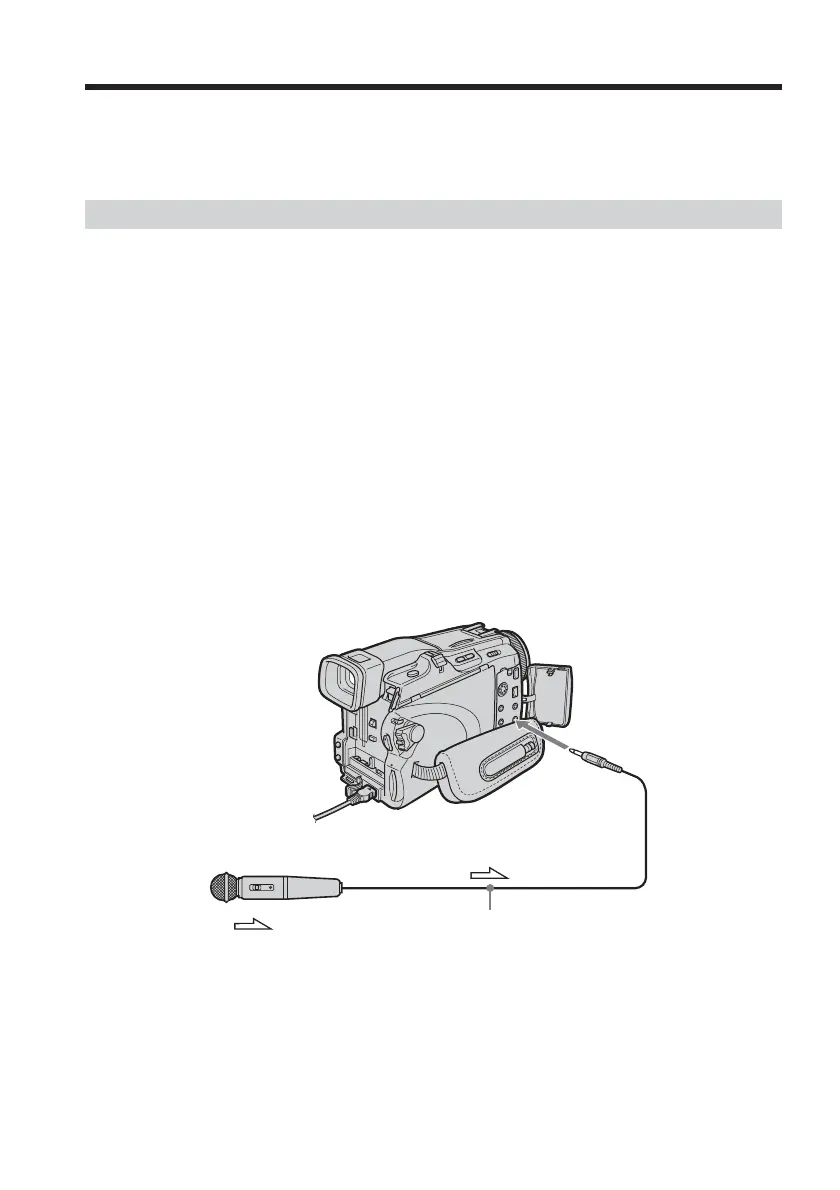
Connecting the microphone (optional) to the MIC jack
You can check the recorded picture and sound by connecting the AUDIO/VIDEO jack
to a TV.
The recorded sound is not output from a speaker. Check the sound by using the
headphones or TV.
Audio dubbing
MIC (PLUG IN
POWER) jack
Microphone (optional)
: Signal flow
MIC (PLUG IN
POWER) jack


 To Next Page
 Loading...