13
GB
Preparations
4
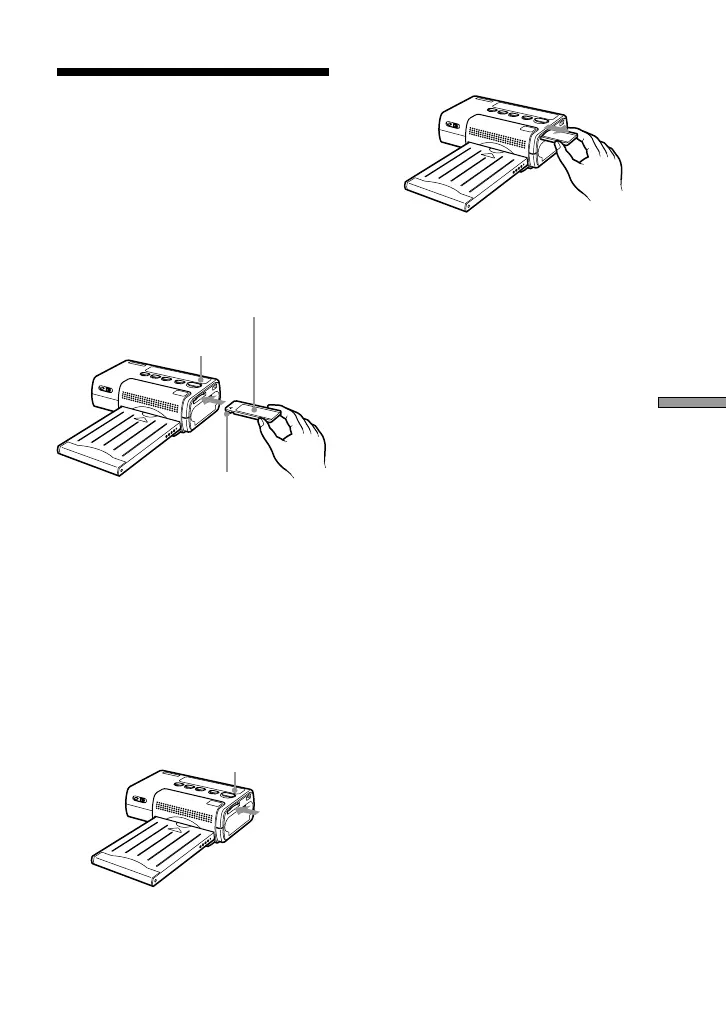
Inserting the
“Memory Stick”
Insert a “Memory Stick” into the unit
as shown below.
Be sure to push the “Memory Stick” all
the way in, until it audibly snaps into
place.
To remove the “Memory Stick”
1 Verify that the MS ACCESS
indicator is out. Then push
the “Memory Stick” fully into
the unit.
When you let go, the “Memory
Stick” will pop out slightly.
2 Pull out the “Memory Stick”.
Notes
• While the “Memory Stick” is being
accessed, the MS ACCESS indicator lights
up. Do not remove the “Memory Stick”
from the unit during this interval.
Otherwise the unit and/or the “Memory
Stick” may be damaged.
• Do not forcibly push or remove the
“Memory Stick” into or from the unit.
Otherwise the unit and/or the “Memory
Stick” may be damaged.
• While printing is in progress, do not
remove the “Memory Stick” from the unit.
Otherwise the unit and/or the “Memory
Stick” may be damaged.
• The maximum Memory Stick capacity
with which this unit is compatible is 128
MB.
• For information and precautions regarding
the handling of the “Memory Stick”, see
the section “Memory Stick” on page 27.
MS ACCESS indicator
“Memory Stick”
MS ACCESS indicator
Insert with cutoff section
facing left and arrow at
top left.



 To Next Page