EasyManua.ls Logo

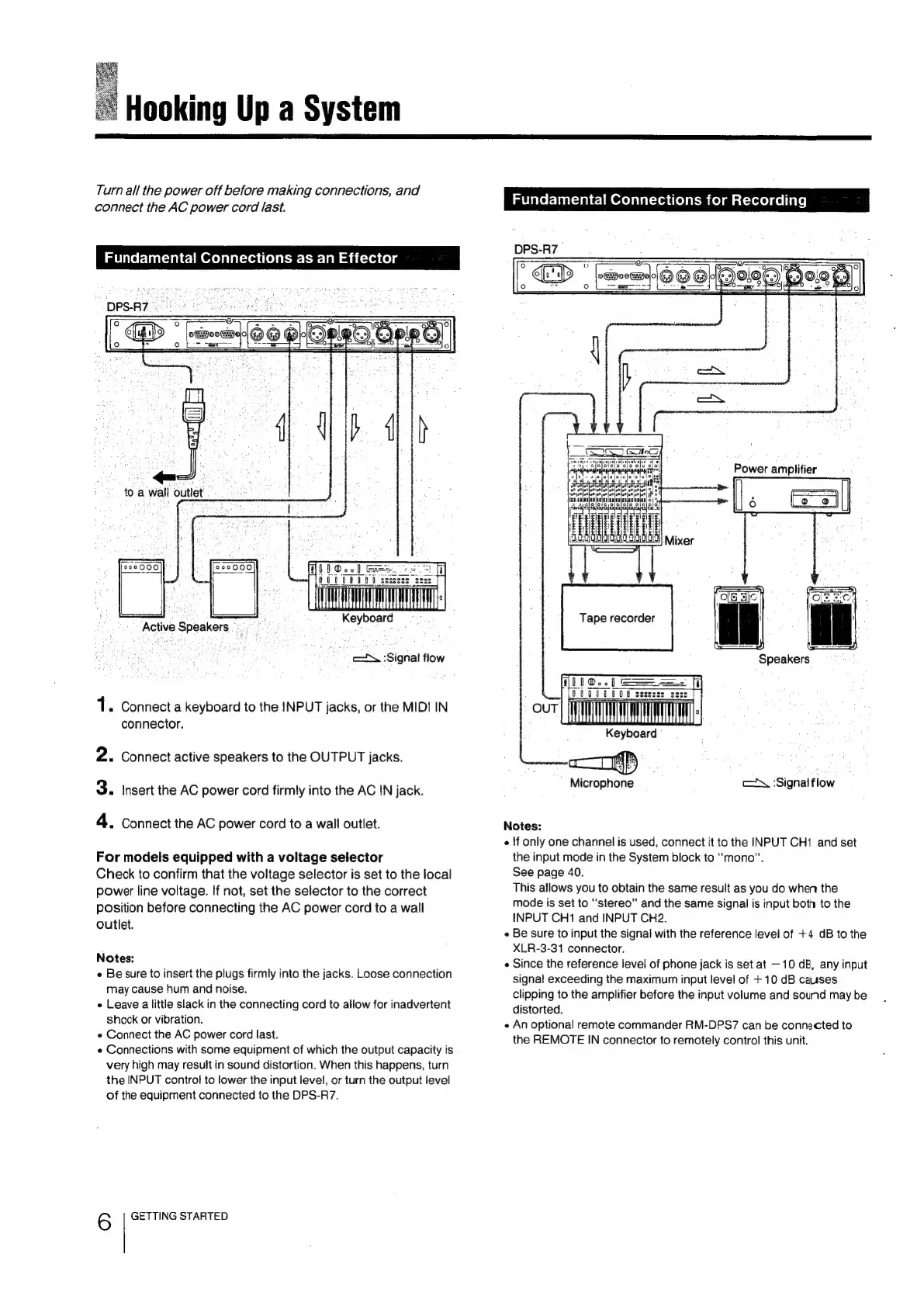
Sony DPS-R7 - System Connection Guide; Effector Connection Setup; Recording Connection Setup

Sony DPS-R7
64 pages
Print Icon
To Next Page IconTo Next Page
To Previous Page IconTo Previous Page
Loading...
Hooking
Up
a
System
Turn
all
the
power
off
before
making
connections,
and
connect
the
AC
power
cord
last.
Keyboard
.”
Active
Speakers
ey
we
:Signal
flow
1.
Connect
a
keyboard
to
the
INPUT
jacks,
or
the
MIDI
IN
connector.
2.
Connect
active
speakers
to
the
OUTPUT
jacks.
3.
Insert
the
AC
power
cord
firmly
into
the
AC
IN
jack.
4.
Connect
the
AC
power
cord
to
a
wall
outlet.
For
models
equipped
with
a
voltage
selector
Check
to
confirm
that
the
voltage
selector
is
set
to
the
local
power
line
voltage.
If
not,
set
the
selector
to
the
correct
position
before
connecting
the
AC
power
cord
to
a
wall
outlet.
Notes:
«
Be
sure
to
insert
the
plugs
firmly
into
the
jacks.
Loose
connection
may
cause
hum
and
noise.
e
Leave
a
little
slack
in
the
connecting
cord
to
allow
for
inadvertent
shock
or
vibration.
«
Connect
the
AC
power
cord
last.
¢
Connections
with
some
equipment
of
which
the
output
capacity
is
very
high
may
result
in
sound
distortion.
When
this
happens,
turn
the
INPUT
control
to
lower
the
input
level,
or
turn
the
output
fevel
of
the
equipment
connected
to
the
DPS-R7.
6
GETTING
STARTED
meine
r-lan-al
elm
Crelalicrea
elit
mie)mat-reelaeliate|
Speakers
Microphone
cc
‘Signal
flow
Notes:
«
!f
only
one
channel
is
used,
connect
it
to
the
INPUT
CH1
and
set
the
input
mode
in
the
System
block
to
“mono”.
See
page
40.
This
allows
you
to
obtain
the
same
result
as
you
do
when
the
mode
is
set
to
“stereo”
and
the
same
signal
is
input
both
to
the
INPUT
CH1
and
INPUT
CH2.
¢
Be
sure
to
input
the
signal
with
the
reference
level
of
+4
dB
to
the
XLR-3-31
connector,
¢
Since
the
reference
level
of
phone
jack
is
set
at
10
dB,
any
input
signal
exceeding
the
maximum
input
level
of
+10
dB
causes
clipping
to
the
amplifier
before
the
input
volume
and
sound
may
be
distorted.
e
An
optional
remote
commander
RM-DPS7
can
be
connected
to
the
REMOTE
IN
connector
to
remotely
control
this
unit.

Related product manuals