EasyManua.ls Logo

Sony DPS-R7 - Loading Stored Memories; Memory Load Mode Indicators

Sony DPS-R7
64 pages
Print Icon
To Next Page IconTo Next Page
To Previous Page IconTo Previous Page
Loading...
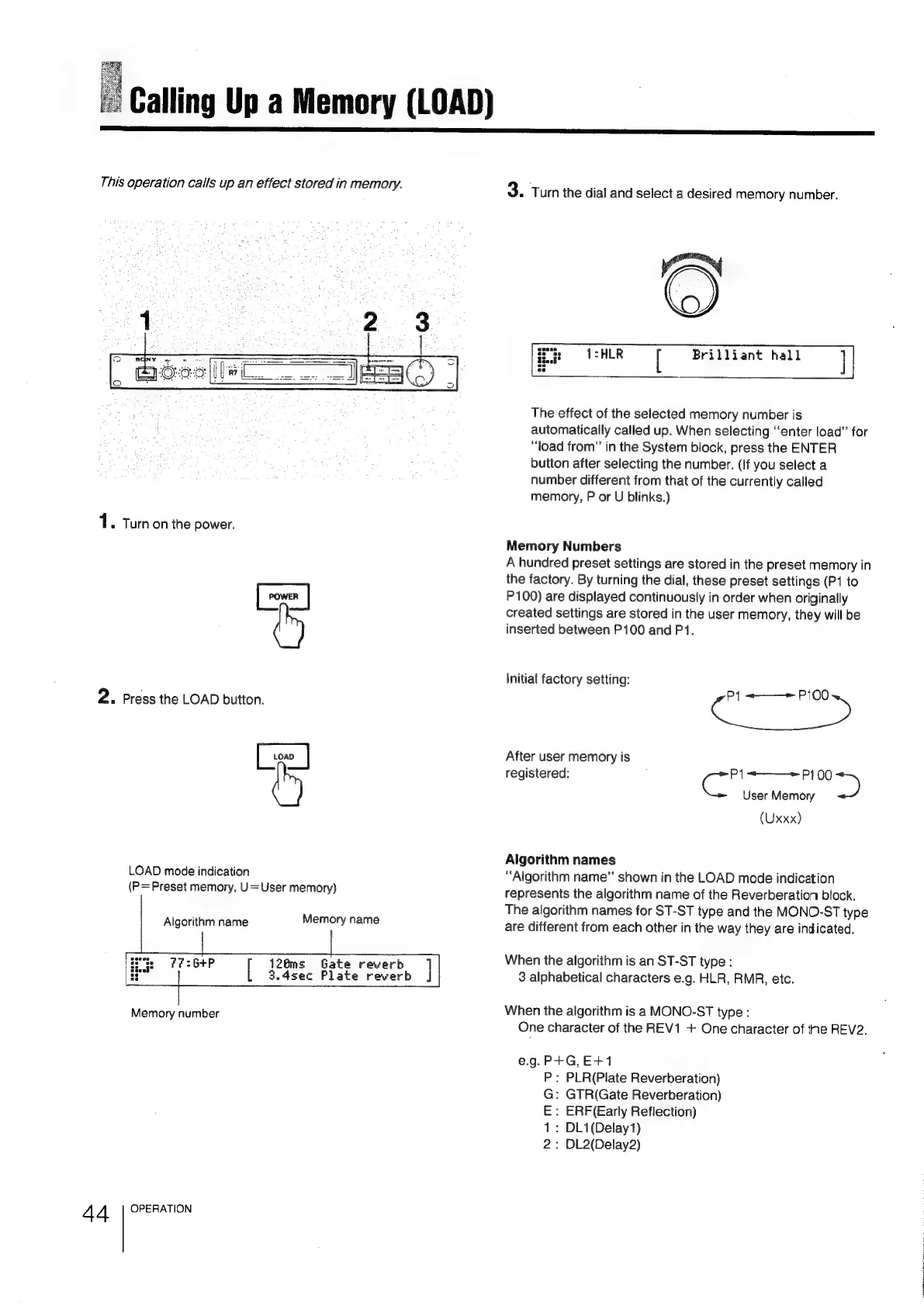
Calling
Up
a
Memory
(LOAD)
This
operation
calls
up
an
effect
stored
in
memory.
3.
Turn
the
dial
and
select
a
desired
memory
number.
Brilliant
hall
1.
Turnon
the
power.
&
2.
Press
the
LOAD
button.
44
[0
|
w
LOAD
mode
indication
(P=Preset
memory,
U=User
memory)
Algorithm
name
Memory
name
7
J
126ms
Gate
reverb
:6+P
[
3.4sec
Plate
reverb
Memory
number
OPERATION
The
effect
of
the
selected
memory
number
is
automatically
called
up.
When
selecting
‘‘enter
load”
for
“oad
from”
in
the
System
block,
press
the
ENTER
button
after
selecting
the
number.
(If
you
select
a
number
different
from
that
of
the
currently
called
memory,
P
or
U
blinks.)
Memory
Numbers
A
hundred
preset
settings
are
stored
in
the
preset
memory
in
the
factory.
By
turning
the
dial,
these
preset
settings
(P1
to
P100)
are
displayed
continuously
in
order
when
originally
created
settings
are
stored
in
the
user
memory,
they
will
be
inserted
between
P100
and
P1.
Initial
factory
setting:
P{
-——»
P100
After
user
memory
is
registered:
cc
———~
P100
>
User
Memory
(Uxxx)
Algorithm
names
“Algorithm
name”
shown
in
the
LOAD
mode
indication
represents
the
algorithm
name
of
the
Reverberation
block.
The
algorithm
names
for
ST-ST
type
and
the
MONO-ST
type
are
different
from
each
other
in
the
way
they
are
indicated.
When
the
algorithm
is
an
ST-ST
type
:
3
alphabetical
characters
e.g.
HLR,
RMR,
etc.
When
the
algorithm
is
a
MONO-ST
type
:
One
character
of
the
REV1
+
One
character
of
the
REV2,
e.g.P+G,E+1
:
PLR(Plate
Reverberation)
:
GTR(Gate
Reverberation)
:
ERF(Early
Reflection)
:
DL1(Delay1)
:
DL2(Delay2)
yN-mMmGQ
VU

Related product manuals