EasyManua.ls Logo

Sony DPS-R7 - Chapter 1 Getting Started; Identifying the Parts 0

Sony DPS-R7
64 pages
Print Icon
To Next Page IconTo Next Page
To Previous Page IconTo Previous Page
Loading...
identifying
the
Parts
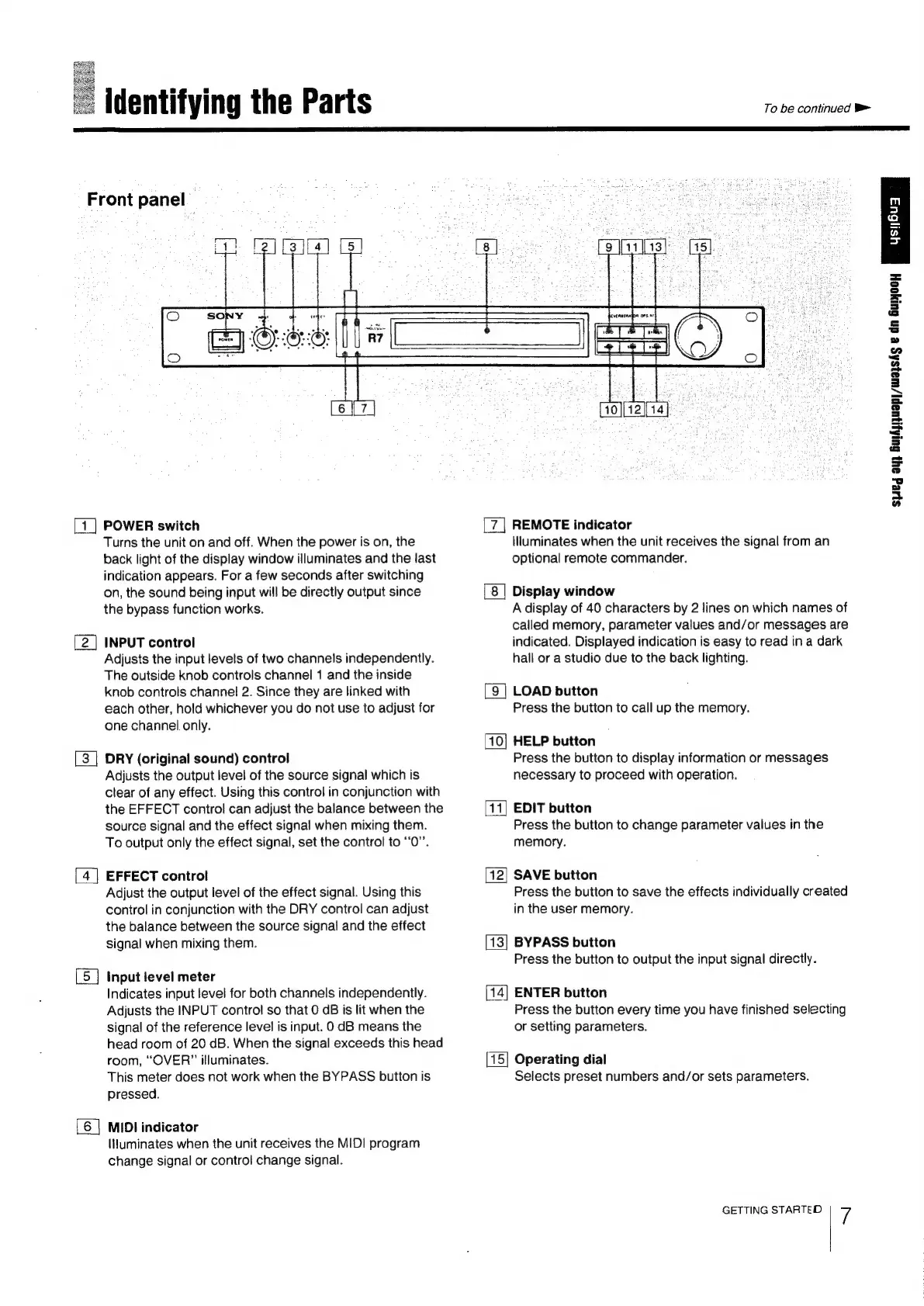
Front
panel
To
be
continued
POWER
switch
Turns
the
unit
on
and
off.
When
the
power
is
on,
the
back
light
of
the
display
window
illuminates
and
the
last
indication
appears.
For
a
few
seconds
after
switching
on,
the
sound
being
input
will
be
directly
output
since
the
bypass
function
works.
INPUT
control
Adjusts
the
input
levels
of
two
channels
independently.
The
outside
knob
controls
channel
1
and
the
inside
knob
controls
channel
2.
Since
they
are
linked
with
each
other,
hold
whichever
you
do
not
use
to
adjust
for
one channel
only.
DRY
(original
sound)
control
Adjusts
the
output
level
of
the
source
signal
which
is
clear
of
any
effect.
Using
this
control
in
conjunction
with
the
EFFECT
control
can
adjust
the
balance
between
the
source
signal
and
the
effect
signal
when
mixing
them.
To
output
only
the
effect
signal,
set
the
control
to
“0”.
EFFECT
control
Adjust
the
output
level
of
the
effect
signal.
Using
this
control
in
conjunction
with
the
DRY
control
can
adjust
the
balance
between
the
source
signal
and
the
effect
signal
when
mixing
them.
Input
level
meter
Indicates
input
level
for
both
channels
independently.
Adjusts
the
INPUT
control
so
that
0
GB
is
lit
when
the
signal
of
the
reference
level
is
input.
0
dB
means
the
head
room
of
20
dB.
When
the
signal
exceeds
this
head
room,
“OVER?”
illuminates.
This
meter
does
not
work
when
the
BYPASS
button
is
pressed.
[6
|
MIDI
indicator
liluminates
when
the
unit
receives
the
MIDI
program
change
signal
or
control
change
signal.
REMOTE
indicator
llluminates
when
the
unit
receives
the
signal
from
an
optional
remote
commander.
Display
window
A
display
of
40
characters
by
2
lines
on
which
names
of
called
memory,
parameter
values
and/or
messages
are
indicated.
Displayed
indication
is
easy
to
read
in
a
dark
hall
or
a
studio
due
to
the
back
lighting.
[9
]
LOAD
button
Press
the
button
to
call
up
the
memory.
[10]
HELP
button
Press
the
button
to
display
information
or
messages
necessary
to
proceed
with
operation.
= =
EDIT
button
Press
the
button
to
change
parameter
values
in
the
memory.
SAVE
button
Press
the
button
to
save
the
effects
individually
created
in
the
user
memory.
BYPASS
button
Press
the
button
to
output
the
input
signal
directly.
ENTER
button
Press
the
button
every
time
you
have
finished
selecting
or
setting
parameters.
Operating
dial
Selects
preset
numbers
and/or
sets
parameters.
GETTING
STARTED
7
syeg
oy}
GuApuapj/wayshs
e
dn
Guryooy

Related product manuals