EasyManua.ls Logo

Sony DPS-R7 - Page 8

Sony DPS-R7
64 pages
Print Icon
To Next Page IconTo Next Page
To Previous Page IconTo Previous Page
Loading...
Identifying
the
Parts
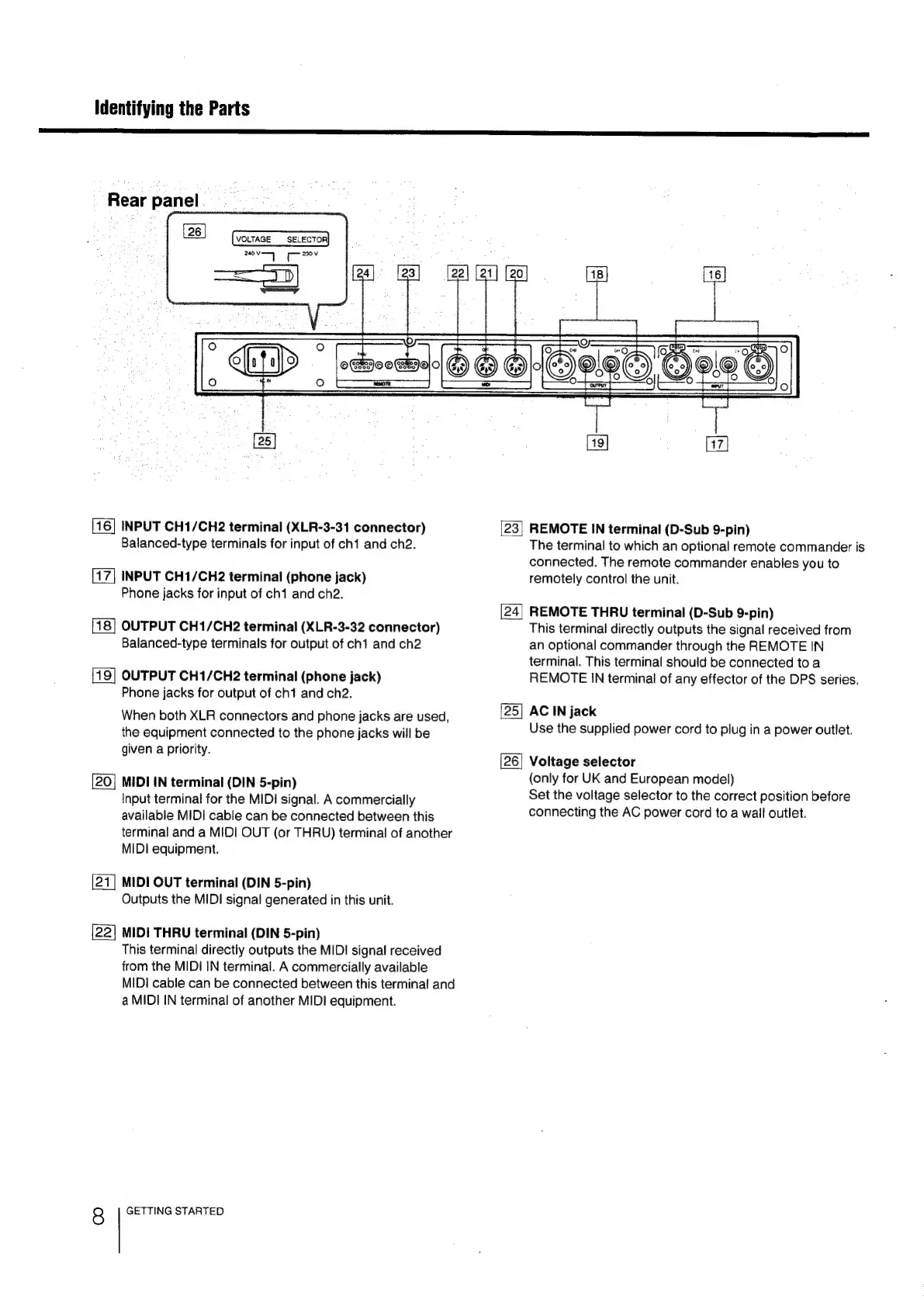
Rear
panel
VOLTAGE
SELECTOR
240V
aces
Cet
230V
[16]
INPUT
CH1/CH2
terminal
(XLR-3-31
connector)
Balanced-type
terminals
for
input
of
ch1
and
ch2.
[17]
INPUT
CH1/CH2
terminal
(phone
jack)
Phone
jacks
for
input
of
ch1
and
ch2.
OUTPUT
CH1/CH2
terminal
(XLR-3-32
connector)
Balanced-type
terminals
for
output
of
ch1
and
ch2
OUTPUT
CH1/CH2
terminal
(phone
jack)
Phone
jacks
for
output
of
ch1
and
ch2.
When
both
XLR
connectors
and
phone
jacks
are
used,
the
equipment
connected
to
the
phone
jacks
will
be
given
a
priority.
MIDI
IN
terminal
(DIN
5-pin)
Input
terminal
for
the
MIDI
signal.
A
commercially
available
MIDI
cable
can
be
connected
between
this
terminal
and
a
MIDI
OUT
(or
THRU)
terminal
of
another
MIDI
equipment.
|21|
MIDI
OUT
terminal
(DIN
5-pin)
Outputs
the
MIDI
signal
generated
in
this
unit.
[22]
MIDI
THRU
terminal
(DIN
5-pin)
This
terminal
directly
outputs
the
MID!
signal
received
from
the
MIDI
IN
terminal.
A
commercially
available
MIDI
cable
can
be
connected
between
this
terminal
and
a
MIDI
IN
terminal
of
another
MIDI
equipment.
8
GETTING
STARTED
e0
23|
REMOTE
IN
terminal
(D-Sub
9-pin)
The
terminal
to
which
an
optional
remote
commander
is
connected.
The
remote
commander
enables
you
to
remotely
control
the
unit.
REMOTE
THRU
terminal
(D-Sub
9-pin)
This
terminal
directly
outputs
the
signal
received
from
an
optional
commander
through
the
REMOTE
IN
terminal.
This
terminal
should
be
connected
to
a
REMOTE
IN
terminal
of
any
effector
of
the
DPS
series.
[25]
AC
IN
jack
Use
the
supplied
power
cord
to
plug
in
a
power
outlet.
[26]
Voltage
selector
(only
for
UK
and
European
model)
Set
the
voltage
selector
to
the
correct
position
before
connecting
the
AC
power
cord
to
a
wall
outlet.

Related product manuals