2-8
DSC-U20
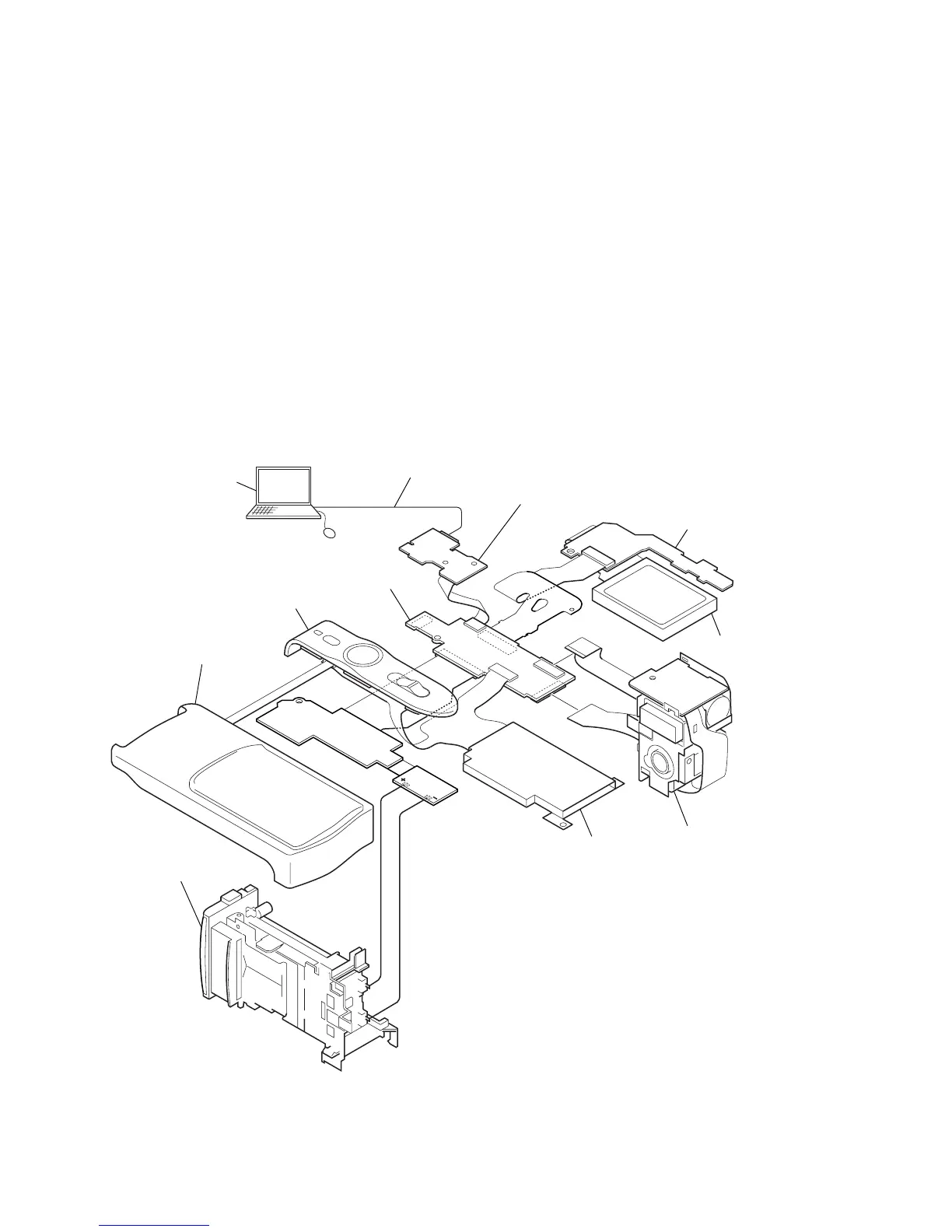
[SERVICE POSITION]
Memory stick connector
Lens block assembly
Cabinet (upper) block assembly
Cabinet (front) block assembly
TY-15 board
US-4 flexible board
PD-174 board
USB cable
(1-823-932-11)
BT holder assembly
LCD module
Insert the batteries*.
*:size AAA
Nickel Metal Hydride batteries (x2).
PC
Setting the “Forced STILL/PLAY mode Power ON” mode
1) Select page: 00, address: 01, and set data: 01.
2) Select page: 2F, address: 11, and write data: E0.
3) Select page: 2F, address: 12, and write data: BC.
4) Select page: 20, address: 00, and set data: 29.
5) Select page: 20, address: 01, and write data: 29.
At this time, the set is reset and the power is turns off once and
then on again. Accordingly, the message “Receive Packet Error”
is displayed on the SEUS screen, and the SEUS goes in
“disconnect” state, but this is not a trouble. Click [Connect]
on the SEUS screen to restore the “connected” state.
6) Select page: 00, address: 01, and set data: 01.
7) Select page: 2F, address: 21, and write the following data.
02: STILL mode
03: PLAY mode
Insert the Memory Stick and the Batteries to DSC-U20, and connect the HASP key to USB connector of PC.
The following setup is performed using the application for adjustment (SEUS).
Exiting the “Forced Power ON mode”
1) Select page: 00, address: 01, and set data: 01.
2) Select page: 2F, address: 21, and write data: 00.
3) Select page: 2F, address: 12, and write data: 3C.
4) Select page: 2F, address: 11, and write data: 60.
5) Select page: 00, address: 01, and set data: 00.


 To Next Page