17
Getting Started
17
Step 3: TV Hookups
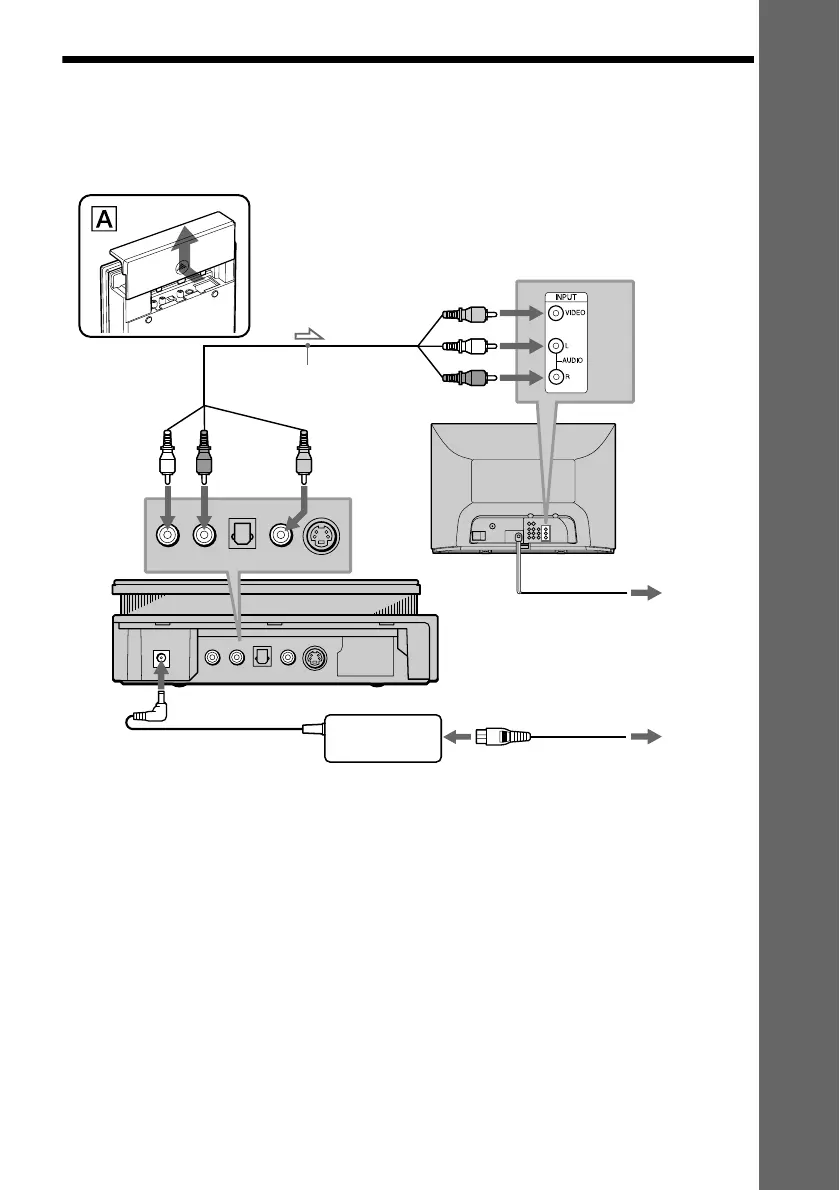
Remove the jack cover from the player (see fig. A). Connect the supplied audio/video cord and
power cord in the order (1~3) shown below. Be sure to connect the power cord last.
When connecting to a wide screen TV
Depending on the disc, the image may not fit your TV screen.
If you want to change the aspect ratio, please refer to page 68.
3 Power source
1 Audio/video cord
(supplied)
CD/DVD Player
TV
2 Power source
l: Signal flow
to video input
to AUDIO
OUT L
(red)
(white)
(yellow)
to VIDEO
OUT
(red)
(white)
(yellow)
to audio input
(yellow)
(white)
(red)
AC power adaptor
(AC-F21, supplied)
to
AUDIO
OUT R
(white)
(red)
(yellow)
AC power cord
(supplied)



 To Next Page