30
Step 3: Attaching the Jack Cover
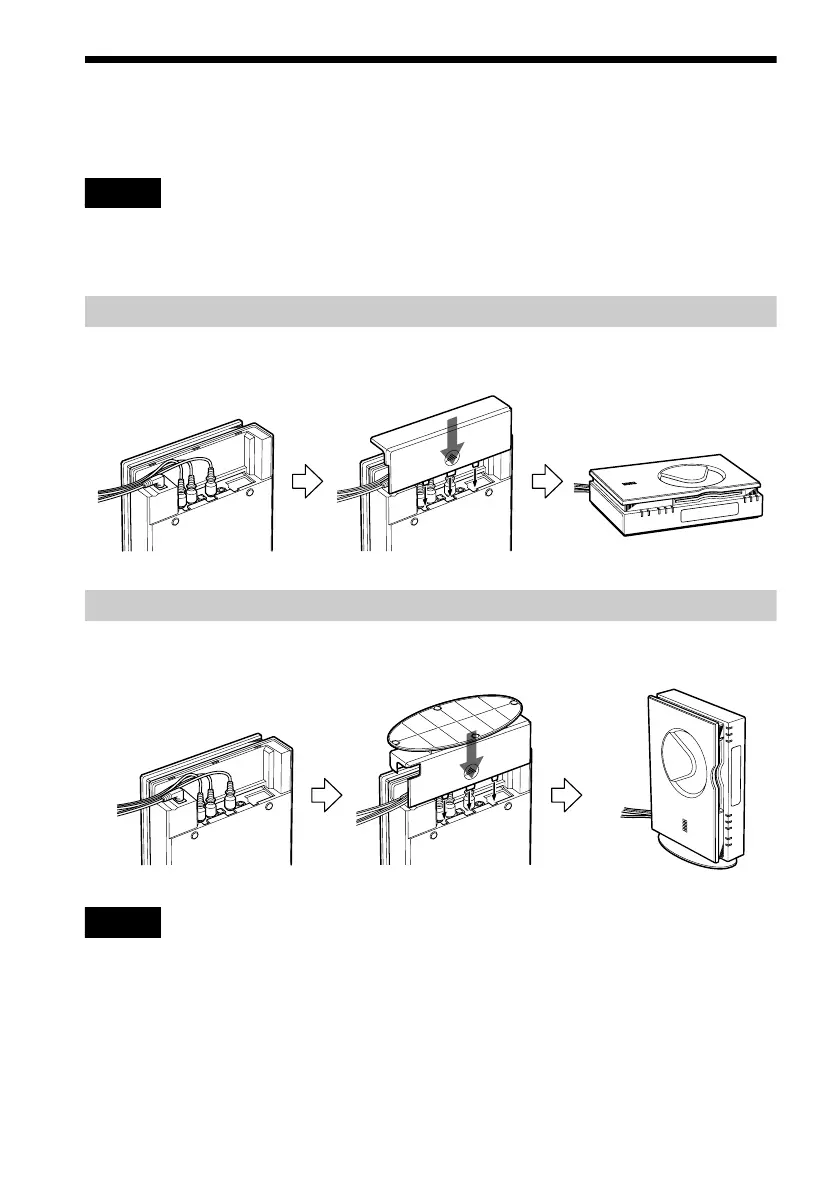
You can install the player horizontally, vertically or on the wall.
Notes
• Make sure that the connecting cords are not trapped by the jack cover.
• If you use commercially available cords, make sure that those cords are similar to the supplied cords in size. If the
cords are too thick or hard, or the plug is too large, you may not be able to attach the jack cover securely.
When you install the player horizontally
First, gather all the connecting cords together and let them pass through the side of the player.
Then attach the jack cover carefully not to trap the cords.
When you install the player vertically
First, gather all the connecting cords together and let them pass through the side of the player.
Then attach the jack cover for vertical installation (supplied) carefully not to trap the cords.
Notes
• When you place the player in a horizontal position, remove the jack cover for vertical installation.
• To move the player, hold the player itself. If you hold the flat part of the jack cover for vertical installation, it may
break.
• Do not place the player in a vertical position without attaching the jack cover for vertical installation. If you do not
attach it, the player will be unstable and may fall over.



 To Next Page