42
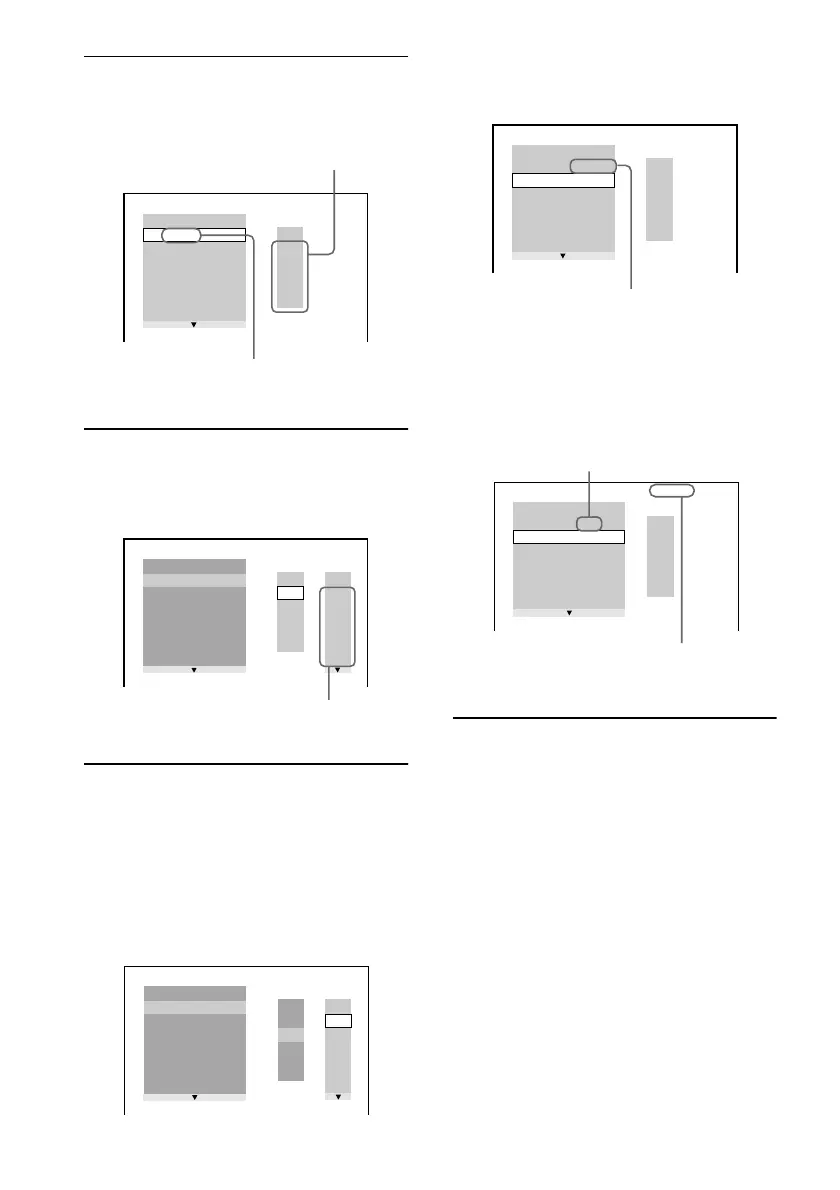
3 Press X/x to select “SETt” and press
ENTER.
The display for programming appears.
4 Press c.
The cursor moves to the title or track (in
this case, “01”).
5 Select the title, chapter, or track you
want to program.
x When playing a DVD
For example, select chapter “03” of title
“02.”
Press X/x to select “02” under “T,” then
press ENTER.
Next, press X/x to select “03” under
“C,” then press ENTER.
x When playing a VIDEO CD or CD
For example, select track “02.”
Press X/x to select “02” under “T,” then
press ENTER.
6 To program other titles, chapters, or
tracks, repeat Steps 4 to 5.
The programmed titles, chapters, and
tracks are displayed in the selected order.
PROGRAM
1. TITLE
ALL CLEAR
2. TITLE
– –
3. TITLE
– –
4. TITLE
– –
5. TITLE
– –
6. TITLE
– –
7. TITLE
– –
T
– –
01
02
03
04
05
Tracks or titles recorded on a disc
“TRACK” is displayed when you
play a VIDEO CD or a CD
PROGRAM
1. TITLE
– –
ALL CLEAR
2. TITLE
– –
3. TITLE
– –
4. TITLE
– –
5. TITLE
– –
6. TITLE
– –
7. TITLE
– –
T
C
ALL
01
02
03
04
05
06
– –
01
02
03
04
05
Chapters recorded on a disc
PROGRAM
1. TITLE
– –
ALL CLEAR
2. TITLE
– –
3. TITLE
– –
4. TITLE
– –
5. TITLE
– –
6. TITLE
– –
7. TITLE
– –
C
ALL
02
03
04
05
06
T
– –
01
02
03
04
05
01
T
– –
01
02
03
04
05
PROGRAM
1. TITLE 0 2
–
0 3
ALL CLEAR
2. TITLE
– –
3. TITLE
– –
4. TITLE
– –
5. TITLE
– –
6. TITLE
– –
7. TITLE
– –
Selected title and chapter
PROGRAM
1. TRACK 0 2
ALL CLEAR
2. TRACK
– –
3. TRACK
– –
4. TRACK
– –
5. TRACK
– –
6. TRACK
– –
7. TRACK
– –
0:15:30
– –
01
02
03
04
05
T
Total time of the programmed
tracks
Selected track



 To Next Page