Guide
to
Parts
and
Controls
[I]
LCD
panel
(page
11)
[2J
Speaker
For more information, see the pages
indicated in parentheses.
Player
@
,;==========jj
@
1
1--+---11--'"
~
TOP
MENU
button
Displays the menu
or
changes the
playback mode.
• When playing a DVD VIDEO:
Displays the top menu.
• When playing a DVD VR:Switches
between "Original" and "Play List"
on the disc created Playlist. During
playback, you cannot switch. Press
• twice, and press TOP MENU.
Displays the menu or changes the
playback mode.
• When playing a DVD:Displays the
menu.
• When playing a CD:Each time you
press the button, switches Repeat
Play, Random Play, and Play.
• When playing a IPEG file:Displays
the list
of
thumbnails and plays a
slideshow. See page
14.
@]
DISPLAY
button
Displays the playback information.
• When playing a DVD:Displays the
playback information and changes
the playback mode. See page
13.
• When playing a CD:Each time you
press the button, the time
information switches.
MENU
button
[gJ1-I1----
___
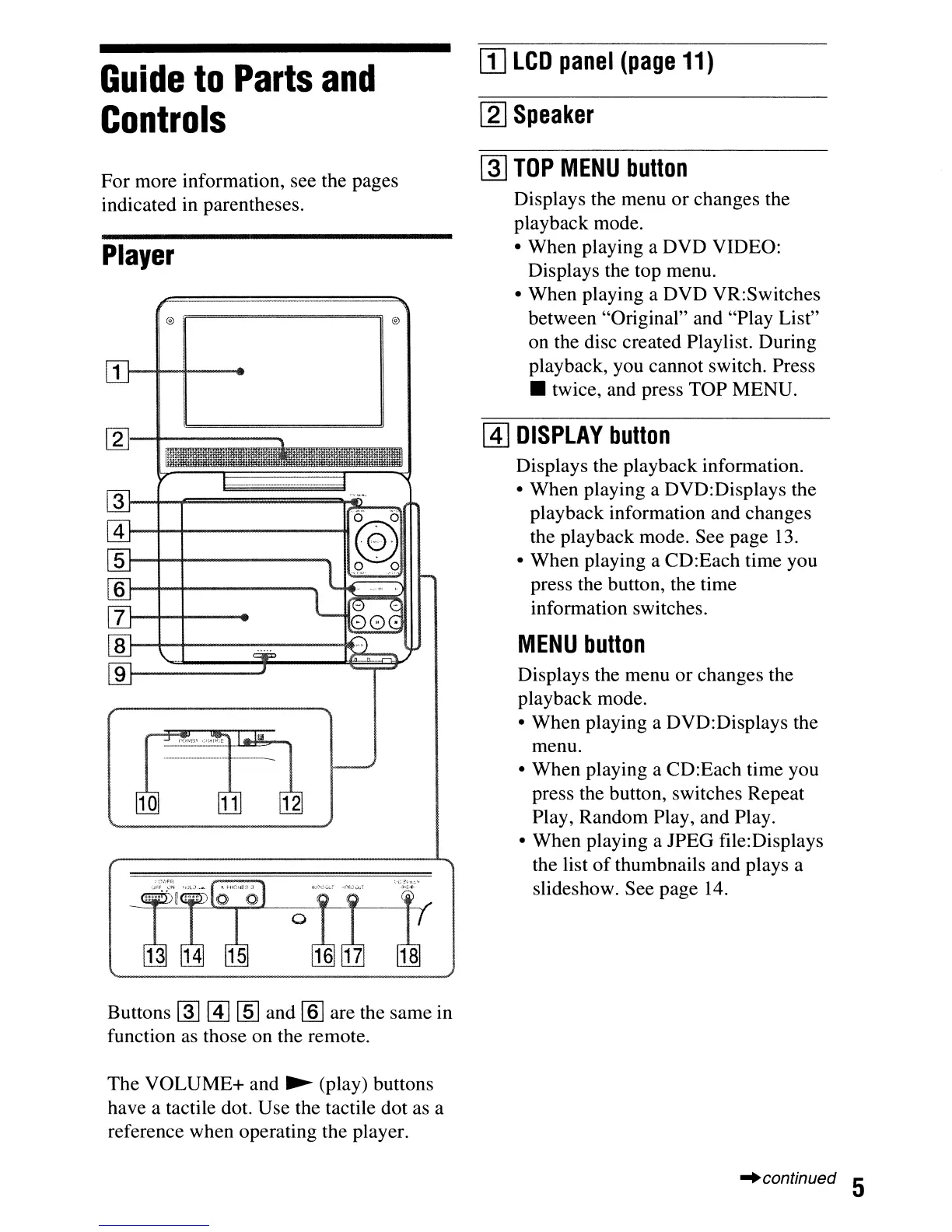
Buttons
~
[1]
[ID
and [§] are the same in
function as those on the remote.
The VOLUME+ and
~
(play) buttons
have a tactile dot. Use the tactile dot as a
reference when operating the player.
-'continued 5



 To Next Page