4
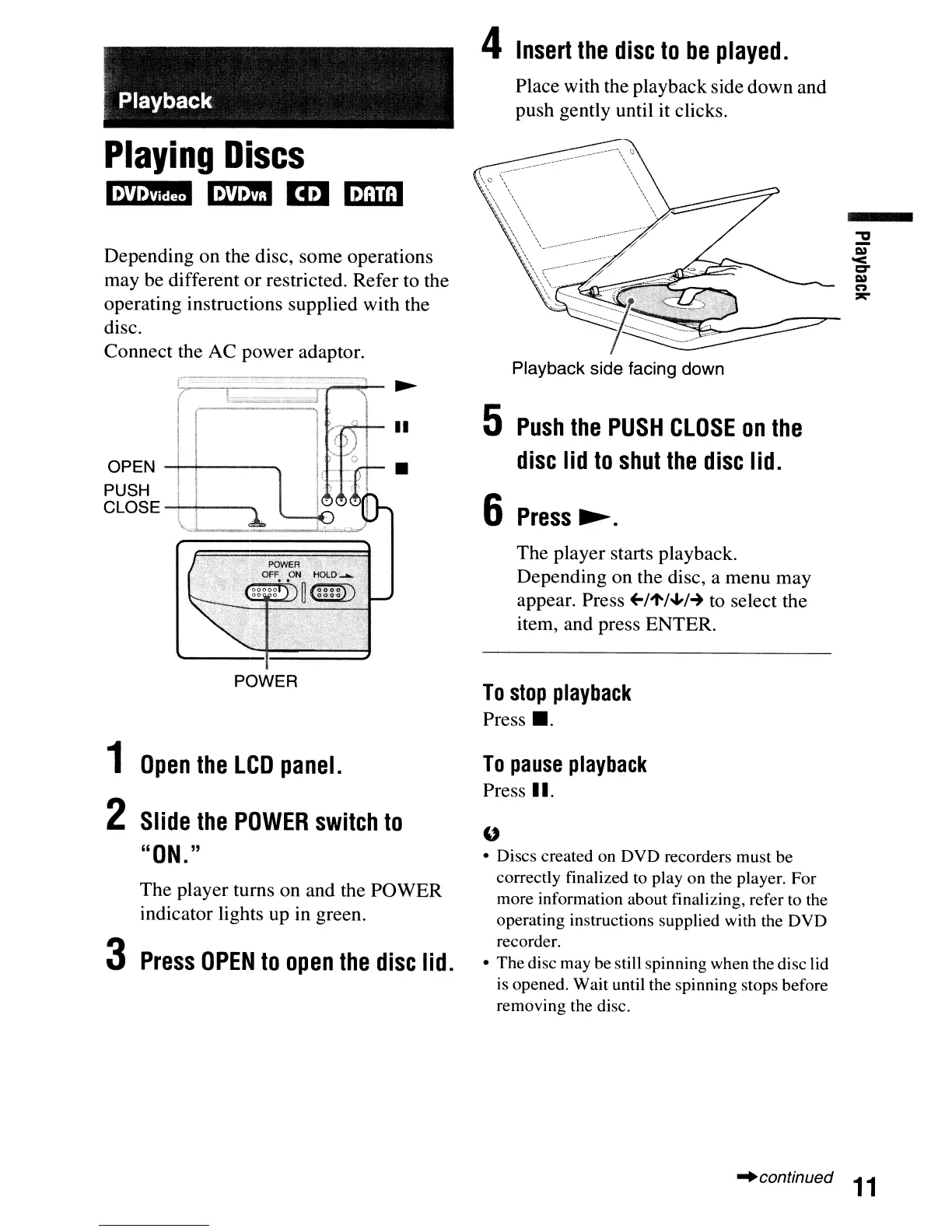
Insert
the
disc
to
be
played.
Playback
Place with the playbackside down and
push gently until it clicks.
Playing
Discs
Iiml!!I
m!mI
Em
ImWl
Depending on the disc, some operations
may be different
or
restricted. Refer to the
operating instructions supplied with the
disc.
Connect the AC power adaptor.
Playback side facing down
The player starts playback.
Depending on the disc, a menu may
appear. Press
+-/'t/~/-+
to select the
item, and press ENTER.
5
Push
the
PUSH
CLOSE
on
the
disc
lid
to
shut
the
disc
lid.
6
Press~.
•
OPEN
-t--+---~
PUSH
CLOSE
-t--+--~
POWER
To
stop
playback
Press
•.
1
Open
the
LCD
panel.
2
Slide
the
POWER
switch
to
"ON.
"
The player turns on and the POWER
indicator lights up in green.
3
Press
OPEN
to
open
the
disc
lid.
To
pause
playback
Press
II.
"
• Discs created on DVD recorders must be
correctly finalized to play on the player. For
more information about finalizing, refer to the
operating instructions supplied with the DVD
recorder.
• The disc may be still spinning when the disc lid
is opened. Wait until the spinning stops before
removing the disc.
"continued
11



 To Next Page