GB
42 Preparations
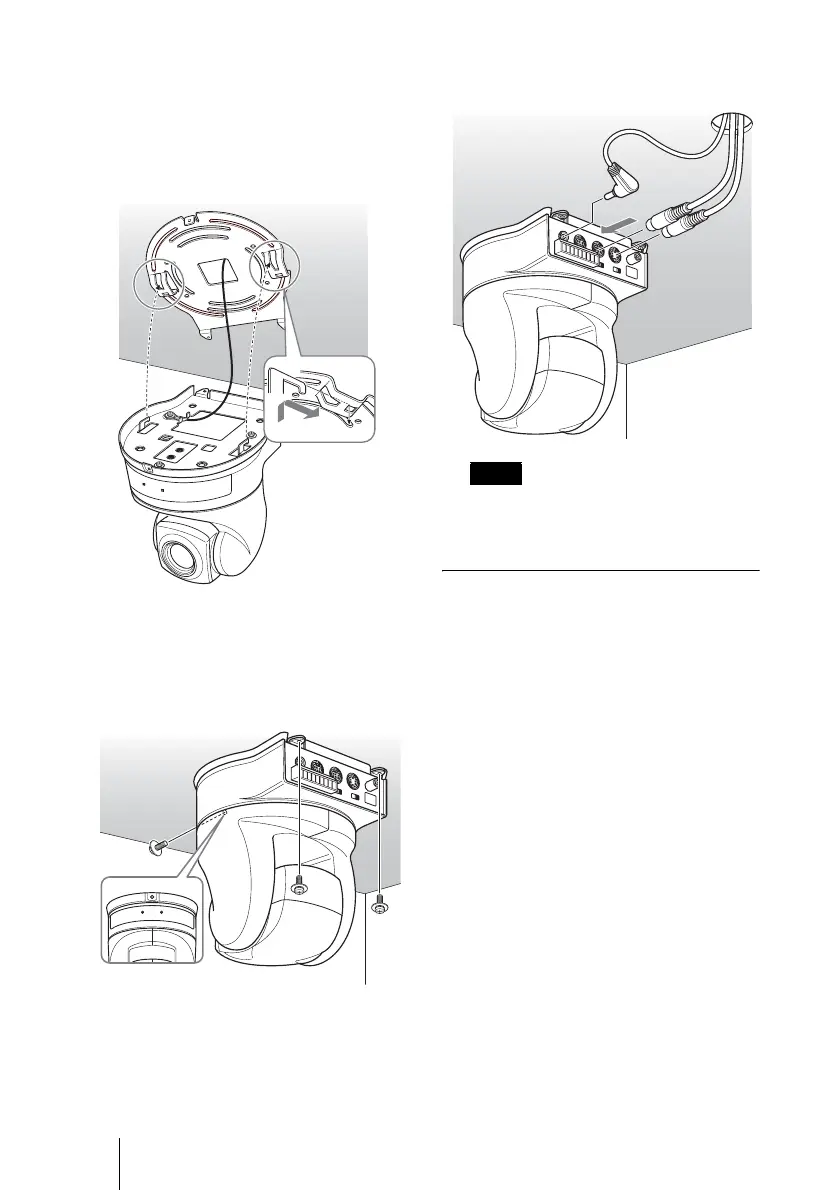
5 Insert the protrusions raised on the
ceiling bracket (A) into the spaces
prepared in the ceiling bracket (B),
and temporarily attach them by
pushing the ceiling bracket (A) to the
rear.
6 While pushing up on the front part of
the camera, attach it using the three
screws provided (
3M 3 × 6), starting
with the screw at position 1.
7 Connect the cables to the connectors
on the rear of the camera.
Take the proper steps to ensure that the
load of the cables connected does not
cause problems.
Removing the camera
1 Remove the 3 screws used to attach
the camera in step 6 of “Installation.”
2 While pushing the entire camera up
towards the ceiling, move the camera
to the front.
The hooks will disengage, and you can
remove the camera.
Ceiling
bracket
(B)
Ceiling
bracket (A)
Ceiling
3M 3 × 6
(supplied)
Ceiling
1
Note
Ceiling



 To Next Page