GB
36 Locations of Controls
Locations of
Controls
For details, see the pages indicated in
parenthesis.
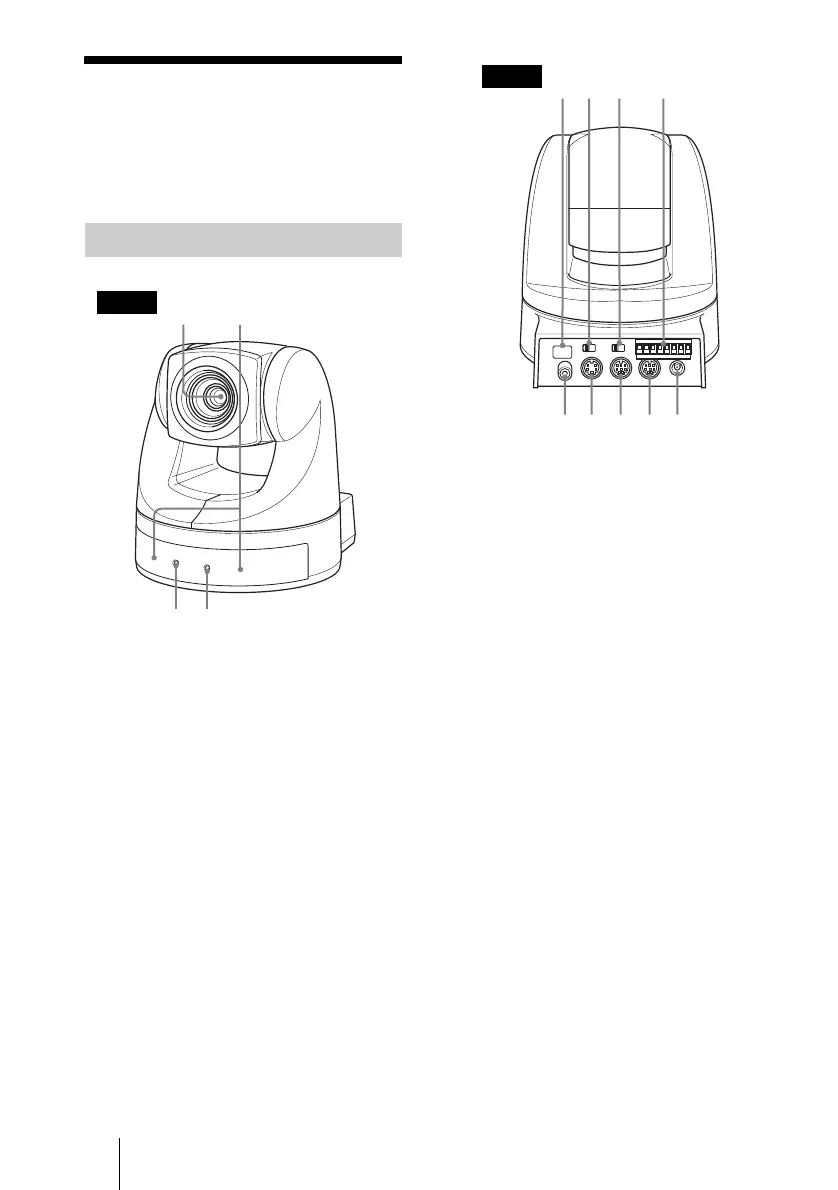
1 Lens
A wide conversion lens can be attached.
(39)
2 Sensor for the Remote
Commander
3 POWER lamp (44)
4 STANDBY lamp (46)
5 Sensor for the Remote
Commander
6 IMAGE FLIP switch (40)
Flips the image upside down. Normally
set this to OFF when you use the camera.
When the camera is attached to the
ceiling, set this to ON. When you switch
this, the pre-set setting is returned to the
initial setting. It takes about 7 seconds
for the image displayed to respond to the
setting change.
7 IR SELECT switch (46)
8 VISCA RS-422 connector (54)
A VISCA RS-422 connector plug is
attached to the unit at the factory.
9 VIDEO (output) connector (43)
0 S VIDEO (output) connector (43)
qa VISCA RS-232C IN connector
(43)
qs VISCA RS-232C OUT connector
(43)
qd DC IN 12V connector (43)
Main Unit
34
Front
9q;qa qsqd
Rear



 To Next Page