43
GB
Preparations
Basic Operations
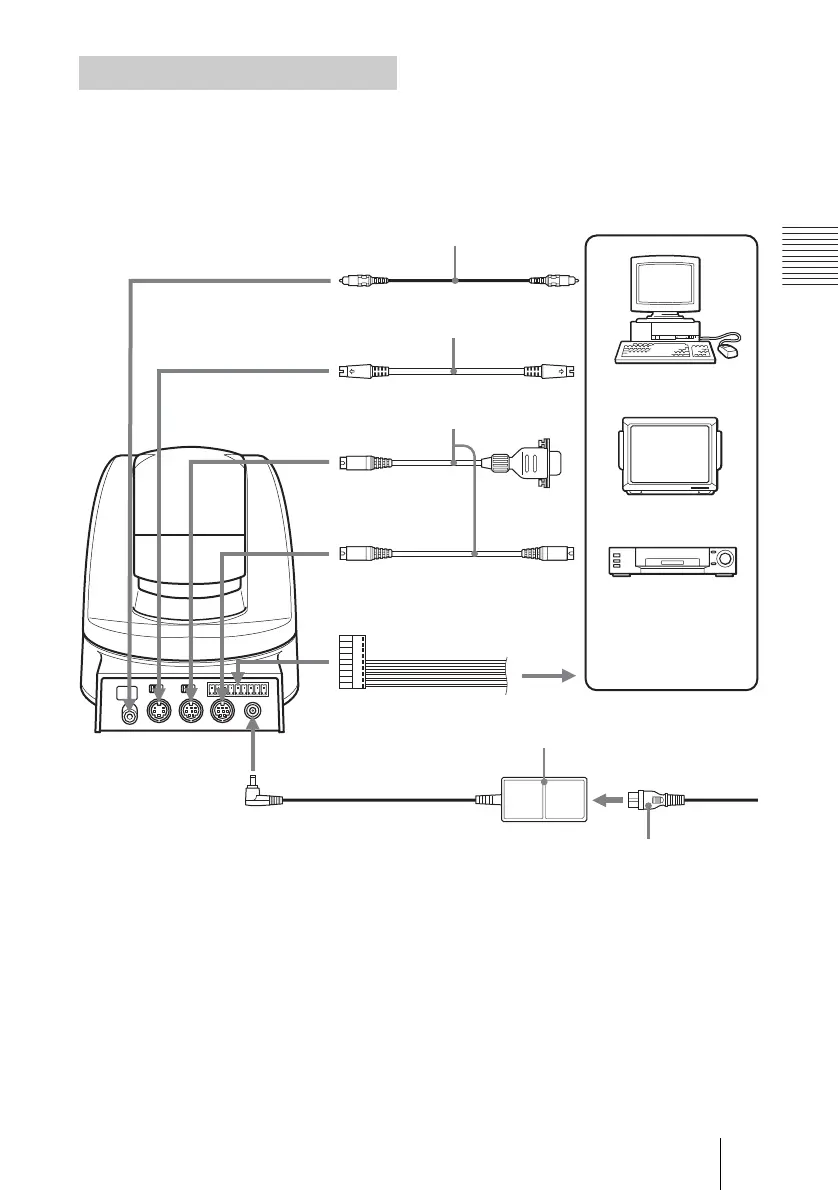
Connect your Color Video Camera to a
computer, TV or VCR equipped with a
video input. Some connections may require
extra cables. Refer to the instruction manual
of the equipment to be connected.
Connections
Video cable
(not supplied)
to VIDEO
to S VIDEO
to Video
input
VISCA cable
(not supplied)
1)
to S-Video
input
to VISCA RS-232C IN
to VISCA
RS-232C OUT
to RS-232C
To VISCA IN of other
EVI-D70/D70Ps (when
connecting to more than
one camera)
to VISCA RS-422
2)
to DC IN 12V
AC power adaptor MPA-AC1
(supplied)
Power cord (supplied)
Computer, TV or
VCR with a video
input jack
to AC outlet
S-Video cable
(not supplied)
1)
When the camera is connected to a computer with a VISCA cable (cross type, RS-232C),
you can operate the camera with the computer. To obtain a cable, consult the dealer
where you bought your camera.
2)
For details on how to connect using VISCA RS-422, see page 54.



 To Next Page