FDR-AX43/AX45/AX60
4-734-285-21(1)
F:\56216_EN\SONY\CX49400_IM_GB\4734285211\47342
85211FDRAX434560GB\01GB\030GET.fm
master:Right
GB
11
Getting started
Turning the power on
• To turn off the power, close the LCD monitor. If the viewfinder is pulled
out, retract it (models with the viewfinder (FDR-AX60) only).
• To set the date and time again, select [Setup] [Clock
Settings] [Date & Time Setting]. (In case you haven’t used your
camcorder for several months)
• To turn off the operating sound, select [Setup]
[ General Settings] [Beep] [Off].
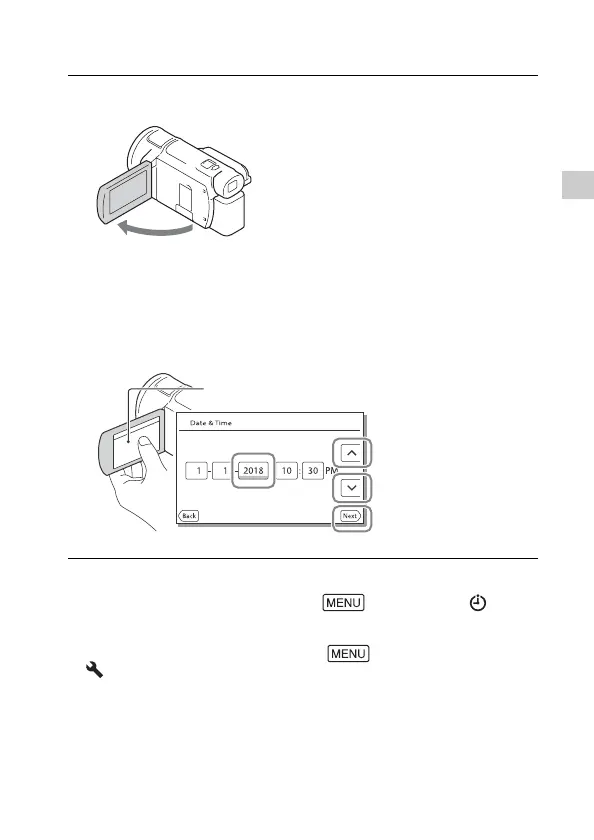
1
Open the LCD monitor of your camcorder and turn
the power on.
• You can also turn on the camcorder by pulling out the viewfinder
(models with the viewfinder (FDR-AX60) only).
2
Following the instructions on the LCD monitor, select
the language, the geographical area, Daylight
Savings or Summer Time, date format, and the date
and time.
• To go to the next page, touch [Next].
Touch the button on the LCD monitor.



 To Next Page