FDR-AX43/AX45/AX60
4-734-285-21(1)
F:\56216_EN\SONY\CX49400_IM_GB\4734285211\47342
85211FDRAX434560GB\01GB\040REC.fm
master:Right
GB
19
Recording/Playback
Playback
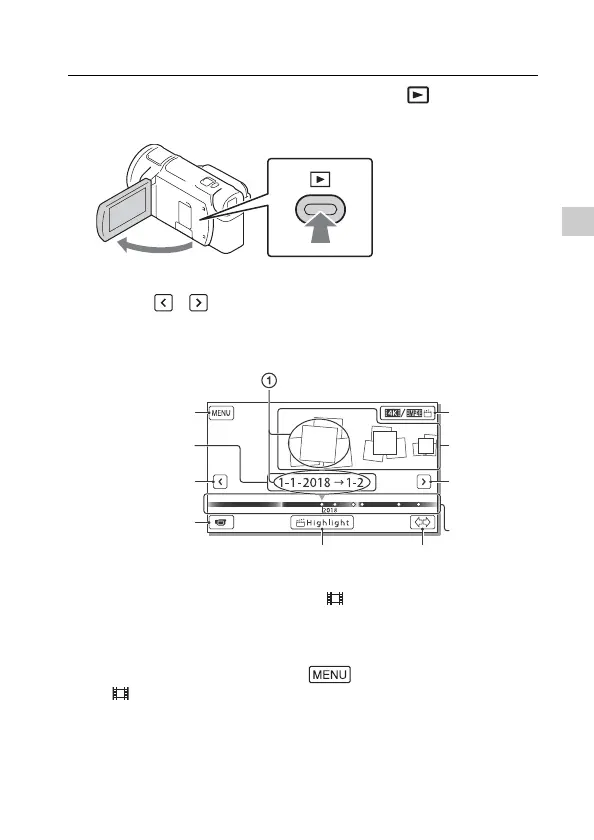
1
Open the LCD monitor and press the (View
Images) button on the camcorder to enter the
playback mode.
• The Event View screen appears after some seconds.
2
Select / to move the desired event to the
center, and then select the part circled () in the
figure.
* The icon varies depending on the [ File Format] setting (page 21).
• Photos and movies are stored in the same recording medium
(internal memory/memory card) (FDR-AX45/AX60).
• To select the XAVC S movies or AVCHD movies you want to play, edit,
or copy to other devices, select [Image Quality/Size]
[File Format].
• You can play movies of the selected frame rate only in the case of
XAVC S 4K movies. Select the frame rate according to the movies you
want to play.
To the MENU
screen
Event name
To the
previous event
Events
Change to the
movie/photo
recording
mode
Switch Movie
Format
button*
(4K/MP4)
To the next
event
Time-line bar
Change Event Scale buttonHighlight Movie
Maker



 To Next Page