FDR-AX43/AX45/AX60
4-734-285-21(1)
F:\56216_EN\SONY\CX49400_IM_GB\4734285211\47342
85211FDRAX434560GB\01GB\030GET.fm
master:Left
GB
12
Inserting a memory card
• To select a memory card as the recording medium, select
[Setup] [ Media Settings] [Media Select] [Memory Card]
(FDR-AX45/AX60).
• To eject the memory card, open the cover and lightly push the memory
card in once.
Types of memory card you can use with your
camcorder
Select the type of memory card to use with the camcorder referring to
the following table.
SD cards
1
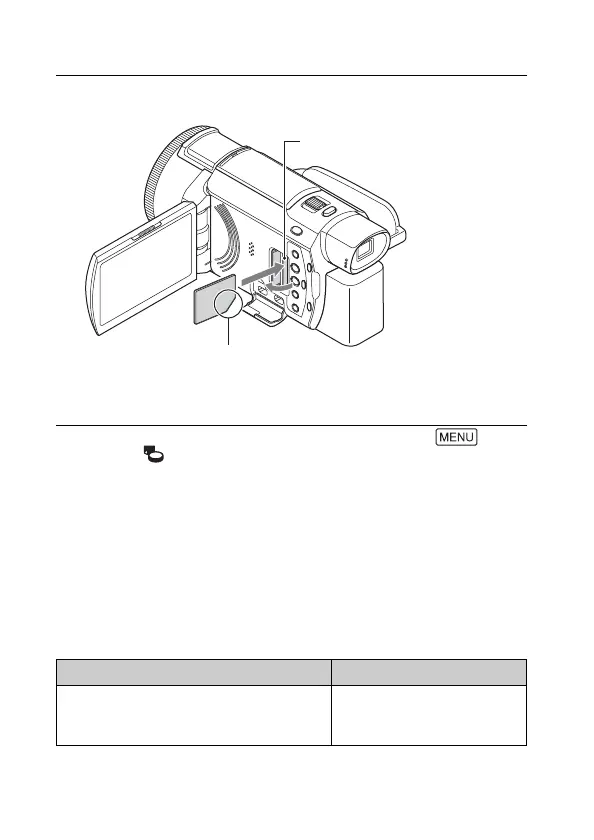
Open the cover, and insert the memory card until it
clicks.
• The [Preparing image database file. Please wait.] screen appears if
you insert a new memory card. Wait until the screen disappears.
Recording formats Supporting memory cards
Photos SD/SDHC/SDXC memory
card, microSD/microSDHC/
microSDXC memory card
Insert the card with the notched
corner in the direction as illustrated.
Access lamp



 To Next Page