FDR-AX43/AX45/AX60
4-734-285-21(1)
F:\56216_EN\SONY\CX49400_IM_GB\4734285211\47342
85211FDRAX434560GB\01GB\040REC.fm
master:Right
GB
15
Recording/Playback
Recording/Playback
Recording
• While recording movies in the XAVC S 4K 100Mbps or XAVC S 4K 60Mbps
format, video signals (HDMI output signal/AV cable output signal) are not
output to external media.
To record MP4 movies simultaneously (Dual Video
REC)
When [Dual Video REC] is set to [On], the camcorder records MP4
movies while recording “XAVC S 4K movies”, “XAVC S HD movies” or
“AVCHD movies” at the same time.
• [On] is set for its default value.
• When you change the setting, select [Image Quality/Size]
[Dual Video REC] desired setting.
• MP4 format is easy for playing back your movies on a smartphone, for
uploading to a network, or for uploading to the Web.
• Select [On] for [Dual Video REC] when you create a highlight movie with
“Highlight Movie Maker.”
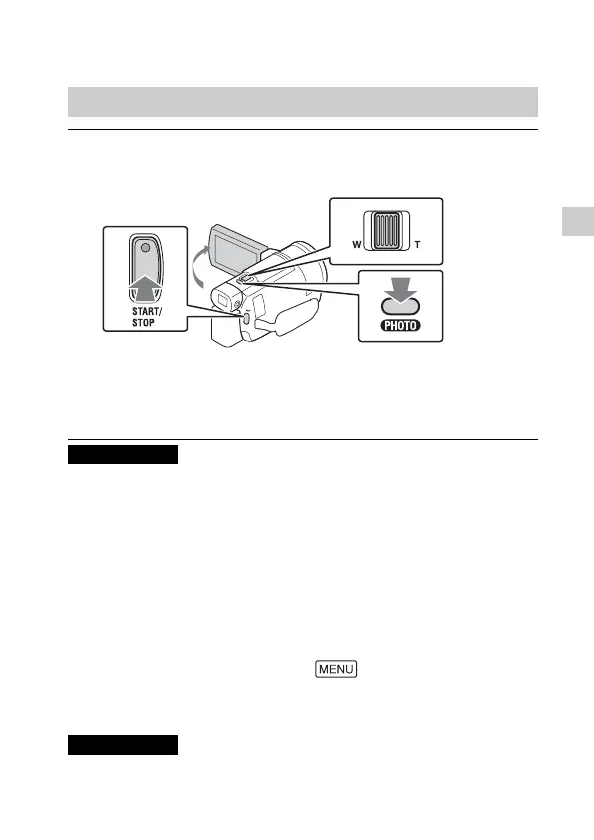
Recording movies
1
Open the LCD monitor, and press START/STOP to
start recording.
• To stop recording, press START/STOP again.
• Items on the LCD monitor disappear if you do not operate the
camcorder for a few seconds. To display items again, touch
anywhere except the buttons on the LCD monitor.
Notes
Notes



 To Next Page