EasyManua.ls Logo

Sony FDR-AX45 - Customizing Your Camcorder; Using the Menus

Sony FDR-AX45
48 pages
Print Icon
To Next Page IconTo Next Page
To Previous Page IconTo Previous Page
Loading...
FDR-AX43/AX45/AX60
4-734-285-21(1)
F:\56216_EN\SONY\CX49400_IM_GB\4734285211\47342
85211FDRAX434560GB\01GB\060MEN.fm
master:Left
GB
34
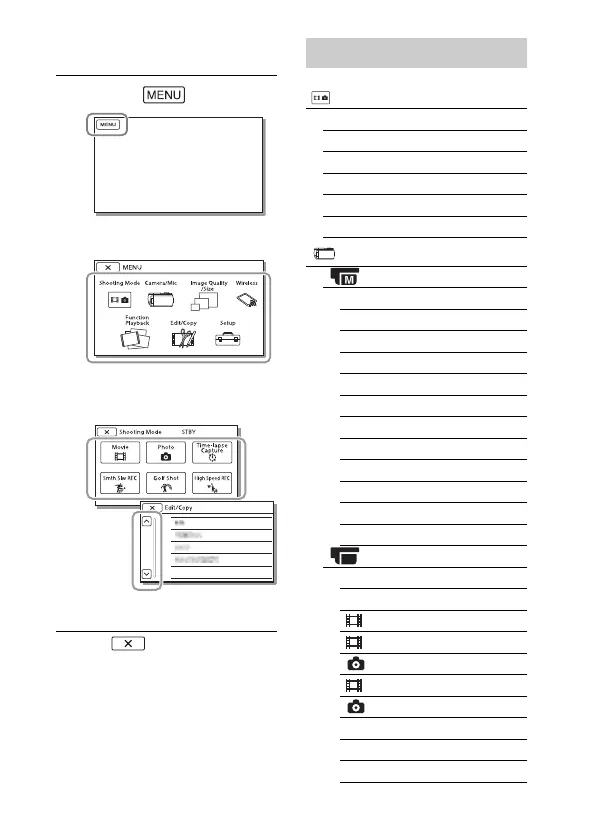
Customizing your camcorder
Using the menus
Select to finish setting the
menu or to return to the previous
menu screen.
1
Select .
2
Select a category.
3
Select a desired menu
item.
Scroll the menu items
up or down.
Menu lists
Shooting Mode
Movie
Photo
Time-lapse Capture
Smth Slw REC
*1
Golf Shot
*1
High Speed REC
*2
Camera/Mic
Manual Settings
White Balance
Spot Meter/Fcs
Spot Meter
Spot Focus
Exposure
Focus
IRIS
Shutter Speed
AGC Limit
AE Shift
White Balance Shift
Low Lux
Camera Settings
Scene Selection
Picture Effect
Cinematone
Fader
Self-Timer
SteadyShot
SteadyShot
Digital Zoom
Filter/Protector
Auto Back Light

Other manuals for Sony FDR-AX45

Related product manuals