FDR-AX43/AX45/AX60
4-734-285-21(1)
F:\56216_EN\SONY\CX49400_IM_GB\4734285211\47342
85211FDRAX434560GB\01GB\030GET.fm
master:Left
GB
8
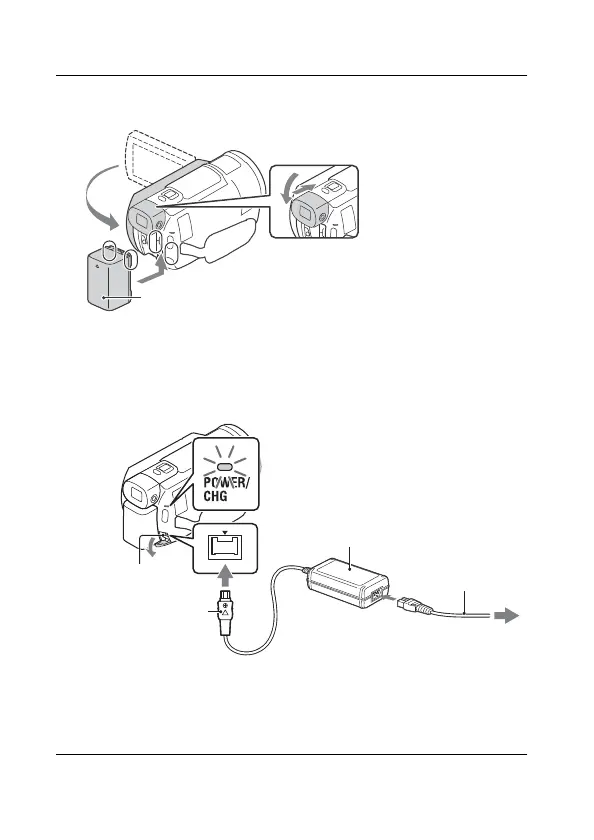
Charging the battery pack
1
Turn off your camcorder by closing the LCD monitor,
retract the viewfinder*, and attach the battery pack.
* Models with the viewfinder (FDR-AX60) only
2
Connect the AC Adaptor and the power cord (mains
lead) to your camcorder and the wall outlet (wall
socket).
*Align the mark on the DC plug with that on the DC IN jack.
• The POWER/CHG (charge) lamp turns orange.
• The POWER/CHG (charge) lamp turns off when the battery pack is
fully charged. Disconnect the AC Adaptor from the DC IN jack of the
camcorder.
DC plug*
AC Adaptor
Wall outlet (wall socket)
DC IN jack
Power cord
(mains lead)



 To Next Page