FDR-AX43/AX45/AX60
4-734-285-21(1)
F:\56216_EN\SONY\CX49400_IM_GB\4734285211\47342
85211FDRAX434560GB\01GB\040REC.fm
master:Right
GB
25
Recording/Playback
Connecting the camcorder to a network-compatible
TV
Connect the camcorder to an access point with a security setting
(page 33). Press (View Images) on the camcorder, and then select
[Wireless] [ Function] [View on TV] image type
to be played back.
• You can view AVCHD movies, MP4 movies, and photos only.
You can play back the movies recorded in XAVC S 4K file format while
magnifying and trimming the part you want to watch, and also while
zooming the scene up to the full high definition image quality.
Playing back trimmed movies (Trimming Playback)
recorded in XAVC S 4K format
1
Change the HDMI output setting to output 4K
movies.
Select [Setup] [ Connection] [HDMI
Resolution] desired setting.
2
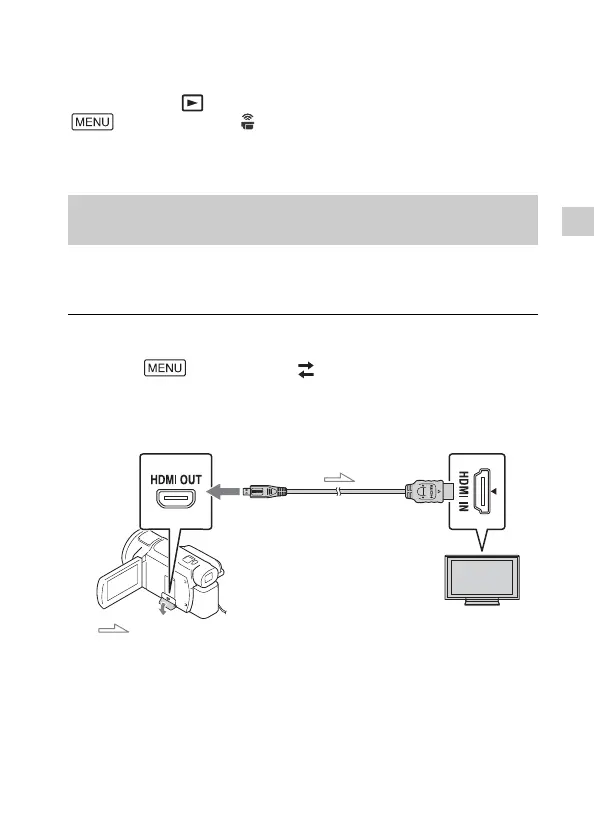
Connect the HDMI OUT jack of the camcorder to the
HDMI IN jack of a TV using the HDMI cable supplied.



 To Next Page