EasyManua.ls Logo

Sony FH-B411 - Inserting the Batteries

Sony FH-B411
20 pages
Print Icon
To Next Page IconTo Next Page
To Previous Page IconTo Previous Page
Loading...
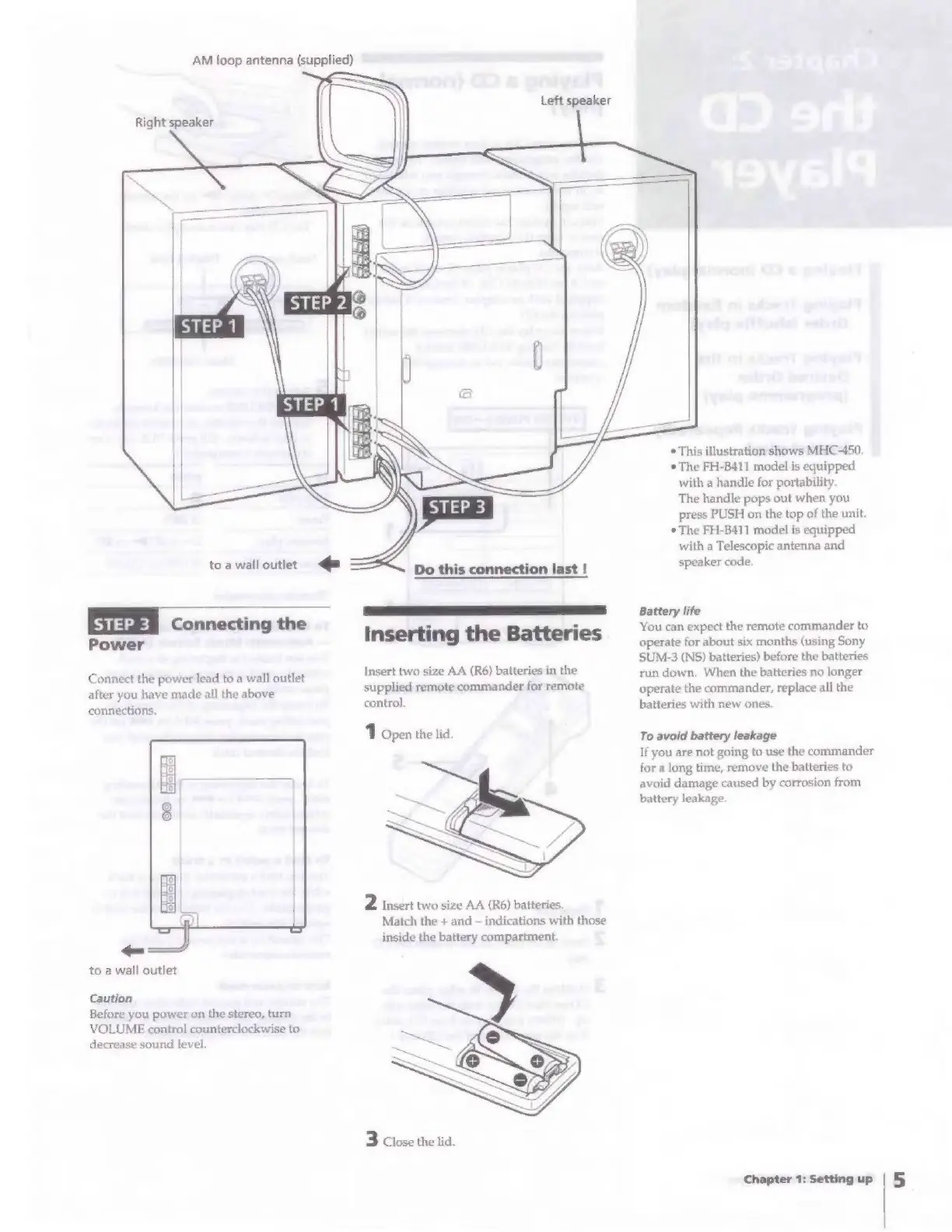
AM
loop
antenna
(supplied)
Right
speaker
to
a
wall
outlet
je
Connecting
the
Power
Connect
the
power
lead
to a
wall
outlet
after
you
have
made
all
the
above
connections.
to
a
wall
outlet
Caution
Before
you
power
on
the
stereo,
turn
VOLUME
control
counterclockwise
to
decrease
sound
level.
Inserting
the
Batteries
Insert
two
size
AA
(R6)
batteries
in
the
supplied
remote
commander
for
remote
control.
1
Open
the
lid.
2
Insert
two
size
AA
(R6)
batteries.
Match
the
+
and
indications
with
those
inside
the
battery
compartment.
3
Close
the
lid.
*
This
illustration
shows
MHC-450.
*
The
FH-B411
model
is
equipped
with
a
handle
for
portability.
The
handle
pops
out
when
you
press
PUSH
on
the
top
of
the
unit.
¢
The
FH-B411
model
is
equipped
with
a
Telescopic
antenna
and
speaker
code.
Battery
life
You
can
expect
the
remote
commander
to
operate
for
about
six
months
(using
Sony
SUM-3
(NS)
batteries)
before
the
batteries
run
down,
When
the
batteries
no
longer
operate
the
commander,
replace
all
the
batteries
with
new
ones.
To
avoid
battery
leakage
If
you
are
not
going
to
use
the
commander
for
a
long
time,
remove
the
batteries
to
avoid
damage
caused
by
corrosion
from
battery
leakage.
Chapter
1:
Setting
up

Related product manuals